
Local browser tool · Resize
Resize Image to 1920 × 1080
Full HD is the desktop wallpaper and presentation frame, and a mis-sized image brings black bars with it. To resize an image to 1920 × 1080, drop it here with both fields preset and choose fill or fit: fill crops the overflow so the frame covers the whole screen, while fit keeps every pixel and pads the remainder with a background colour. Nothing uploads, and the export is exactly the size you asked for.
Cut a picture to a 16:9 Full HD frame
Preset to 1920 × 1080 with fill and fit both available, so wallpaper and slide use cases work. Suitable for resize tasks on JPG, PNG, and WebP files; the export is always a new copy.
Click a thumbnail to preview it before you start.
These are the settings you last used for this tool. They stay in this browser and are never sent anywhere.
Picking one fills both boxes with that platform's exact size, releases the aspect lock, and crops the overflow instead of stretching it — switch the mode below if you would rather keep every pixel.
Estimated output —
Your files are read locally. Nothing is uploaded.
Your results
Pick a picture in the list to look at that file instead.
Full size
Actual pixels, straight from this browser — scroll to check edges and fine detail, then close.
Free to use. Local limits: up to 30 files, 100 MB per file, and 250 MB per batch, processed entirely in this browser. Nothing is uploaded; what stays on your device afterwards is the settings you last used and, after a run, the picture this page made so a next step can open it without choosing the file again. Start over deletes that picture.
Resize at a glance
| Files it opens | JPG, PNG, WebP, GIF, BMP |
|---|---|
| Files you get back | JPG, PNG, WebP |
| Camera data (EXIF) | Not copied — this browser writes a fresh picture from its pixels, so GPS, timestamps and camera tags stay in the file you started with |
| This page is already set to | JPG output, 1920 px wide |
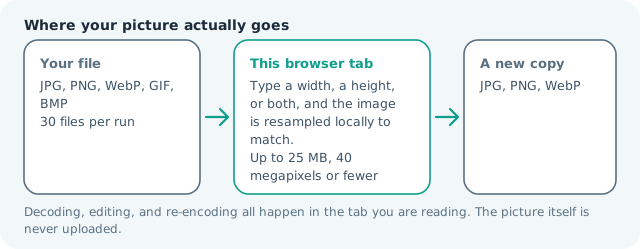
| Where the work happens | In this browser tab — the picture itself is never uploaded |
| Largest file | 100 MB, 40 megapixels or fewer |
| Largest batch | 30 files per run |
| Account, price, watermark | No sign-up, no charge, nothing stamped on your export |
When this helps
- Desktop and TV wallpapers on a 16:9 screen
- Presentation master backgrounds for slides
- Video thumbnails and player posters
- Digital signage and kiosk full-screen images
Measured on this page: a 1,200 × 900 photo filled the 1,920 × 1080 frame and weighed 228 KB. That is an enlargement, so it buys you the exact shape a form asks for while inventing no detail the camera never captured.
Detailed guidance
Why 1920 × 1080 is still the safe wide target
Full HD remains the lowest common denominator of modern screens: laptops, monitors, televisions, projectors, and most video platforms all accept it without scaling artefacts, and it doubles as a clean downscale for 4K. Authoring to it means a wallpaper fills the display, a slide matches the projector, and a poster frame uploads without a second crop. It is also a friendly budget for the web — a well-encoded 1920 × 1080 JPG sits comfortably under 300 KB, so a hero image can be full-width without stalling a page. When you need one asset to serve many surfaces, this is the size to start from and scale down, not up.
Fill, fit, and the choice you actually make
Most photographs are not 16:9. A 3:2 camera shot or a 4:5 portrait must either lose edges or gain bars, and the two modes name that decision honestly. Fill covers the frame and crops the overflow, which is what a background wants — position the subject before exporting so the crop removes sky rather than heads. Fit keeps every pixel and pads the remainder, which suits product shots on a fixed slide template where cutting the object is unacceptable. Stretching is the one option nobody should take: the distortion is obvious even at a glance, and it is invisible in a thumbnail until the full screen reveals it.
Composing for a screen you cannot see
Wallpapers and slides share a problem: interface elements cover part of the frame. Desktop icons claim the left edge, slide titles claim the top third, and a TV overlays a progress bar at the bottom. Place the subject slightly off-centre and keep the busiest detail away from those bands. After resizing, preview the file at actual screen size and squint: if the eye lands somewhere wrong, crop again before exporting rather than hoping the layout hides it.
Finishing the export
Confirm the printed dimensions in the result card before setting the file as a background — a wallpaper scaled by the OS is the usual cause of soft text on a desktop. If weight also matters, run the resized file through the compressor afterwards rather than lowering quality here, so the encoder works on the frame you actually chose. Because everything happens locally, a full set of slide backgrounds can be produced on a plane, and none of the source photographs ever leaves the machine.
Downsizing from 4K without softness
A 3840 × 2160 source halves neatly to Full HD, which is the cleanest resize this frame can receive: the mapping is exact, so edges stay crisp and no resampling artefacts appear. Other sources are less forgiving. A 6,000 px photograph shrinks by an awkward factor, and heavy downscaling can reveal sharpening halos that only show at actual size. The sequence stays the same: compose and crop at full resolution, resize once to 1920 × 1080, then inspect at 100 percent rather than fitted to the window. If detail looks mushy, resharpen lightly after the resize, never before it.
Resize Image to 1920 × 1080 questions
How do I make a picture 1920x1080?
Add the file to this page, where both fields are preset, then pick fill to crop the overflow or fit to pad the edges. Either way the export reports exactly 1920 × 1080, which is what a wallpaper or slide template expects.
Should I use fill or fit for a wallpaper?
Fill, almost always. A wallpaper should reach every screen edge, and fit leaves bars that look like a mistake. If the crop would cut something important, crop the source deliberately first, then fill.
Can I enlarge a small photo to 1920x1080?
The tool will, but resampling cannot invent detail, so a 900 px source enlarged past roughly 1.5x goes soft. For a background you view from a distance it can still work; for anything with text, start from a larger original.
Is 1920x1080 the same as 16:9?
It is one 16:9 resolution among several, including 1280 × 720 and 3840 × 2160. Anything authored at 1920 × 1080 scales cleanly to those, which is why it remains the safe default for wide screens.