
Local browser tool · Rotate Image
Rotate Image Online
To rotate an image online, choose 90, 180, or 270 degrees and add the file. The browser redraws the pixels into a new canvas, swaps width and height for a quarter-turn when necessary, and gives you a fresh JPG, PNG, or WebP copy. This is useful for sideways phone photos, scanned pages, and assets that arrived with the wrong visual orientation. Your source file remains unchanged and never travels to a processing server.
Turn a sideways picture the right way up
Choose a quarter-turn or half-turn and export a fresh copy with the correct canvas orientation. Suitable for rotate image tasks on JPG, PNG, WebP, GIF, and BMP files; the export is always a new copy.
Click a thumbnail to preview it before you start.
These are the settings you last used for this tool. They stay in this browser and are never sent anywhere.
Rotation can swap width and height. Flips and colour inversion keep the canvas dimensions.
Your files are read locally. Nothing is uploaded.
Your results
Pick a picture in the list to look at that file instead.
Full size
Actual pixels, straight from this browser — scroll to check edges and fine detail, then close.
Free to use. Local limits: up to 30 files, 100 MB per file, and 250 MB per batch, processed entirely in this browser. Nothing is uploaded; what stays on your device afterwards is the settings you last used and, after a run, the picture this page made so a next step can open it without choosing the file again. Start over deletes that picture.
Rotate Image at a glance
| Files it opens | JPG, PNG, WebP, GIF, and BMP |
|---|---|
| Files you get back | JPG, PNG, WebP |
| Camera data (EXIF) | Not copied — this browser writes a fresh picture from its pixels, so GPS, timestamps and camera tags stay in the file you started with |
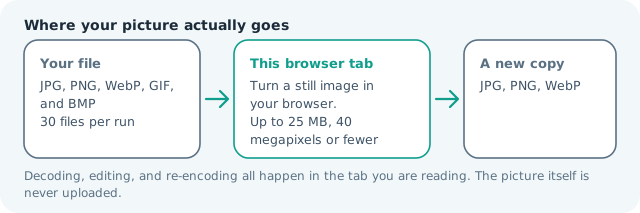
| Where the work happens | In this browser tab — the picture itself is never uploaded |
| Largest file | 100 MB, 40 megapixels or fewer |
| Largest batch | 30 files per run |
| Account, price, watermark | No sign-up, no charge, nothing stamped on your export |
When this helps
- A phone photo that uploads sideways because the receiving form ignores the orientation tag
- A scanned page whose top edge ended up on the wrong side
- A landscape shot that has to sit upright inside a document or slide
- An exported asset whose canvas and pixels disagree about which way is up
A quarter-turn swaps the output width and height.
Detailed guidance
What Rotate image online is for
A sideways photo is usually a delivery problem, not a photography problem. Some apps understand orientation tags while upload forms, older desktop viewers, and document systems do not. A physical quarter-turn creates a copy whose pixels and canvas agree about which edge is up, which makes the result more portable than relying on a tag another program may ignore. A browser redraws pixels reliably; it cannot guess what a picture was meant to do. So the control below stays narrow, and the file it hands back is named for the job it did.
What happens in this browser tab
The selected angle becomes a canvas transform. A 90-degree or 270-degree turn maps the source width onto the output height and the source height onto the output width; a 180-degree turn keeps the same dimensions. The browser then encodes the transformed pixels in the chosen output format and keeps the source file separate. Nothing waits in a server queue, and the file you chose is never rewritten: you get a new copy with its own download link.
Limits that are part of the tool
The page accepts common still-image formats within the site's normal 100 MB and 40-megapixel local limits. Large camera originals may take longer because a decoded canvas is much larger than the compressed file on disk. If a phone has already exported a huge image, resizing it after the rotation can make the next handoff lighter. A decoded canvas costs several times its disk size in memory, which is why a slow phone should work in smaller batches or from a smaller source.
How to check the result before publishing it
Open the result in the application that previously showed the wrong orientation. Check faces, text, and the top edge of the scene, then verify the output dimensions: quarter-turns should swap them, while a half-turn should not. A rotated scan should also be checked for readable text before it is attached to a form. Judge the download in the application that will receive it rather than in the preview here, and keep the original until you have.
Other jobs this page does
Turning a picture sideways, rotating a JPG by a quarter turn, and squaring up a photo that arrived at 90 degrees are one fixed-angle operation. Once the orientation is correct, the resize and compress pages handle platform dimensions and attachment limits without changing this page's promise.
When another tool is the honest choice
This tool does not straighten a crooked horizon, correct lens distortion, or rotate only a selected object. Use crop or an editor when the picture needs a free-angle adjustment, and use OCR when the real goal is to extract the words from a scanned page.
Rotate Image Online questions
How do I rotate a picture 90 degrees?
Choose 90 or 270 degrees, add the picture, and press the button. The output canvas swaps its width and height so the image turns without being squeezed into the original orientation.
Will rotating an image lower its quality?
The rotation itself does not reduce the pixel dimensions. The result is encoded again, so choose PNG for lossless graphics or a high JPG/WebP quality when the smaller file size is more important.
Can I rotate several images at once?
Yes. Add a batch and the same angle is applied to each file independently. Every result receives its own download name, while the originals remain in the queue until you clear them.
Does this fix a phone photo with the wrong orientation?
It fixes the visible orientation by drawing a physically rotated copy. It does not edit every possible camera orientation tag, which is why checking the downloaded file in the receiving app is still worthwhile.