
Local browser tool · Flip Image
Flip Image Online
Flip an image online when you need a mirror copy rather than a quarter-turn. Choose horizontal to reverse left and right, or vertical to turn the picture top to bottom. ImageMunch performs the transform in your browser, keeps the original dimensions, and downloads a fresh copy in the format and quality you select. It is useful for product layouts, mirrored portraits, scanned artwork, and any asset where the direction needs to change without a design application.
Mirror the picture without changing its size
Reverse left-to-right or top-to-bottom and keep the same pixel dimensions. Suitable for flip image tasks on JPG, PNG, WebP, GIF, and BMP files; the export is always a new copy.
Click a thumbnail to preview it before you start.
These are the settings you last used for this tool. They stay in this browser and are never sent anywhere.
Rotation can swap width and height. Flips and colour inversion keep the canvas dimensions.
Your files are read locally. Nothing is uploaded.
Your results
Pick a picture in the list to look at that file instead.
Full size
Actual pixels, straight from this browser — scroll to check edges and fine detail, then close.
Free to use. Local limits: up to 30 files, 100 MB per file, and 250 MB per batch, processed entirely in this browser. Nothing is uploaded; what stays on your device afterwards is the settings you last used and, after a run, the picture this page made so a next step can open it without choosing the file again. Start over deletes that picture.
Flip Image at a glance
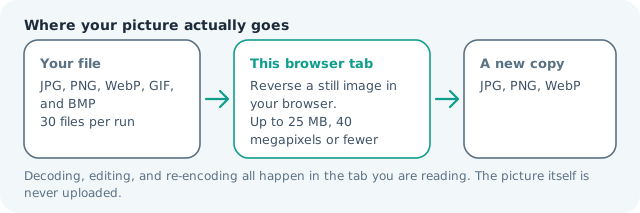
| Files it opens | JPG, PNG, WebP, GIF, and BMP |
|---|---|
| Files you get back | JPG, PNG, WebP |
| Camera data (EXIF) | Not copied — this browser writes a fresh picture from its pixels, so GPS, timestamps and camera tags stay in the file you started with |
| Where the work happens | In this browser tab — the picture itself is never uploaded |
| Largest file | 100 MB, 40 megapixels or fewer |
| Largest batch | 30 files per run |
| Account, price, watermark | No sign-up, no charge, nothing stamped on your export |
When this helps
- Text mirrored for heat transfer, vinyl cutting, or a window decal
- A portrait reversed to compare which side of the face reads better
- A photo taken through glass or a mirror that came back the wrong way round
- A diagram turned to match the direction its reader travels
A flip keeps the same pixel dimensions.
Detailed guidance
What Flip image online is for
Mirroring is a small change with a clear visual purpose. A product may need to face into a page, a mirror selfie may need to match how the photographer saw it, or an illustration may need a second direction for a layout. Flipping preserves the canvas size and the subject proportions, so it is not a substitute for cropping or resizing. A browser redraws pixels reliably; it cannot guess what a picture was meant to do. So the control below stays narrow, and the file it hands back is named for the job it did.
What happens in this browser tab
The tool maps each source column to the opposite output column for a horizontal flip, or maps each source row for a vertical flip. It does not stretch, rotate, or infer the subject. The transformed canvas is then written as a new image, and your selected quality or format controls the final encoding. Nothing waits in a server queue, and the file you chose is never rewritten: you get a new copy with its own download link.
Limits that are part of the tool
The local ceiling remains 100 MB per input, about 40 megapixels, and up to 30 files in a batch. A flip is usually quick because it only needs one decoded canvas, but a high-resolution batch still uses memory for the source and output at the same time. Process a smaller group if a mobile browser becomes sluggish. A decoded canvas costs several times its disk size in memory, which is why a slow phone should work in smaller batches or from a smaller source.
How to check the result before publishing it
Check any lettering, logos, faces, and directional objects in the downloaded file. A mirrored word is the fastest way to confirm the transform, while a car, arrow, or person facing sideways tells you whether the direction changed as intended. Compare dimensions too: they should be identical before and after. Judge the download in the application that will receive it rather than in the preview here, and keep the original until you have.
Other jobs this page does
Mirroring left to right, flipping a JPG, and turning a photo over vertically are the two directions this page offers. The transform preset is different from rotate, so the next tool link should be chosen based on whether the canvas orientation or only the reflection needs to change.
When another tool is the honest choice
Flipping does not remove a background, correct a perspective problem, or create a true reflective surface with altered lighting. If the result needs a mirrored composition with a seam, use the image editor or join tool; if the purpose is privacy, use a redaction effect instead.
Flip Image Online questions
What is the difference between horizontal and vertical flip?
Horizontal flip mirrors left and right, like a reflection in a mirror. Vertical flip turns the top edge toward the bottom and the bottom edge toward the top. Both keep the same width and height.
Can I mirror text in a photo?
Yes, but the text will read backward after a horizontal flip. That can be useful for a mirror selfie or a design mock-up, but it is usually the wrong choice for a document that must remain readable.
Does flipping change the image resolution?
No. The output uses the same pixel width and height as the source. The browser re-encodes the pixels, so keep a lossless format for line art or choose JPG/WebP when a smaller delivery copy is the priority.
Can I flip multiple images at once?
Yes. Add several still images and the selected mirror direction is applied to each one. The batch is processed locally, and each output is offered separately or in one ZIP.