
Local browser tool · Resize
Resize an Image for a YouTube Thumbnail
A thumbnail is judged at postage-stamp size first and rendered everywhere from a sidebar to a television. To resize an image for a YouTube thumbnail, use this page preset to 1280 × 720 — the 16:9 frame the player uses — and choose fill so the artwork covers the canvas with no bars. The upload cap is 2 MB, which a well-encoded 1280 px JPG clears easily, so check the export small rather than large.
Cut artwork to a 1280 × 720 thumbnail
Preset to the 16:9 HD thumbnail frame, with fill to cover and fit to pad. Suitable for resize tasks on JPG, PNG, and WebP files; the export is always a new copy.
Click a thumbnail to preview it before you start.
These are the settings you last used for this tool. They stay in this browser and are never sent anywhere.
Picking one fills both boxes with that platform's exact size, releases the aspect lock, and crops the overflow instead of stretching it — switch the mode below if you would rather keep every pixel.
Estimated output —
Your files are read locally. Nothing is uploaded.
Your results
Pick a picture in the list to look at that file instead.
Full size
Actual pixels, straight from this browser — scroll to check edges and fine detail, then close.
Free to use. Local limits: up to 30 files, 100 MB per file, and 250 MB per batch, processed entirely in this browser. Nothing is uploaded; what stays on your device afterwards is the settings you last used and, after a run, the picture this page made so a next step can open it without choosing the file again. Start over deletes that picture.
Resize at a glance
| Files it opens | JPG, PNG, WebP, GIF, BMP |
|---|---|
| Files you get back | JPG, PNG, WebP |
| Camera data (EXIF) | Not copied — this browser writes a fresh picture from its pixels, so GPS, timestamps and camera tags stay in the file you started with |
| This page is already set to | JPG output, 1280 px wide |
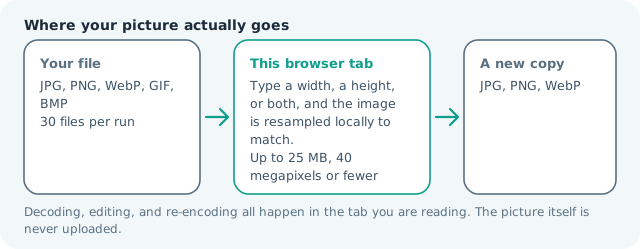
| Where the work happens | In this browser tab — the picture itself is never uploaded |
| Largest file | 100 MB, 40 megapixels or fewer |
| Largest batch | 30 files per run |
| Account, price, watermark | No sign-up, no charge, nothing stamped on your export |
When this helps
- Video thumbnails produced from a still or a screenshot
- Channel artwork resized for the 16:9 preview surface
- Course and webinar recordings needing a clean poster
- Thumbnail variants tested against each other
Measured on this page: a 1,200 × 900 photo was cut to 1,280 × 720 and weighed 130 KB. YouTube shows a thumbnail at roughly 168 px wide, so where the crop falls matters far more than the byte count does.
Detailed guidance
Designing for a very small preview
A thumbnail is mostly seen at 210 px wide in a sidebar, occasionally at 48 px in a suggestion list, and only briefly at full size. That hierarchy dictates the design: one face or one object, high contrast between subject and background, and text limited to a few words large enough to survive the reduction. After resizing here, shrink the preview window to roughly a fifth and read it again — anything you cannot make out at that size is decoration rather than communication, and it costs clicks. The 16:9 frame also matches most players, so nothing is cropped in the preview surface on a television or in an embed.
Getting to 1280 × 720 honestly
A still photo is usually 3:2, a screenshot is often 16:10, and a game capture may already be 16:9. Fill crops whatever does not match, which is why composition matters before export: keep the focal point inside the central band so the crop takes sky or floor rather than a face. Fit pads instead and is appropriate for a logo or graphic built for another ratio. Never stretch — a subtly widened face reads as wrong even to viewers who cannot say why.
Staying inside 2 MB without softness
Photographic artwork at 1280 × 720 typically encodes between 150 and 400 KB at good quality, so the cap is generous and the real risk is a second compression pass. Export once from the cleanest source, avoid adding heavy sharpening, and if the file is a graphic with flat colour or text, prefer PNG. If a photographic export does approach the limit, reduce dimensions slightly before touching quality — smaller and crisp beats large and smeared at the size people actually see.
Testing variants quickly
You can run several images in one pass, so produce two or three thumbnail candidates rather than committing to the first composition. Name them by variant, publish one, and check the click-through rate after a day; channels that test consistently gain more from a better thumbnail than from any extra processing. All of this happens locally, so unreleased footage frames and client artwork never pass through a third-party thumbnail service on the way to the upload.
Text that survives a 168-pixel sidebar
Thumbnails are mostly seen tiny: a sidebar renders around 168 px wide and a mobile feed barely larger, so any words must read at that scale. That means four words maximum, heavy weight, strong contrast against the background, and generous space from the frame edges. Panel or outline the text rather than trusting the photograph behind it, and check by zooming the browser out until the image is a small rectangle. The lower-right corner belongs to the duration stamp, never to your copy. If an idea needs a paragraph, it belongs in the title: the image sells the click, the title explains the video.
Resize an Image for a YouTube Thumbnail questions
What size is a YouTube thumbnail?
1280 × 720 at 16:9 is the recommended frame, with a 2 MB ceiling. YouTube also serves smaller renditions, so authoring at 1280 px wide keeps detail intact without fighting the cap.
My thumbnail looks blurry after upload — why?
Usually the source was too small and got upscaled, or heavy text was flattened by the encoder. Start from a larger image, keep type bold and generous, and avoid a third compression pass by exporting once at the right size.
Should I use fill or fit?
Fill, so the artwork reaches every edge; bars look like an error on a dark theme. If a crop would cut something important, crop the source deliberately first so you choose what the edges lose.
Does PNG work for thumbnails?
Yes, and it is the better choice for flat graphics and text, since it avoids ringing around glyph edges. Watch the 2 MB cap, which a photographic PNG can exceed while the same frame as JPG is a few hundred kilobytes.