
Local browser tool · Resize
Resize Image to 800 × 600
Four-by-three is the shape of a submitted photograph: gallery forms, school portals and catalogue thumbnails still ask for it. To resize an image to 800 × 600, add it here with both fields preset, and the tool resamples locally to that exact frame and reports the delivered dimensions before you download. At 800 px a photograph still carries comfortably inside a 100-200 KB budget once it is compressed.
Produce an exact 800 × 600 copy
A 4:3 frame preset for both fields, with the aspect lock available when the source differs. Suitable for resize tasks on JPG, PNG, and WebP files; the export is always a new copy.
Click a thumbnail to preview it before you start.
These are the settings you last used for this tool. They stay in this browser and are never sent anywhere.
Picking one fills both boxes with that platform's exact size, releases the aspect lock, and crops the overflow instead of stretching it — switch the mode below if you would rather keep every pixel.
Estimated output —
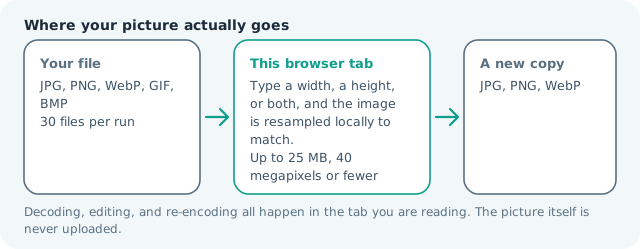
Your files are read locally. Nothing is uploaded.
Your results
Pick a picture in the list to look at that file instead.
Full size
Actual pixels, straight from this browser — scroll to check edges and fine detail, then close.
Free to use. Local limits: up to 30 files, 100 MB per file, and 250 MB per batch, processed entirely in this browser. Nothing is uploaded; what stays on your device afterwards is the settings you last used and, after a run, the picture this page made so a next step can open it without choosing the file again. Start over deletes that picture.
Resize at a glance
| Files it opens | JPG, PNG, WebP, GIF, BMP |
|---|---|
| Files you get back | JPG, PNG, WebP |
| Camera data (EXIF) | Not copied — this browser writes a fresh picture from its pixels, so GPS, timestamps and camera tags stay in the file you started with |
| This page is already set to | JPG output, 800 px wide |
| Where the work happens | In this browser tab — the picture itself is never uploaded |
| Largest file | 100 MB, 40 megapixels or fewer |
| Largest batch | 30 files per run |
| Account, price, watermark | No sign-up, no charge, nothing stamped on your export |
When this helps
- Competition and gallery entries that specify 800 px on the long edge
- School and examination photograph uploads
- Catalogue and inventory thumbnails on 4:3 grids
- Legacy website slots built for a 4:3 asset box
Measured on this page: a 1,200 × 900 photo came back exactly 800 × 600 at 76 KB. Both shapes are 4:3, so filling the frame cost nothing; send a 16:9 original through the same preset and the sides are what go.
Detailed guidance
An old size that refuses to retire
Eight hundred by six hundred comes from an era when 1,024 × 768 was a desktop and galleries needed one dimension that suited every screen. It survives because it is still a good compromise: big enough to judge a photograph, small enough that thirty entries fit an email. Competition rules, school forms, and inventory systems state it plainly, and a submission at exactly 800 × 600 is accepted without argument. The practical benefit of matching it precisely is that no server gets to resize your file badly on your behalf — automated resamplers on upload handlers are the reason many entries look soft to judges even though the original looked excellent.
Getting an exact frame from a 3:2 source
Most cameras shoot 3:2, so a straight resize to 4:3 either stretches or pads. Cropping to 4:3 first keeps the picture honest and usually improves it, because the framing you choose is the framing the judge sees. Check that no subject is halved at the cut, then resize to 800 × 600 and compress to whatever byte cap the rules state. Working in that order — crop, resize, compress — produces a sharper file than any single aggressive step, because each operation stays within what the pixels can support.
Why shrinking here is safe
Downsampling to 800 px is the easy direction: detail is discarded rather than invented, and edges stay clean. A 24-megapixel image contains roughly thirty times the pixels needed for this frame, so the reduction is invisible at normal viewing distance and can even improve perceived sharpness by hiding sensor noise. The one caution is fine text: a scan of a document at 800 × 600 becomes unreadable, so a text requirement almost always means a larger frame plus a tighter byte cap. Read the rule twice before assuming which constraint dominates.
Checking and finishing
Open the export and confirm the dimensions reported in the result card match what the form requires, then view it at 100 percent to judge framing. Keep the original: if a later round asks for a larger submission size, you will be regenerating from the master rather than upscaling a shrunken copy. Since the resampling runs in your browser, a whole entry set processes in one batch without uploads, and images of children, documents, or unreleased work never leave the device.
When the form wants 600 × 800 instead
Rules written this way are usually orientation-agnostic, but forms rarely say so. A portrait entry on an 800 × 600 canvas either gains padding or loses its top and bottom, so decide before shooting: an upright photo wants the two fields swapped. Where orientation is strict, keep the ratio lock on, let the shorter edge fall where it falls, and read the reported numbers back. Entries are rejected on stated dimensions rather than intent, and a 798 × 600 file can be refused while a 600 × 800 is waved through. The same source photo can produce both frames here in one sitting, which is the practical reason to keep the original archived.
Resize Image to 800 × 600 questions
How do I resize a photo to 800x600?
Drop it on this page, where the width and height are already preset, and run the resize. If the source is not 4:3, either leave the lock on and accept the nearest matching dimension, or crop to 4:3 first for an exact 800 × 600 export.
Will my photo get cropped or squashed?
Only if you let it. With the ratio lock on the tool never stretches; it computes the partner dimension instead. For an exact 800 × 600 from a differently shaped source, crop deliberately to 4:3 before resizing so you decide what the edges lose.
What file size should an 800x600 photo be?
Between 80 and 200 KB for a photograph at normal quality, which is why forms pairing 800 × 600 with a 100 or 200 KB cap are reasonable. Resize here first, then compress to the byte target.
Is 800x600 still 4:3?
Yes, and that ratio matches most compact cameras and older projectors. The frame is small enough to load quickly yet large enough to inspect detail, which keeps it a common submission requirement.