
Local browser tool · Compress GIF
Compress GIF Online
To compress a GIF online, load the animation onto this page and choose how much of it to give back: a smaller picture, fewer frames, or both. Your browser reads every frame in the file, rebuilds the loop at the settings you picked, and hands you a lighter GIF that still plays at the same speed — with nothing uploaded to a server and no quality guesswork left to chance.
Bring a heavy animated GIF back down to size
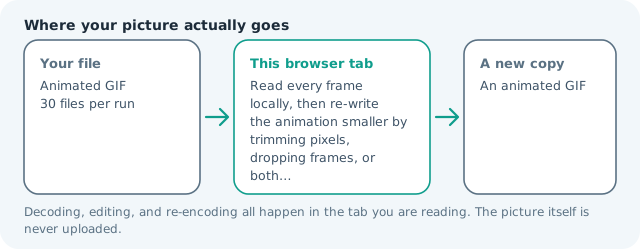
Read every frame locally, then re-write the animation smaller by trimming pixels, dropping frames, or both. Suitable for compress gif tasks on Animated GIF files; the export is always a new copy.
Click a thumbnail to preview it before you start.
These are the settings you last used for this tool. They stay in this browser and are never sent anywhere.
Width and dropped frames do the saving; the encoder only re-packs the colours that are left. Speed is preserved by merging skipped frames into the next frame delay. A very heavy clip stops early instead of hanging the tab, and the result card says where it stopped.
Output formatGIF animation
Your files are read locally. Nothing is uploaded.
Your results
Pick a picture in the list to look at that file instead.
Full size
Actual pixels, straight from this browser — scroll to check edges and fine detail, then close.
Free to use. Local limits: up to 30 files, 100 MB per file, and 250 MB per batch, processed entirely in this browser. Nothing is uploaded; what stays on your device afterwards is the settings you last used and, after a run, the picture this page made so a next step can open it without choosing the file again. Start over deletes that picture.
Compress GIF at a glance
| Files it opens | Animated GIF |
|---|---|
| Files you get back | An animated GIF |
| Camera data (EXIF) | Not copied — this browser writes a fresh picture from its pixels, so GPS, timestamps and camera tags stay in the file you started with |
| Where the work happens | In this browser tab — the picture itself is never uploaded |
| Largest file | 100 MB, 40 megapixels or fewer |
| Largest batch | 30 files per run |
| Account, price, watermark | No sign-up, no charge, nothing stamped on your export |
When this helps
- Fitting a reaction loop inside a chat app that rejects files over a few megabytes
- Lightening an animated product spin before it goes into a listing page
- Shrinking a tutorial loop so an email template stays under its weight cap
- Cutting a big GIF down for a forum signature or a documentation page
Measured on this page: a 1.51 MB, four-frame animation at 800 × 999 came down to 264 KB (83% smaller) at the default 320 px width with every other frame dropped, to 542 KB (65%) at 480 px with all four frames kept, and to 805 KB (48%) at 600 px. Trimming the picture rather than the timing is the bigger lever, and the page reports the new frame size so you can see what you traded.
Detailed guidance
Where the bytes in a GIF actually go
Weight is roughly frame count multiplied by frame area multiplied by how well the colors pack. Size is the cheapest lever because it works on every frame at once: halve the widest edge and the picture is down to a quarter of its pixels. Cutting half the frames takes off something close to half the rest. Re-quantizing the colors alone rarely saves much, because GIF is already limited to 256 entries — so start with geometry and timing, and treat color as the finishing adjustment.
Dropping frames without changing the speed
A loop that plays twice as fast is a broken loop. Here, frames you discard have their hold time added to the next frame that survives, so a two-second animation stays two seconds and simply updates less often. That is also why a GIF of a slow pan shrinks so well: the eye cannot tell the difference between sixty updates of a gentle slide and thirty.
Partial frames, disposal, and why naive tools break
Most GIFs do not store complete pictures. To save space, an encoder writes only the rectangle that changed and leaves the rest to the previous frame, with a disposal note saying whether to keep, clear, or restore that region afterwards. A tool that decodes carelessly produces smeared, ghosted, or half-empty output. This page walks every frame in order onto a running canvas, applies each frames disposal rule, and only then takes a snapshot, so what you re-encode is a set of complete pictures.
Transparency and the matte colour
GIF transparency is one bit per pixel: a pixel is either fully see-through or fully opaque, and there is no in-between. Re-encoding flattens that bit onto the matte colour you choose, which is why a white logo loop on a dark page can arrive as a white rectangle. Match the matte to the surface the GIF will sit on and the seam disappears.
Choosing settings that survive the destination
Know the cap before you start. Chat apps commonly reject anything over 8 MB, email templates want to stay near 1 MB, and forum signatures can demand 500 KB. Work downward from the cap: keep the original width if you can, otherwise step to 480 px, then 320 px, and only then start dropping frames. Each pass takes a few seconds locally, so iterating is cheap — and unlike a server-side tool you are not waiting in a queue to learn whether the guess was right.
What gets harder after a pass
Text inside a loop is the first casualty, because shrinking thin glyph strokes is unforgiving in a format with no subpixel rendering. If the GIF carries captions or a UI mock-up, keep the width at or above 480 px and drop frames instead. Dithering smooths gradients on skin and skies but adds noise that costs bytes back, so leave it off unless banding genuinely bothers you. And if the result comes out larger than the original, that is useful information: the file was already tuned tightly, and the sensible answer is to change the frame rate or the width rather than force it.
Compress GIF Online questions
How much smaller will my GIF get?
Usually a lot, because the encoder rewrites every frame palette and you can also shrink the canvas and drop frames. A heavy chat loop commonly lands under a megabyte at 320 px on its widest edge with every frame kept, but the result card prints both numbers.
What is the fastest way to cut GIF file size?
Shrink the widest edge. Weight tracks pixel area more steeply than it tracks frame count, and reducing size costs no motion at all. Only then consider dropping frames, since removing every other one changes how smooth the loop reads even though the timing is preserved.
Does dropping frames change how long the animation plays?
No. When the tool takes out every second or third frame, the skipped duration is added to the frame that replaces it, so the loop runs for the same total time. It simply steps in larger jumps, which reads as fine on a short reaction clip and clumsy on a slow pan.
What does the matte colour do?
GIF transparency does not survive a full re-encode, so the compressor paints your chosen colour behind every frame and flattens the animation onto it. Set that colour to the background where the GIF will actually appear and the filled areas disappear into the page.
Can I use this on a still GIF or a normal photo?
It reads only .gif files, and a single-frame animation has no frames to trim, so the palette rewrite saves little there. For a still picture use the image compressor instead, which exposes a quality slider and a target size built for one frame.