
Local browser tool · Invert Image
Invert Image Online
Invert an image online to turn each visible colour into its RGB opposite, creating a photographic negative or a simple high-contrast effect. Add a JPG, PNG, WebP, GIF, or BMP, choose invert, and ImageMunch redraws the pixels locally before offering a new file to download. The canvas size stays the same, the source remains untouched, and no image is uploaded. Use the result as a visual effect or a scan aid, not as a promise of restored detail.
Turn the colours into a photographic negative
Invert RGB values locally and export the effect as a fresh image copy. Suitable for invert image tasks on JPG, PNG, WebP, GIF, and BMP files; the export is always a new copy.
Click a thumbnail to preview it before you start.
These are the settings you last used for this tool. They stay in this browser and are never sent anywhere.
Rotation can swap width and height. Flips and colour inversion keep the canvas dimensions.
Your files are read locally. Nothing is uploaded.
Your results
Pick a picture in the list to look at that file instead.
Full size
Actual pixels, straight from this browser — scroll to check edges and fine detail, then close.
Free to use. Local limits: up to 30 files, 100 MB per file, and 250 MB per batch, processed entirely in this browser. Nothing is uploaded; what stays on your device afterwards is the settings you last used and, after a run, the picture this page made so a next step can open it without choosing the file again. Start over deletes that picture.
Invert Image at a glance
| Files it opens | JPG, PNG, WebP, GIF, and BMP |
|---|---|
| Files you get back | JPG, PNG, WebP |
| Camera data (EXIF) | Not copied — this browser writes a fresh picture from its pixels, so GPS, timestamps and camera tags stay in the file you started with |
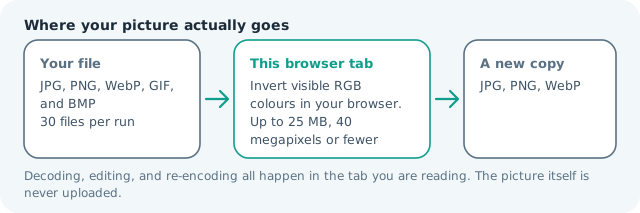
| Where the work happens | In this browser tab — the picture itself is never uploaded |
| Largest file | 100 MB, 40 megapixels or fewer |
| Largest batch | 30 files per run |
| Account, price, watermark | No sign-up, no charge, nothing stamped on your export |
When this helps
- A quick negative for judging tonal balance in a flat or dark scan
- A line drawing reversed to chalk-on-board so it reads at a distance
- A logo checked light-on-dark before anyone rebuilds it
- A pale screenshot made readable in a dark room without opening an editor
The canvas dimensions stay unchanged.
Detailed guidance
What Invert image online is for
An inverted image is the digital equivalent of a negative: every channel moves to the opposite side of its range. That makes the effect useful for film-like experiments, scan inspection, dark-background mock-ups, and simple visual design work. It is a deliberate colour transform, not a repair operation, so a blurry or clipped source remains blurry or clipped after the colours change. A browser redraws pixels reliably; it cannot guess what a picture was meant to do. So the control below stays narrow, and the file it hands back is named for the job it did.
What happens in this browser tab
The browser applies the channel operation to the decoded canvas, preserving the source width and height. The alpha channel is left alone when the output format supports it, which means transparent PNG and WebP artwork can keep its cut-out shape while the visible colours change. A new encoding is then produced for download. Nothing waits in a server queue, and the file you chose is never rewritten: you get a new copy with its own download link.
Limits that are part of the tool
The same local file, pixel, and batch limits apply as the other ImageMunch canvas tools. The raw RGBA canvas can be large even when a compressed source is small, and a batch of several camera images can use more memory than the file sizes suggest. If the device is older, run one image first and inspect the result before adding more. A decoded canvas costs several times its disk size in memory, which is why a slow phone should work in smaller batches or from a smaller source.
How to check the result before publishing it
Check a familiar colour in the output, such as a white page, a blue sky, or a black logo. It should move to the opposite appearance consistently. Open the export at full size to make sure text edges and transparent boundaries still look as intended, then verify the file type matches the receiving app. Judge the download in the application that will receive it rather than in the preview here, and keep the original until you have.
Other jobs this page does
Negative images, inverted PNG colours, and photo colour reversal are one operation. Rotate and flip are separate spatial transforms, while this page changes the colour values without moving any pixels on the canvas.
When another tool is the honest choice
Inverting will not create a night mode, recolour one object while leaving the rest intact, or recover a damaged negative scan. Those jobs need selective colour editing or restoration. For a whole-image negative, however, a fixed channel inversion is reproducible and easy to reverse by running it again.
Invert Image Online questions
How do I make a negative image?
Add the image, choose the invert transform, and export it. The browser replaces each RGB value with its opposite, so dark areas become light and colour relationships reverse into a negative-style image.
Does inverting an image make it black and white?
No. It inverts red, green, and blue channels separately, so a colour photo remains a colour negative. Use a separate grayscale editor when you need a black-and-white result.
Can I invert a PNG and keep transparency?
The visible RGB colours are inverted while transparent pixels remain transparent in a PNG export. JPG has no alpha channel, so choose PNG or WebP when the transparent background is part of the asset.
Is the original image changed?
No. The browser draws an inverted copy on a local canvas and leaves the selected source file as it was. You can reset the queue and run the source again with a different output format.