
Local browser tool · Image to Base64
Image to Base64
Convert an image to Base64 when a small asset needs to sit inside HTML, CSS, JavaScript, or an API test instead of at a public URL. ImageMunch reads the original file bytes in your browser and writes a plain-text data URI with the correct MIME prefix. It does not resize, compress, or silently redraw the image. Because Base64 adds overhead, this is a practical encoder for icons, fixtures, and prototypes rather than a replacement for ordinary image hosting.
Create a copyable image data URI
Turn the original file bytes into Base64 text for HTML, CSS, JavaScript, or API tests. Suitable for image to base64 tasks on JPG, PNG, WebP, GIF, BMP, and SVG files; the export is always a new copy.
Click a thumbnail to preview it before you start.
These are the settings you last used for this tool. They stay in this browser and are never sent anywhere.
The result is a plain-text report you can copy or download. The image itself stays in this browser tab.
Output formatPlain text (.txt)
Your files are read locally. Nothing is uploaded.
Your results
Pick a picture in the list to look at that file instead.
Full size
Actual pixels, straight from this browser — scroll to check edges and fine detail, then close.
Free to use. Local limits: up to 30 files, 100 MB per file, and 250 MB per batch, processed entirely in this browser. Nothing is uploaded; what stays on your device afterwards is the settings you last used and, after a run, the picture this page made so a next step can open it without choosing the file again. Start over deletes that picture.
Image to Base64 at a glance
| Files it opens | JPG, PNG, WebP, GIF, BMP, and SVG files |
|---|---|
| Files you get back | A plain-text (.txt) file |
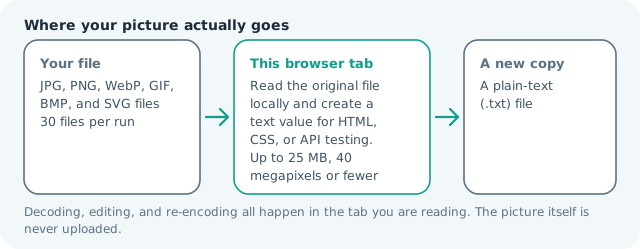
| Where the work happens | In this browser tab — the picture itself is never uploaded |
| Largest file | 100 MB, 40 megapixels or fewer |
| Largest batch | 30 files per run |
| Account, price, watermark | No sign-up, no charge, nothing stamped on your export |
When this helps
- Testing an inline image in HTML or CSS
- Preparing a data URI for a small icon or fixture
- Inspecting the MIME prefix before sending an API request
- Copying one local image into a prototype without a public URL
A 12 KB PNG becomes a text value beginning with data:image/png;base64, and the encoded payload is longer than the binary file. The browser reads the selected file directly, so the output does not silently resize or re-encode it.
Detailed guidance
What Image to Base64 is for
A small image is sometimes easier to test when it is one text value. A CSS background, an HTML image fixture, a JavaScript demo, and a multipart or JSON test request can all need a data URI rather than a hosted file. An image-to-Base64 encoder solves that packaging problem while leaving the binary source intact. The trade-off is size: text is convenient for embedding, but it is not a compression format. A browser redraws pixels reliably; it cannot guess what a picture was meant to do. So the control below stays narrow, and the file it hands back is named for the job it did.
What happens in this browser tab
The browser reads the selected File object with FileReader and returns a data URL that contains the original MIME type followed by the Base64 payload. This path does not decode the picture onto a canvas, so the pixels, dimensions, animation bytes, and file structure are not rewritten by the tool. The text report includes the filename above the value so a batch remains understandable when several files are selected. Nothing waits in a server queue, and the file you chose is never rewritten: you get a new copy with its own download link.
Limits that are part of the tool
The local limits are 30 files and 100 MB per input, but a large Base64 value can make the text result uncomfortable to copy and can consume memory in a long page. For production web assets, use a normal image URL, a responsive image pipeline, or a build-time asset process. Use this page for small icons, test fixtures, snippets, and short-lived prototypes. A decoded canvas costs several times its disk size in memory, which is why a slow phone should work in smaller batches or from a smaller source.
How to check the result before publishing it
Copy a small sample of the data URI into the exact destination where it will be used. Confirm that the prefix matches the property or API field, that the receiving system accepts data URLs, and that any size limit is measured after encoding rather than before. Keep the original file beside the text result because the Base64 text is a representation, not a better archive. Judge the download in the application that will receive it rather than in the preview here, and keep the original until you have.
Other jobs this page does
PNG to Base64, JPG data URIs, and image-to-text encoding all end at the same output. The convert page is the next step when the receiving system requires a different image format, while compress and resize are better choices when the actual goal is fewer bytes.
When another tool is the honest choice
This page is not an image host, a CDN, a compressor, or an encryption tool. Base64 is reversible encoding and anyone who receives the string can recover the image. Do not treat it as a privacy layer. When a page needs fast delivery, a properly sized image file and a cacheable URL are usually more efficient than a large inline string.
Image to Base64 questions
What is the output of an image to Base64 converter?
The output is a plain-text file containing a complete data URI. It starts with the file MIME type, such as data:image/png;base64, and continues with the Base64 representation of the original bytes.
Does Base64 make an image smaller?
No. Base64 normally increases the payload by roughly one third. It is useful when a small image must be embedded into markup or a test request, not when the goal is to reduce download size.
Can I convert PNG or JPG to Base64?
Yes. JPG, PNG, WebP, GIF, BMP, and SVG are accepted according to the browser file picker. The MIME prefix records the selected file type, and the source is not re-encoded.
Is the image uploaded during conversion?
No. FileReader reads the selected file inside the browser tab and the data URI is created locally. The site does not send the image to a conversion endpoint or store the encoded result.