
Local browser tool · Resize
Resize a Photo for a LinkedIn Profile Picture
LinkedIn masks your headshot into a circle and shows it at barely 40 px in comments, so framing beats file size here. To resize a photo for a LinkedIn profile picture, use this page preset to 400 × 400 and place the face in the upper-centre band before exporting. The platform accepts up to 8 MB, which is not the constraint: a portrait shot to the chest survives the square crop, a full-body photo becomes a head floating in background.
Cut a headshot to LinkedIn's square
A 400 × 400 preset sized for the circle mask and the tiny comment-thread rendition. Suitable for resize tasks on JPG, PNG, and WebP files; the export is always a new copy.
Click a thumbnail to preview it before you start.
These are the settings you last used for this tool. They stay in this browser and are never sent anywhere.
Picking one fills both boxes with that platform's exact size, releases the aspect lock, and crops the overflow instead of stretching it — switch the mode below if you would rather keep every pixel.
Estimated output —
Your files are read locally. Nothing is uploaded.
Your results
Pick a picture in the list to look at that file instead.
Full size
Actual pixels, straight from this browser — scroll to check edges and fine detail, then close.
Free to use. Local limits: up to 30 files, 100 MB per file, and 250 MB per batch, processed entirely in this browser. Nothing is uploaded; what stays on your device afterwards is the settings you last used and, after a run, the picture this page made so a next step can open it without choosing the file again. Start over deletes that picture.
Resize at a glance
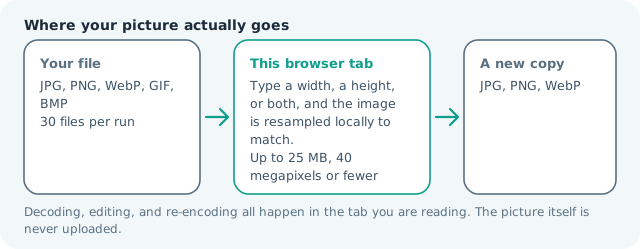
| Files it opens | JPG, PNG, WebP, GIF, BMP |
|---|---|
| Files you get back | JPG, PNG, WebP |
| Camera data (EXIF) | Not copied — this browser writes a fresh picture from its pixels, so GPS, timestamps and camera tags stay in the file you started with |
| This page is already set to | JPG output, 400 px wide |
| Where the work happens | In this browser tab — the picture itself is never uploaded |
| Largest file | 100 MB, 40 megapixels or fewer |
| Largest batch | 30 files per run |
| Account, price, watermark | No sign-up, no charge, nothing stamped on your export |
When this helps
- Headshots recomposed from a taller portrait
- Team photos cropped to one person for a profile
- Rebranding a profile after a role change
- Graduates replacing a casual photo with a professional frame
Measured on this page: a 1,200 × 900 photo came back as a 400 × 400 square of 31 KB. LinkedIn displays that square far smaller than it stores it, so start from the largest headshot you have and use this preset to frame the face.
Detailed guidance
The photo is viewed at 40 pixels
LinkedIn renders a profile picture smallest in the places it matters most: a comment thread, a search result, a message list. At that size, only two things register — the shape of the face and the contrast between subject and background. Everything else is noise. That is the argument for cropping tighter than feels natural, since a portrait that looks correct printed at A4 becomes a speck in a comment row. Check your export by zooming your browser out until the image is thumbnail-sized, and confirm the face still reads. A headshot where the hairline nearly touches the top of the frame and the shoulders fill the bottom usually survives best.
Square first, circle second
The upload is cropped to a square and then masked to a circle, so corners are invisible in the rendered result. Keep anything you want seen inside the inscribed circle — which means leaving a small margin above the head and avoiding glasses arms or earrings near the edges. Cropping here rather than in the upload dialog matters because the platform's auto-frame centres on the whole image, not on the face, and it has no idea which part of your photograph matters.
Lighting and background beat resolution
A modestly sized photo with even light looks professional; a large, moody one looks like a mistake at thumbnail size. Face a window, put the light source slightly above eye level, and stand far enough from the wall behind you that its shadows stop mattering. Then choose a background that separates from your hair and shoulders. Those two decisions improve how a profile reads more than any slider here, and they cost nothing to redo — which is not true of a reshoot.
Exporting and swapping in
Confirm the result reports a square, then upload and use LinkedIn's preview to check the circle mask rather than trusting the crop you see on your own screen. Keep the source portrait archived: a future change of role or headshot means cropping from the original again instead of upscaling a previous export, which is where softness creeps in. Because the crop and resample happen in your browser, a professional photograph is never routed through an unknown third-party server.
The other frames on your profile
A headshot is only half the visual job. The banner behind it sits at 1584 × 396 and crops differently on desktop and mobile, while shared post cards pull a 1,200 × 627 preview. Preparing all three in one sitting beats solving them in a rush before each update, and the same portrait can serve the banner if you shoot with room around the subject. Keep every export at its exact target rather than letting the site resample on upload, which is where softness appears. The profile square, the wide banner, and the card crop all come from one original here, and none of it routes a professional photograph through a third-party service.
Resize a Photo for a LinkedIn Profile Picture questions
What size should a LinkedIn profile photo be?
A square at least 400 × 400 px is the practical minimum, and anything from 800 × 800 upward gives LinkedIn room to render its own renditions. This page presets 400 × 400; raise both fields if you prefer to upload larger.
How do I stop my headshot being cropped badly?
Frame it before resizing. LinkedIn crops to a square and then masks it to a circle, so keep the eyes roughly a third down from the top and leave a little space above the head. Crop here first so you see what the platform will hide.
Why does my photo look blurry on my profile?
Usually an upscale. A small or previously cropped image enlarged to the required size softens, and the platform compresses again. Start from the largest clean original you have and resize down to the square.
Should the background be plain?
At 40 px, a busy background competes with your face. A calm, evenly lit backdrop reads far better in comment threads and search results than a scenic one, which is why studio headshots outperform travel photos on a profile grid.