
Local browser tool · Watermark
Add Text to Image
Add text to an image when a caption, label, draft mark, or credit needs to be baked into a shareable copy. Type the wording, choose its position, size, colour, and opacity, then ImageMunch draws it on a local canvas and downloads a new file. The original remains untouched. This is a focused text overlay tool rather than a full layout editor, so it is quick for one mark and transparent about the controls it does not provide.
Write a caption directly on the picture
Add text, choose its position and style, then export a fresh image copy. Suitable for watermark tasks on JPG, PNG, and WebP files; the export is always a new copy.
Click a thumbnail to preview it before you start.
These are the settings you last used for this tool. They stay in this browser and are never sent anywhere.
Watermark is baked into the exported copy — your original file stays clean.
Your files are read locally. Nothing is uploaded.
Your results
Pick a picture in the list to look at that file instead.
Full size
Actual pixels, straight from this browser — scroll to check edges and fine detail, then close.
Free to use. Local limits: up to 30 files, 100 MB per file, and 250 MB per batch, processed entirely in this browser. Nothing is uploaded; what stays on your device afterwards is the settings you last used and, after a run, the picture this page made so a next step can open it without choosing the file again. Start over deletes that picture.
Watermark at a glance
| Files it opens | JPG, PNG, WebP, GIF, BMP |
|---|---|
| Files you get back | JPG, PNG, WebP |
| Camera data (EXIF) | Not copied — this browser writes a fresh picture from its pixels, so GPS, timestamps and camera tags stay in the file you started with |
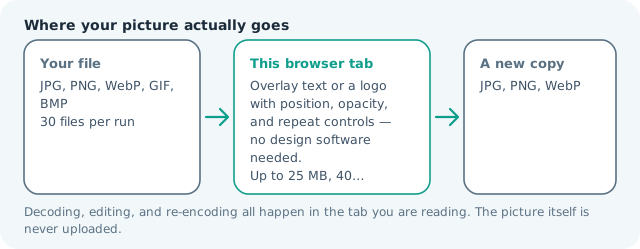
| Where the work happens | In this browser tab — the picture itself is never uploaded |
| Largest file | 100 MB, 40 megapixels or fewer |
| Largest batch | 30 files per run |
| Account, price, watermark | No sign-up, no charge, nothing stamped on your export |
When this helps
- Protecting listing photos from marketplace scraping
- Branding real-estate and menu photography with a logo corner mark
- Marking drafts as SAMPLE across a proof image
- Signing personal photos before sharing in a group
Measured on this page: the 3,992 × 2,992, 3.55 MB photo came back at 2.33 MB with a 32 px text mark in the corner at 60% opacity — the 34% drop is the JPG re-encode at quality 82, not the overlay, which costs nothing you can measure. Size is a share of the picture, so 32 px across 3,992 px reads as a signature; on a phone shot at 820 px wide the same setting is comparatively huge, which is why the preview matters more than the number.
Detailed guidance
What Add text to image is for
A short caption can be the difference between a picture that needs explanation and one that can travel on its own. A product label, draft status, event date, ownership credit, and social caption are all small layout jobs that do not need a full design application. The useful boundary is that this page places one text treatment over an image; it does not claim to build a multi-layer poster. A browser canvas is good at repeatable pixel operations and poor at reading intent, so the control below stays narrow and names its output honestly.
What the local engine changes
The browser decodes the source, selects a position on the canvas, calculates a readable font size from the image dimensions, and draws the text with the chosen colour and opacity. A tiled diagonal position is available for broad draft marking. The result is encoded into the selected image format, while the source file and any clean original stay separate. The file is decoded in this tab, transformed in memory, and encoded as a new download; the source is never overwritten.
Limits and output trade-offs
The normal local limit is 30 files per run, 100 MB per file, and about 40 megapixels per decoded image. Very long text is capped so it does not create an unreadable line or an unexpectedly large batch. A text overlay is part of the pixels after export, so save the original if you may need to edit the wording later. A compressed camera file can occupy many times its disk size once decoded, which is what the ceilings are there to protect.
How to check the download
Read the caption at the intended display size and inspect the edges at 100 percent. Check that the text is not hidden by a bright background, cropped by the canvas, or too opaque over a face or product detail. Open the output in the receiving app because different viewers can use slightly different font rendering. These effects are exports, not reversible edits, so keep the source until the copy has been judged where it will be used.
Other jobs this page does
Writing text on an image, adding a caption, and labelling a photo are one overlay. The watermark page remains the better intent page when the mark is primarily ownership protection; this page is written for captions and labels that explain the image.
When to use a stronger tool
This is not a slide editor, typesetting system, text recognition tool, or way to edit text already printed inside a photo. The overlay cannot wrap a paragraph into a designed box, make existing pixels editable, or create a separate text layer after download. Use the full image editor when you need multiple objects and alignment guides.
Add Text to Image questions
How do I add text to a photo online?
Type the text, choose its position, size, colour, and opacity, add the image, and press the button. The browser draws the wording onto a new canvas and downloads a fresh copy.
Can I add a caption to several images?
Yes. The same text and placement are applied to each selected image. This suits a batch that needs one consistent label or credit, such as a date, product name, or campaign mark.
Can I use a transparent PNG after adding text?
Yes. PNG and WebP can retain transparency around the text and source artwork. JPG has no alpha channel, so choose a format that supports it when transparency matters.
Is my photo uploaded to add the text?
No. The canvas overlay runs in your browser and the source file is never sent to a processing server. The download is assembled locally after the text has been drawn.