
Local browser tool · Image to SVG
Image to SVG
Convert an image to SVG when a receiving field or layout requires the SVG container format but the visual asset can remain raster content. ImageMunch writes a local SVG file with an image element and an embedded data URI for the original bytes. This preserves the visual source without uploading or re-encoding it. The page is deliberately precise: it creates an SVG wrapper, not editable vector paths or an infinitely scalable traced illustration.
Put the image inside an SVG container
Create a portable SVG wrapper around the original image data for layout and testing workflows. Suitable for image to svg tasks on JPG, PNG, WebP, GIF, BMP, and SVG files; the export is always a new copy.
Click a thumbnail to preview it before you start.
These are the settings you last used for this tool. They stay in this browser and are never sent anywhere.
The result is an SVG wrapper around the original raster bytes, not a traced vector path file.
Output formatSVG image wrapper
Your files are read locally. Nothing is uploaded.
Your results
Pick a picture in the list to look at that file instead.
Full size
Actual pixels, straight from this browser — scroll to check edges and fine detail, then close.
Free to use. Local limits: up to 30 files, 100 MB per file, and 250 MB per batch, processed entirely in this browser. Nothing is uploaded; what stays on your device afterwards is the settings you last used and, after a run, the picture this page made so a next step can open it without choosing the file again. Start over deletes that picture.
Image to SVG at a glance
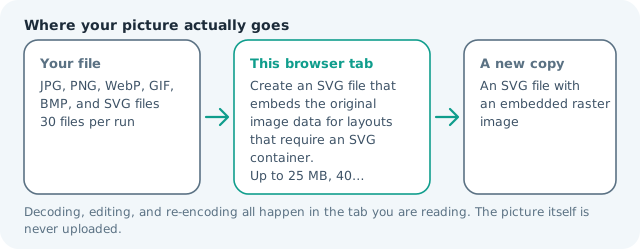
| Files it opens | JPG, PNG, WebP, GIF, BMP, and SVG files |
|---|---|
| Files you get back | An SVG file with an embedded raster image |
| Camera data (EXIF) | Carried over — the SVG stores your original bytes inside it, so GPS and camera tags travel with the file |
| Where the work happens | In this browser tab — the picture itself is never uploaded |
| Largest file | 100 MB, 40 megapixels or fewer |
| Largest batch | 30 files per run |
| Account, price, watermark | No sign-up, no charge, nothing stamped on your export |
When this helps
- Testing an image in an SVG-only upload field
- Embedding a raster asset in an SVG layout mock-up
- Keeping a data URI inside a single SVG file
- Preparing a portable fixture for an SVG renderer test
A PNG becomes an SVG text file with an image element and a Base64 data URI. The visual pixels remain the same as the source, while the outer file now has the SVG container and namespace.
Detailed guidance
What Image to SVG is for
Some upload fields and layout systems accept SVG as a container even when the asset itself does not need editable vector shapes. Wrapping a PNG or JPG inside an SVG can solve that packaging requirement without pretending that a photo has become a set of paths. This page keeps the distinction visible so a developer can test the receiving system without making a false promise about scalability. A browser canvas is good at repeatable pixel operations and poor at reading intent, so the control below stays narrow and names its output honestly.
What the local engine changes
The browser reads the selected file as a data URL, then places that value in an SVG image element with the SVG namespace and a preserve-aspect-ratio rule. The result is a text-based SVG download. The original file bytes are embedded rather than drawn onto a canvas, so the image is not resized or re-encoded during this conversion. The file is decoded in this tab, transformed in memory, and encoded as a new download; the source is never overwritten.
Limits and output trade-offs
The same 30-file and 100 MB-per-file local limits apply, and the SVG text can be larger than the source because Base64 adds overhead. Use this for small assets and compatibility tests. For production pages, a normal image URL is often more cacheable and efficient than a large inline data URI inside an SVG. A compressed camera file can occupy many times its disk size once decoded, which is what the ceilings are there to protect.
How to check the download
Open the SVG in the target application and confirm that it accepts embedded image content rather than requiring path-only artwork. Inspect the file text if the destination has a strict MIME or security policy, and compare the visual result with the source. Keep the raster original because the SVG wrapper does not improve its resolution. These effects are exports, not reversible edits, so keep the source until the copy has been judged where it will be used.
Other jobs this page does
PNG to SVG, JPG to SVG, and image-to-SVG requests are what this wrapper operation answers. Vectorize image is a separate higher bar because it requires tracing and shape simplification rather than only changing the outer file container. The wrapper keeps the raster at its decoded size, so zooming shows pixels rather than new curves. Tracing is a different job, and this page does not pretend otherwise.
When to use a stronger tool
This is not a vectorizer, path tracer, icon simplifier, or print-separation tool. It cannot turn a photograph into editable curves or remove the raster dependency. Use a specialised tracing workflow when the requirement is a true vector asset, and label the result accordingly.
Image to SVG questions
Does image to SVG vectorize a photo?
No. It creates a valid SVG wrapper that embeds the original raster image. It is useful when a system requires an SVG container, but it does not create editable paths.
Can I convert PNG or JPG to SVG?
Yes. The source bytes are placed in an SVG image element as a Base64 data URI, so the result remains visually raster content inside an SVG file.
Will the SVG make a photo infinitely scalable?
No. The outer SVG can be resized, but the embedded pixels keep the resolution of the source. Use a real tracing engine for scalable shapes.
Is my image uploaded during SVG conversion?
No. The browser reads the file and creates the SVG text locally. The embedded data URI is assembled in the current tab and is not sent to a conversion endpoint.