
Local browser tool · Portrait Background Remover
Make Image Transparent
Make an image transparent when a portrait needs to move onto a slide, product card, profile layout, or solid background. ImageMunch loads its person-segmentation model into your browser, separates a prominent person from the surrounding scene, and exports a transparent PNG. The source stays local. This page is explicit about scope: the available model is for people, not a general-purpose product, pet, vehicle, or object background remover.
Make a portrait background transparent
Cut a person out locally and download a transparent PNG without an upload. Suitable for portrait background remover tasks on JPG, PNG, WebP, GIF, BMP, and HEIC files; the export is always a new copy.
Click a thumbnail to preview it before you start.
These are the settings you last used for this tool. They stay in this browser and are never sent anywhere.
This cuts out a person. Products, animals, and objects are outside what the model was built for, so check the hairline before you rely on the result.
Output formatPNG (carries transparency)
Your files are read locally. Nothing is uploaded.
Your results
Pick a picture in the list to look at that file instead.
Full size
Actual pixels, straight from this browser — scroll to check edges and fine detail, then close.
Free to use. Local limits: up to 30 files, 100 MB per file, and 250 MB per batch, processed entirely in this browser. Nothing is uploaded; what stays on your device afterwards is the settings you last used and, after a run, the picture this page made so a next step can open it without choosing the file again. Start over deletes that picture.
Portrait Background Remover at a glance
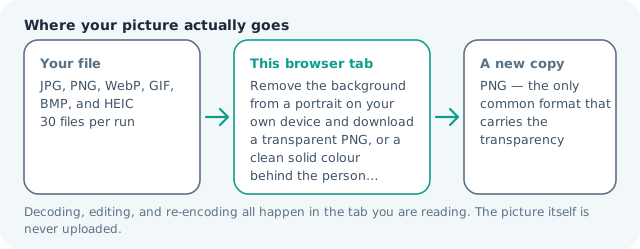
| Files it opens | JPG, PNG, WebP, GIF, BMP, and HEIC |
|---|---|
| Files you get back | PNG — the only common format that carries the transparency |
| Camera data (EXIF) | Not copied — this browser writes a fresh picture from its pixels, so GPS, timestamps and camera tags stay in the file you started with |
| Where the work happens | In this browser tab — the picture itself is never uploaded |
| Largest file | 100 MB, 40 megapixels or fewer |
| Largest batch | 30 files per run |
| Account, price, watermark | No sign-up, no charge, nothing stamped on your export |
When this helps
- A headshot dropped onto a company page whose background colour changes with the theme
- A person lifted out of a busy room for a slide, poster, or event banner
- A cut-out sticker or print where the white box around the subject gives it away
- Layering one shot over another without opening a desktop editor
Measured on this page: a 900 × 1,200 portrait came back as a 426 KB PNG with 41% of the frame turned transparent. The file grows because PNG is the one common format that carries that alpha channel.
Detailed guidance
What Make image transparent is for
A portrait with a transparent background can move between a slide, website card, social graphic, and presentation without carrying the original room or landscape with it. The practical question is not only whether the background should disappear, but also whether the cut-out model understands the subject. This page uses the local person model that already powers the portrait workflow and says so directly. A browser canvas is good at repeatable pixel operations and poor at reading intent, so the control below stays narrow and names its output honestly.
What the local engine changes
The browser downloads the segmentation weights when the tool is first used, decodes the selected image, and estimates which pixels belong to the prominent person. The visible person is then composited onto a transparent canvas and exported as PNG. The model and the source image stay inside the browser tab. A solid background option remains available when the destination does not support alpha. The file is decoded in this tab, transformed in memory, and encoded as a new download; the source is never overwritten.
Limits and output trade-offs
The normal local limits are 30 files, 100 MB per input, and about 40 megapixels per decoded image, with additional memory used by the segmentation model. Clear head-and-shoulders portraits are the most reliable case. A busy group photo, a full-frame face, very small subject, or low-contrast clothing can produce a poor mask even when the button completes. A compressed camera file can occupy many times its disk size once decoded, which is what the ceilings are there to protect.
How to check the download
Inspect hair, fingers, shoes, and the border between the person and the background at 100 percent. Confirm that the downloaded file is PNG and that the transparent checkerboard appears correctly in the destination. Keep the original until the mask has been reviewed because a cut-out is a new delivery copy, not a reversible edit. These effects are exports, not reversible edits, so keep the source until the copy has been judged where it will be used.
Other jobs this page does
Transparent image makers, clear backgrounds, and making a portrait transparent all resolve to the same local person cut-out. The existing portrait background page is the broader explanatory guide; this page is the direct action page for the transparent PNG result. Coverage is reported as a share of the frame, which is the quickest way to notice a mask that has grabbed the wrong thing.
When to use a stronger tool
This is not a general object background remover, magic eraser, hair retouching service, or perfect product photographer. It cannot make a printed address disappear from the pixels and it cannot reliably isolate pets, cars, furniture, or merchandise. Use a general segmentation model or manual path when those objects are the subject.
Make Image Transparent questions
How do I make a portrait background transparent?
Add a portrait, choose transparent background, and press the button. The browser loads a local person-segmentation model and writes the cut-out to a new PNG.
Can this make a product or pet image transparent?
No. The local model is designed for a prominent person. Products, animals, cars, and objects need a general cutout model or a manual mask, so this page does not promise those results.
Will the transparent PNG keep the person edges?
It keeps an approximate person mask and is strongest with a clear, well-lit subject against a contrasting background. Check hair, fingers, and thin edges at full size before publishing.
Is my portrait uploaded to remove the background?
No. The model and pixels run in your browser. The source remains on your device and the output is assembled locally. The page does not need to send the portrait to a remote background-removal service before creating the PNG cut-out.