
Local browser tool · Image Splitter
Image Splitter
An image splitter divides one large picture into a grid without stretching it. Choose rows and columns, add your source, and ImageMunch cuts exact pixel boundaries in your browser, numbers the pieces, and packs them into one ZIP. This works for tiled maps, comic panels, carousel slides, and wide screenshots that need to travel in smaller sections. The original stays untouched, and an uneven final row or column keeps its remaining pixels instead of throwing them away.
Split one canvas into numbered tiles
Set rows and columns, then download every exact-pixel piece as one archive. Suitable for image splitter tasks on JPG, PNG, WebP, GIF, and BMP files; the export is always a new copy.
Click a thumbnail to preview it before you start.
These are the settings you last used for this tool. They stay in this browser and are never sent anywhere.
The final row or column keeps any remainder pixels. Each tile is numbered and packed into one ZIP.
Output formatZIP of numbered image tiles
Your files are read locally. Nothing is uploaded.
Your results
Pick a picture in the list to look at that file instead.
Full size
Actual pixels, straight from this browser — scroll to check edges and fine detail, then close.
Free to use. Local limits: up to 30 files, 100 MB per file, and 250 MB per batch, processed entirely in this browser. Nothing is uploaded; what stays on your device afterwards is the settings you last used and, after a run, the picture this page made so a next step can open it without choosing the file again. Start over deletes that picture.
Image Splitter at a glance
| Files it opens | JPG, PNG, WebP, GIF, and BMP |
|---|---|
| Files you get back | A ZIP of numbered image tiles |
| Camera data (EXIF) | Not copied — this browser writes a fresh picture from its pixels, so GPS, timestamps and camera tags stay in the file you started with |
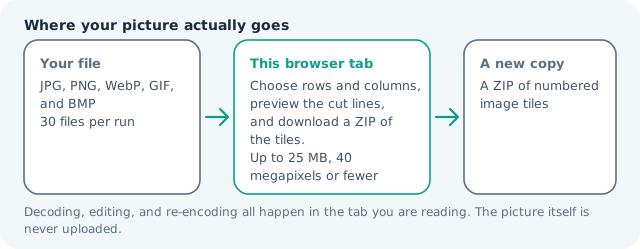
| Where the work happens | In this browser tab — the picture itself is never uploaded |
| Largest file | 100 MB, 40 megapixels or fewer |
| Largest batch | 30 files per run |
| Account, price, watermark | No sign-up, no charge, nothing stamped on your export |
When this helps
- Preparing a large map or poster for a tiled upload
- Breaking a comic or contact sheet into numbered panels
- Sending a wide screenshot in pieces when a platform has a width cap
- Creating a social carousel from one designed canvas
A 2,400 × 1,600 source split into 3 columns and 2 rows produces six tiles of 800 × 800. No tile is stretched: the canvas is cut at exact pixel boundaries, and any uneven remainder stays in the final row or column.
Detailed guidance
What An image splitter is for
A large image is sometimes the wrong delivery shape even when its pixels are fine. A map tile, a long comic strip, a carousel panorama, and a contact sheet all contain several logical panels inside one canvas. Splitting is the operation that changes the delivery shape while leaving each panel's pixels alone. A browser redraws pixels reliably; it cannot guess what a picture was meant to do. So the control below stays narrow, and the file it hands back is named for the job it did.
What happens in this browser tab
After you choose a row and column count, the tool computes integer boundaries and draws each rectangle to a separate canvas. The pieces are encoded in the selected web image format, named with row and column numbers, and packed into a store-only ZIP so the archive adds almost no processing overhead. Nothing waits in a server queue, and the file you chose is never rewritten: you get a new copy with its own download link.
Limits that are part of the tool
The normal ImageMunch limits are 30 files per run, 100 MB per input, and about 40 megapixels per decoded image. A 10 by 10 grid is technically possible, but it creates 100 files and is rarely a useful handoff. Start with the fewest panels that meet the receiving platform's width or height limit. A decoded canvas costs several times its disk size in memory, which is why a slow phone should work in smaller batches or from a smaller source.
How to check the result before publishing it
Open the ZIP and check the first, middle, and last tiles at 100 percent. Look for an edge that should continue cleanly into the next panel, verify that row and column numbering matches the intended reading order, and confirm that transparent graphics still have the output format you expect. Judge the download in the application that will receive it rather than in the preview here, and keep the original until you have.
Other jobs this page does
Equal sections, tiles, carousel panels, and dividing one picture into parts are all the same grid operation, and this page performs it. The related pages for crop, resize, and compress are the next steps when the canvas needs framing or a byte budget before it is divided. Tiles are numbered in row order, so a 3 by 2 grid gives six files whose names say which row and column each piece came from, and the remainder pixels always land in the last row or column.
When another tool is the honest choice
A splitter does not join the pieces again, create a seamless panorama, or understand the content of each panel. If the real problem is an upload-size cap, compress or resize the original first and split the lighter copy only if the platform still needs separate tiles.
Image Splitter questions
Can I split an image into equal parts?
Yes. Choose the grid dimensions and the browser calculates the cut lines from the source width and height. When a dimension is not evenly divisible, the final tile keeps the remainder rather than stretching the other pieces.
Does the image splitter crop any pixels?
No. Every source pixel belongs to one tile. The only visual change is the boundary between pieces, and the last row or column may be a few pixels larger when the numbers do not divide evenly.
Can I use it for an Instagram carousel?
Yes. Use one row and the number of panels you want, then keep the numbered files in order. Design the original at the final carousel height first if you need a continuous panorama across the slides.
How are the split images downloaded?
The browser creates one numbered image per tile and packs them into a ZIP. That avoids a long series of separate download prompts and preserves the order in the filenames.