
Local browser tool · Change Image Color
Change Image Color
Change image color when a photo, icon, or simple graphic needs a quick tint or brand-colour variation. Pick a target colour and strength, then ImageMunch shifts the visible hues in your browser while preserving lightness, dimensions, and transparency where the format supports it. This is a whole-image treatment for previews and simple recolouring, not a promise to identify one object or replace one exact RGB value. The original file remains untouched.
Shift the picture toward your chosen colour
Pick a target hue and strength, then download a recoloured copy from your browser. Suitable for change image color tasks on JPG, PNG, WebP, GIF, and BMP files; the export is always a new copy.
Click a thumbnail to preview it before you start.
These are the settings you last used for this tool. They stay in this browser and are never sent anywhere.
The whole image shifts toward the chosen colour. Lightness, detail, and transparency remain more natural than with a flat overlay.
Your files are read locally. Nothing is uploaded.
Your results
Pick a picture in the list to look at that file instead.
Full size
Actual pixels, straight from this browser — scroll to check edges and fine detail, then close.
Free to use. Local limits: up to 30 files, 100 MB per file, and 250 MB per batch, processed entirely in this browser. Nothing is uploaded; what stays on your device afterwards is the settings you last used and, after a run, the picture this page made so a next step can open it without choosing the file again. Start over deletes that picture.
Change Image Color at a glance
| Files it opens | JPG, PNG, WebP, GIF, and BMP files |
|---|---|
| Files you get back | JPG, PNG, WebP |
| Camera data (EXIF) | Not copied — this browser writes a fresh picture from its pixels, so GPS, timestamps and camera tags stay in the file you started with |
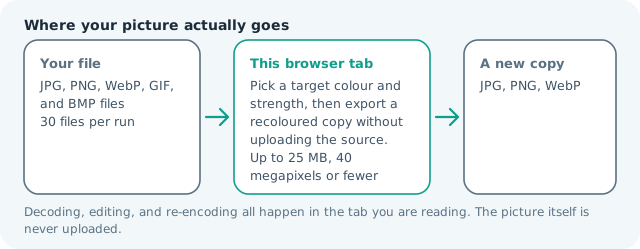
| Where the work happens | In this browser tab — the picture itself is never uploaded |
| Largest file | 100 MB, 40 megapixels or fewer |
| Largest batch | 30 files per run |
| Account, price, watermark | No sign-up, no charge, nothing stamped on your export |
When this helps
- Testing a product image in a new brand colour
- Creating a tinted photo or illustration variant
- Recolouring a simple icon or flat graphic
- Exploring a palette before opening a full editor
A blue product photo can be shifted toward a warm orange at 35% strength while its shadows and highlights remain readable. Increase the strength for a clear tint, or lower it when the original material colour should still dominate.
Detailed guidance
What Change image color is for
A quick colour variation can answer a design question before a full editing session begins. A product mock-up may need a second brand colour, a flat icon may need a warm or cool version, and a photograph may need a gentle tint for a campaign. The useful distinction is between a whole-image treatment and a selective replacement: this page deliberately handles the first job with a control that is easy to understand. A browser redraws pixels reliably; it cannot guess what a picture was meant to do. So the control below stays narrow, and the file it hands back is named for the job it did.
What happens in this browser tab
The browser decodes the source into a canvas, converts each visible pixel to a lightness and saturation representation, shifts its hue toward the chosen target, and blends the saturation at the selected strength. Light and dark structure remains in place, and transparent pixels keep their alpha. The result is then encoded using the output format and quality selected on the page. Nothing waits in a server queue, and the file you chose is never rewritten: you get a new copy with its own download link.
Limits that are part of the tool
The normal local ceiling is 30 files per run, 100 MB per input, and about 40 megapixels per decoded image. A camera original can occupy much more memory as raw pixels than it does on disk. Start with a moderate strength, inspect a full-size export, and resize the source first if a mobile device becomes slow or the final destination has a pixel limit. A decoded canvas costs several times its disk size in memory, which is why a slow phone should work in smaller batches or from a smaller source.
How to check the result before publishing it
Check skin tones, neutral areas, text, logos, and transparent edges in the output. A whole-image hue shift can create an attractive preview while making a neutral background unexpectedly coloured. Compare the result in the destination application and keep the original until the colour decision is approved. Judge the download in the application that will receive it rather than in the preview here, and keep the original until you have.
Other jobs this page does
Recolouring a PNG, shifting a flat colour cast, and swapping one image colour for another are the same broad treatment. The palette page helps choose a colour from a reference image, while convert and compress prepare the recoloured copy for the receiving platform.
When another tool is the honest choice
This is not an object-aware replacement tool, a background remover, a colour picker, a Pantone matcher, or a print-proofing workflow. It cannot know whether a red shirt, a red warning sign, and a red logo should be treated differently. Use a layered editor or a masked workflow when the change must target one region only.
Change Image Color questions
How do I change the colour of an image online?
Choose a target colour, set the strength, add the image, and press the button. The browser shifts the visible hues toward that colour and exports a new image without changing the source file.
Can this replace one exact colour in a logo?
It applies a whole-image hue treatment rather than a selective pixel mask. It works well for simple previews and broad tints; exact one-colour replacement needs a mask or a vector editor.
Will the image keep transparency after recolouring?
PNG and WebP can keep transparent pixels because the effect changes RGB values and leaves alpha alone. JPG has no transparency, so choose a format that supports it when the background matters.
Is the image uploaded when the colour is changed?
No. The browser decodes the source, applies the effect to a local canvas, and offers a fresh download. The original file is not overwritten and is not sent to a server.