
Local browser tool · Image DPI Calculator
Image DPI Calculator
Use an image DPI calculator to estimate how large a picture can print at a chosen pixel density. ImageMunch reads the pixel dimensions, lets you choose a target DPI, and returns approximate inches and centimetres without changing the file. This is a calculation tool, not a metadata writer: it does not claim to embed a new DPI value or create detail that the source pixels do not contain. The report helps you decide whether to resize or ask for a larger original.
Estimate physical print size from pixels
Choose DPI and see the approximate inch and centimetre dimensions available from the image. Suitable for image dpi calculator tasks on JPG, PNG, WebP, GIF, and BMP files; the export is always a new copy.
Click a thumbnail to preview it before you start.
These are the settings you last used for this tool. They stay in this browser and are never sent anywhere.
This calculates print dimensions from existing pixels. It does not write DPI metadata or invent detail.
Output formatPlain text (.txt)
Your files are read locally. Nothing is uploaded.
Your results
Pick a picture in the list to look at that file instead.
Full size
Actual pixels, straight from this browser — scroll to check edges and fine detail, then close.
Free to use. Local limits: up to 30 files, 100 MB per file, and 250 MB per batch, processed entirely in this browser. Nothing is uploaded; what stays on your device afterwards is the settings you last used and, after a run, the picture this page made so a next step can open it without choosing the file again. Start over deletes that picture.
Image DPI Calculator at a glance
| Files it opens | JPG, PNG, WebP, GIF, and BMP files |
|---|---|
| Files you get back | A plain-text (.txt) file |
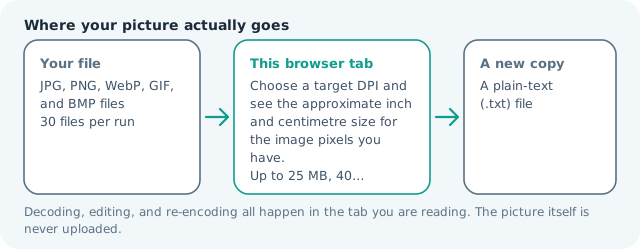
| Where the work happens | In this browser tab — the picture itself is never uploaded |
| Largest file | 100 MB, 40 megapixels or fewer |
| Largest batch | 30 files per run |
| Account, price, watermark | No sign-up, no charge, nothing stamped on your export |
When this helps
- Checking whether a photo has enough pixels for a print size
- Estimating a poster or document image dimension
- Comparing 72, 150, and 300 DPI assumptions
- Explaining why DPI alone does not add detail
A 3,000 × 2,000 image at 300 DPI is approximately 10 × 6.67 inches, or 25.4 × 16.93 centimetres. At 150 DPI the same pixels cover twice the physical size with lower pixel density.
Detailed guidance
What Image DPI calculator is for
DPI connects pixels with a physical print size. It is easy to ask for a 300 DPI file without checking whether the available pixels can cover the requested paper dimensions. A calculation makes the trade-off visible: higher density produces a smaller physical image from the same pixels, while a larger print spreads those pixels over more space and may need a lower effective density or a larger source. A browser canvas is good at repeatable pixel operations and poor at reading intent, so the control below stays narrow and names its output honestly.
What the local engine changes
The browser decodes the image and reads its natural width and height. It divides each dimension by the selected DPI, then converts inches to centimetres for the report. The input file is not re-encoded, and no metadata is rewritten. The result is a planning estimate that can be checked against the printer or document specification before export. The file is decoded in this tab, transformed in memory, and encoded as a new download; the source is never overwritten.
Limits and output trade-offs
The page accepts the normal 30-file, 100 MB-per-file, and roughly 40-megapixel limits. The calculation assumes square pixels and a uniform target DPI. It does not account for bleed, printer margins, cropping, resampling algorithms, paper viewing distance, or colour management. Those decisions still belong to the destination workflow. A compressed camera file can occupy many times its disk size once decoded, which is what the ceilings are there to protect.
How to check the download
Compare the calculated size with the required paper or layout box. If it is too small at the requested DPI, obtain a larger source or accept a different density after checking the printer guidance. Keep the original and do not mistake a larger CSS size or a changed metadata field for added detail. These effects are exports, not reversible edits, so keep the source until the copy has been judged where it will be used.
Other jobs this page does
The image DPI converter, pixels-to-inches, and photo-resolution-for-printing searches all express this calculation. Resize handles new pixel dimensions, while this page helps decide whether the existing pixels are enough before you resize. The number is arithmetic rather than a resampling promise: writing a larger value into a file adds no detail, so the report states the print size the pixels already support and leaves the resampling to the resize page, where the interpolation is visible before you export.
When to use a stronger tool
This is not a print proof, DPI metadata editor, upscaler, or colour-profile converter. It calculates the physical size implied by existing pixels and a selected density. Use a print application when the final file must carry a particular embedded resolution value or production profile.
Image DPI Calculator questions
How do I calculate the print size of an image?
Add the image, choose a target DPI, and divide the pixel width and height by that DPI. The report shows the approximate size in inches and centimetres.
Does changing DPI create more image detail?
No. It changes the relationship between existing pixels and a physical print size. It cannot invent pixels or make a low-resolution source sharp. A larger number may make the calculated print size smaller, but it does not add information missing from the original image.
Which DPI should I choose?
Use the specification from the printer or destination. Three hundred DPI is a common high-detail reference, while larger posters are often viewed at a greater distance and may use a lower effective density.
Does this edit the image DPI metadata?
No. It calculates an estimate from the decoded pixels and selected DPI. Use a print application when embedded resolution metadata must be written into the file.