
Local browser tool · Make GIF
Make a GIF From Images
To make a GIF from images, drop two or more pictures onto this page, choose how long each frame holds and whether the loop repeats, and your browser assembles them into one animated file. Every frame is resized to the same box so the animation cannot jump mid-loop, the encoder runs locally in a worker thread, and the finished GIF downloads without an upload, a queue, or a watermark.
Turn a set of pictures into one looping animation
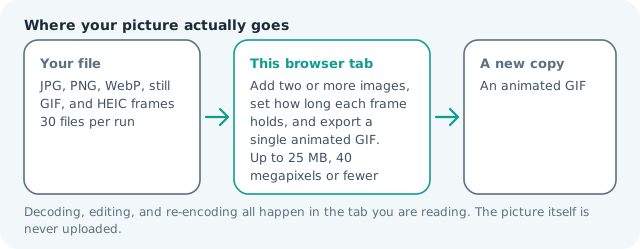
Add two or more images, set how long each frame holds, and export a single animated GIF. Suitable for make gif tasks on JPG, PNG, WebP, still GIF, and HEIC frames files; the export is always a new copy.
Click a thumbnail to preview it before you start.
These are the settings you last used for this tool. They stay in this browser and are never sent anywhere.
Every image becomes one frame at the size of the first image, so the animation never jumps between frame sizes.
Output formatGIF animation
Your files are read locally. Nothing is uploaded.
Your results
Pick a picture in the list to look at that file instead.
Full size
Actual pixels, straight from this browser — scroll to check edges and fine detail, then close.
Free to use. Local limits: up to 30 files, 100 MB per file, and 250 MB per batch, processed entirely in this browser. Nothing is uploaded; what stays on your device afterwards is the settings you last used and, after a run, the picture this page made so a next step can open it without choosing the file again. Start over deletes that picture.
Make GIF at a glance
| Files it opens | JPG, PNG, WebP, still GIF, and HEIC frames |
|---|---|
| Files you get back | An animated GIF |
| Camera data (EXIF) | Not copied — this browser writes a fresh picture from its pixels, so GPS, timestamps and camera tags stay in the file you started with |
| Where the work happens | In this browser tab — the picture itself is never uploaded |
| Largest file | 100 MB, 40 megapixels or fewer |
| Largest batch | 30 files per run |
| Account, price, watermark | No sign-up, no charge, nothing stamped on your export |
When this helps
- Stacking a step-by-step sequence into one file a chat app will accept
- Turning a burst of photos into a stop-motion loop for a post
- Building a simple animated banner where video is not allowed
- Flipping two design variants back and forth to show the difference
Measured on this page: three photographs totalling 3.98 MB became one animated GIF of 398 KB — 3 frames at 384 × 480 px, about 0.9 seconds per loop at the default 300 ms hold — and two of the same pictures made a 259 KB loop. The 256-colour palette is what does that shrinking, which is also why skies and skin band; cut the frame width before you cut frames, because a missing frame changes what the viewer reads as motion.
Detailed guidance
What turns a pile of pictures into a good loop
An animation reads as intentional when the changes between frames are small and regular. A sequence where the subject moves a little each step looks like motion; a sequence of five unrelated photos looks like a slideshow that nobody asked for. Shoot or arrange your frames with the same framing and lighting, keep the count between four and twelve, and let the delay do the storytelling. Two frames flipping back and forth is the honest way to show a before and after, because the eye learns the difference on the second pass.
Frame timing, in numbers that work
Timing is the single biggest quality lever. Under 100 ms per frame reads as a flicker and nobody can follow it. Between 200 and 500 ms is the comfortable band for photo sequences, which is why the default sits at 300 ms. Around a second suits a tutorial where each frame carries text a reader must finish. Because the delay is written into the file rather than chosen by the player, what you set here is exactly what your audience sees.
Size, weight, and the 256-color reality
GIF was designed in 1987 and still carries at most 256 colors per frame with no alpha blending, and it stores each frame whole rather than as a diff from the last one. That is why a photo loop balloons so fast. The practical ceiling for something you will actually send to someone is around 1 MB, and a 480 px, eight-frame photographic loop lands near that. Raise the widest edge only when the destination has a generous cap and the frames carry detail worth the bytes.
Framing every frame the same way
Mixed source sizes are normal — a phone shot next to a screenshot next to a downloaded graphic — and a GIF cannot change dimensions between frames. This tool takes the frame box from the first image you add, so put the one you like best first and add the rest after it. Cover crops the overflow evenly, which keeps the loop tight and is usually right for photos; contain pads the rest with your chosen background color, which is what you want for screenshots, diagrams, and anything with text at the edges.
Where a GIF beats a video file
Plenty of places still refuse video: email clients strip it, forums and marketplaces cap the upload, and chat apps re-encode anything long enough to be called a clip. A GIF plays automatically with no tap in every one of those, which is why it survives as the format for a product spin, a size comparison, a three-step assembly, or a reaction. If the sequence runs longer than a few seconds, has sound, or needs to look sharp on a large screen, export a short MP4 instead and keep this tool for the loops.
Finishing checks before you send
Open the download and watch it twice rather than judging from the first pass: the second loop is where a jittery frame or a mistimed hold becomes obvious. If one image arrived from your iPhone as HEIC it is decoded locally into a frame like any other, so the loop never breaks on an unsupported format. Rename the file immediately, because animation-imgmunch.gif tells you nothing next month, and keep the source frames — a loop is far easier to rebuild from clean inputs than to salvage from a compressed export.
Make a GIF From Images questions
How do I turn a set of photos into a GIF?
Add at least two images in the order they should appear, then set the frame delay: 300 ms is the default, and the useful range runs from four hundredths of a second to three seconds per frame. Your browser assembles the animation and the finished file downloads.
Why does my GIF look worse than the source images?
GIF carries at most 256 colours per frame, so smooth skies and photographic gradients break into bands that no setting here restores. Keep the widest edge as small as the destination allows, and if detail matters more than the format, export a short video instead.
Can I make the animation play once instead of looping?
Yes. Set playing to play once and the viewer stops on the last frame rather than restarting. Pair it with a longer delay on that final image if it carries text a reader has to finish, since nothing brings the frame back.
How do I keep mixed-size images lined up?
A GIF cannot change dimensions between frames, so every image is placed in one shared frame box. Cover crops the overflow evenly, which suits photos; contain keeps every pixel and pads the rest with the background colour you choose, which suits screenshots and text.
What is the cheapest way to make a heavy GIF smaller?
Reduce the widest edge first, because weight follows pixel area and 480 px is usually plenty inside a chat app. After that, drop frames, or run the finished file through the GIF compressor, which rewrites the palette and can thin the frame count locally.