
Local browser tool · Watermark
Add Watermark to an Image
To add a watermark to an image online, type your text or drop a transparent PNG logo, place it in a corner or tile it across the picture, and set the opacity until the mark is visible without fighting the subject. This page composites the layer with your browser's own canvas engine, so the protected copy downloads in seconds and the clean original stays on your device — never uploaded, never stored.
Put your mark on the picture before you post it
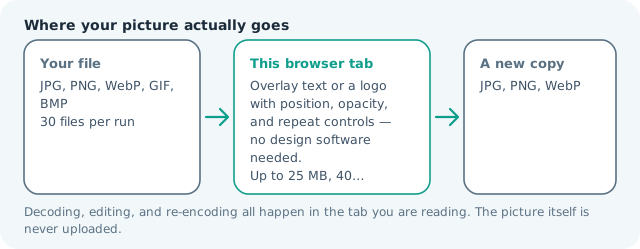
Overlay text or a logo with position, opacity, and repeat controls — no design software needed. Suitable for watermark tasks on JPG, PNG, and WebP files; the export is always a new copy.
Click a thumbnail to preview it before you start.
These are the settings you last used for this tool. They stay in this browser and are never sent anywhere.
Watermark is baked into the exported copy — your original file stays clean.
Your files are read locally. Nothing is uploaded.
Your results
Pick a picture in the list to look at that file instead.
Full size
Actual pixels, straight from this browser — scroll to check edges and fine detail, then close.
Free to use. Local limits: up to 30 files, 100 MB per file, and 250 MB per batch, processed entirely in this browser. Nothing is uploaded; what stays on your device afterwards is the settings you last used and, after a run, the picture this page made so a next step can open it without choosing the file again. Start over deletes that picture.
Watermark at a glance
| Files it opens | JPG, PNG, WebP, GIF, BMP |
|---|---|
| Files you get back | JPG, PNG, WebP |
| Camera data (EXIF) | Not copied — this browser writes a fresh picture from its pixels, so GPS, timestamps and camera tags stay in the file you started with |
| Where the work happens | In this browser tab — the picture itself is never uploaded |
| Largest file | 100 MB, 40 megapixels or fewer |
| Largest batch | 30 files per run |
| Account, price, watermark | No sign-up, no charge, nothing stamped on your export |
When this helps
- Listing, portfolio, and stock photos that get scraped and re-posted elsewhere
- A transparent logo stamped instead of typed text, at an opacity you choose
- Proof images sent to a client before the invoice is paid
- A handle repeated across the whole frame, so cropping one corner removes nothing
Measured on this page: the same 1,200 × 900, 372 KB photo came back at 211 KB with the text tiled diagonally at 40 px and 70% opacity. The difference is the JPG re-encode at quality 82, not the mark itself, which costs almost nothing to draw.
Detailed guidance
Watermark honestly: what it deters and what it does not
A watermark is a credit and a friction device, not armor. A small corner mark identifies the author and looks professional on portfolio and listing shots, but one crop removes it. A semi-transparent tiled mark survives cropping and resizing, which is the right choice for public proof images and anything posted at full resolution before it is for sale. Match the strength to the exposure: previews and drafts get tiles; delivered, paid assets usually get a discreet corner signature or none at all.
Placement and opacity that survive reposting
Put corner marks near content the thief cannot crop without ruining — a listing photo's subject, not the empty sky. Keep opacity between 25 and 45 percent: low enough to read the photo through it, high enough to survive a phone-camera re-shot of the screen. Use a single line of text in a clean weight; decorative scripts blur into noise at small sizes. Logos want transparency so only the shape prints over the picture.
After exporting, do the thief test
Before publishing, open the watermarked copy and ask whether the mark would still be visible after a typical mobile crop and a shrink to thumbnail. If not, raise the opacity a step or switch from corner to tile. Always keep the clean original and watermark at export time — baking a mark into your only copy gives you no way to deliver a clean asset to the buyer later.
Watermarking decisions that hold up
Real-estate and rental listings get scraped within hours, so a tiled semi-transparent mark beats a corner logo there. Product photographers deliver a watermarked proof and release the clean file only after payment. Portfolio sites want the opposite restraint: a small signature corner, because an aggressive mark damages the viewing experience the site exists to sell. Community marketplaces sit in between, where a handle over the subject documents ownership if a dispute arises. The pattern is consistent — mark according to how the image will be exposed, not according to how much you fear theft. A public full-resolution post benefits from a tile; a delivered, paid asset usually deserves nothing at all beyond your own metadata record.
What a mark does and does not stop
A watermark is friction, not armour. A corner mark disappears with one crop; a re-photographed screen defeats opacity; a determined scraper paints over it. What survives is a mark placed over content nobody can crop without ruining the picture, kept at a see-through level that still reads at thumbnail size. Aim for 25-45 percent opacity: squint at the preview and the photo should still dominate. Use one short line in a regular weight — decorative scripts collapse into mush at small sizes. And always watermark on export so your master stays clean, because once a mark is baked into your only copy there is no way back.
Add Watermark to an Image questions
Can I watermark many photos at once?
Yes. Add the batch, set the text once, and every file exports with the same mark in the same place, which is the practical way to protect a set of listing photos before publishing. Each export is a separate copy, so your originals stay clean.
How do I keep a watermark visible without covering the picture?
Start around 60 percent opacity at the default size, then lower it until the image reads through the mark. If the watermark has to survive someone cropping a corner, switch the position to tiled diagonal, which repeats the text across the frame instead of sitting in one place.
Can I use my logo instead of text?
Yes. Turn on the logo option and choose a PNG or WebP with transparency. The mark follows the same position controls as text, and you can run both together, which is how a studio name and its symbol usually go on a photograph.
Does adding a watermark damage image quality?
The mark is drawn onto a canvas at the picture own resolution and encoded once, the same as any other export. Choose PNG for the output when the file may be edited again, because a second JPG pass is what softens edges, not the watermark itself.
How much text fits in a watermark?
Sixty characters, which is deliberately near a full name-plus-handle line. Longer strings turn into a smudge at ordinary sizes, so a short studio name or social handle stays legible at the smaller end of the size slider, where a paragraph never would.