
Local browser tool · Image to Sketch
Image to Sketch
Turn an image into a sketch when you need a quick outline or pencil-style concept from a photo. ImageMunch converts the source to luminance, measures neighbouring contrast, and draws stronger edges as dark lines on a light background. The process stays in your browser and produces a fresh image copy. It is a deterministic edge effect, not a generative drawing model, so texture and compression can become lines too.
Reduce a photo to a simple line sketch
Create a light pencil-style edge treatment locally and download the result. Suitable for image to sketch tasks on JPG, PNG, WebP, GIF, and BMP files; the export is always a new copy.
Click a thumbnail to preview it before you start.
These are the settings you last used for this tool. They stay in this browser and are never sent anywhere.
The browser detects local edges to create a simple pencil-style effect. Texture and compression can also become lines.
Your files are read locally. Nothing is uploaded.
Your results
Pick a picture in the list to look at that file instead.
Full size
Actual pixels, straight from this browser — scroll to check edges and fine detail, then close.
Free to use. Local limits: up to 30 files, 100 MB per file, and 250 MB per batch, processed entirely in this browser. Nothing is uploaded; what stays on your device afterwards is the settings you last used and, after a run, the picture this page made so a next step can open it without choosing the file again. Start over deletes that picture.
Image to Sketch at a glance
| Files it opens | JPG, PNG, WebP, GIF, and BMP files |
|---|---|
| Files you get back | JPG, PNG, WebP |
| Camera data (EXIF) | Not copied — this browser writes a fresh picture from its pixels, so GPS, timestamps and camera tags stay in the file you started with |
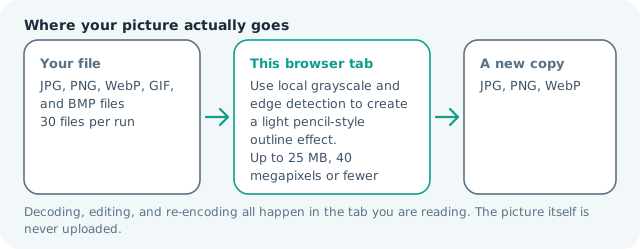
| Where the work happens | In this browser tab — the picture itself is never uploaded |
| Largest file | 100 MB, 40 megapixels or fewer |
| Largest batch | 30 files per run |
| Account, price, watermark | No sign-up, no charge, nothing stamped on your export |
When this helps
- Creating a quick pencil-style reference
- Reducing a photo to its main contours
- Preparing a colouring-page starting point
- Testing an outline treatment for a design concept
The browser converts the source to luminance, compares neighbouring pixels, and draws stronger changes as darker lines on a light background. Texture and noise can also become lines, so a clean source matters.
Detailed guidance
What Image to sketch is for
A line sketch can be a useful intermediate even when it is not a finished illustration. It can help a designer see the main contours, give a colouring-page workflow a starting point, or turn a busy photo into a simpler reference. The honest boundary is important: a local edge detector sees contrast, not artistic intention, so it will also notice hair texture, brick, fabric, and compression noise. A browser canvas is good at repeatable pixel operations and poor at reading intent, so the control below stays narrow and names its output honestly.
What the local engine changes
The canvas is converted to luminance and each pixel is compared with nearby pixels. Strong local differences become darker marks, while quiet areas remain light. The selected strength changes how strongly those differences appear. The result is encoded as a normal image file, and the source dimensions and alpha are retained when the output format allows it. The file is decoded in this tab, transformed in memory, and encoded as a new download; the source is never overwritten.
Limits and output trade-offs
The tool follows the 30-file, 100 MB-per-file, and roughly 40-megapixel limits. Noise in a large JPEG can become many small lines, and a very high-resolution source can use substantial memory after decoding. Resize the source first when the sketch is only meant to be a small reference or thumbnail. A compressed camera file can occupy many times its disk size once decoded, which is what the ceilings are there to protect.
How to check the download
Check the face, text, and the subject boundary at 100 percent. A readable sketch has a clear main contour and enough white space for texture to remain secondary. If the output will become a colouring page, clean stray lines in an editor rather than assuming the automatic effect knows which edges are meaningful. These effects are exports, not reversible edits, so keep the source until the copy has been judged where it will be used.
Other jobs this page does
The image-to-sketch, pencil-sketch, and sketch-effect searches all express this edge-based conversion. Black and white is the simpler luminance-only version, while outline and vector tracing require different processing goals. Line weight follows edge contrast, which is why a low-contrast photo sketches faint and a high-contrast document sketches heavy. Raising the contrast first is the usual fix, and it costs nothing because the source file is never modified. Your own source file is never modified at all, so a second pass can start from the original rather than from a sketch of a sketch.
When to use a stronger tool
This is not a hand-drawn simulator, image-to-image AI, vector tracer, or object-aware line-art model. It cannot separate a person from a textured wall or choose a particular illustration style. Use a layered editor or a specialised model when the final artwork needs selective control.
Image to Sketch questions
Can I turn a photo into a sketch online?
Yes. The browser converts the image to grayscale, detects local edges, and creates a simple line-based export. The result is meant as a quick concept or outline, not a finished hand-rendered illustration.
Will the result look hand drawn?
It is a pixel edge effect rather than a hand-drawn or generative illustration. It works best as a concept, outline, or colouring-page starting point, and texture can remain visible as extra lines.
Why does the background show extra lines?
Edge detection responds to texture, shadows, noise, and compression as well as the main subject. A cleaner source or lower effect strength usually helps, especially for walls, fabric, leaves, and brick.
Is my source image uploaded for the sketch effect?
No. The grayscale and edge calculations run in your browser. The page creates the download from the pixels already selected in the current tab. The source is not sent to a remote image-processing endpoint while the effect is calculated.