
Local browser tool · Image Color Picker
Image Color Picker
An image color picker can turn a reference photo, product shot, or moodboard into a short list of useful hex colours. Add the image and ImageMunch samples the visible pixels in your browser, groups nearby shades, ranks the most common groups, and shows the values as copyable text. It is designed for palette discovery rather than calibrated colour measurement: the result tells you which colours shape the image, while the original stays local and unchanged.
Pull a usable palette out of any image
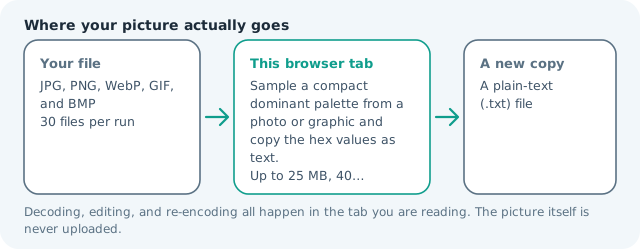
Sample common colours, rank them, and copy the hex list into CSS or a design brief. Suitable for image color picker tasks on JPG, PNG, WebP, GIF, and BMP files; the export is always a new copy.
Click a thumbnail to preview it before you start.
These are the settings you last used for this tool. They stay in this browser and are never sent anywhere.
The result is a plain-text report you can copy or download. The image itself stays in this browser tab.
Output formatPlain text (.txt)
Your files are read locally. Nothing is uploaded.
Your results
Pick a picture in the list to look at that file instead.
Full size
Actual pixels, straight from this browser — scroll to check edges and fine detail, then close.
Free to use. Local limits: up to 30 files, 100 MB per file, and 250 MB per batch, processed entirely in this browser. Nothing is uploaded; what stays on your device afterwards is the settings you last used and, after a run, the picture this page made so a next step can open it without choosing the file again. Start over deletes that picture.
Image Color Picker at a glance
| Files it opens | JPG, PNG, WebP, GIF, and BMP |
|---|---|
| Files you get back | A plain-text (.txt) file |
| Where the work happens | In this browser tab — the picture itself is never uploaded |
| Largest file | 100 MB, 40 megapixels or fewer |
| Largest batch | 30 files per run |
| Account, price, watermark | No sign-up, no charge, nothing stamped on your export |
When this helps
- Building a brand palette from a reference photo
- Picking background colours for a presentation or landing page
- Matching UI accents to a product image
- Turning a moodboard image into reusable hex values
A sunset photograph may return warm orange, muted blue, cream, and charcoal values. A flat logo usually returns fewer useful colours because the same pixels occupy most of the canvas.
Detailed guidance
What Image color picker is for
A picture can carry a useful colour system even when nobody wrote the swatches down. A product photograph may suggest the background for a landing page, a poster may reveal an accent colour, and a moodboard may need a concise palette before the design work starts. Sampling gives you a repeatable starting point instead of asking someone to guess from a thumbnail. A browser redraws pixels reliably; it cannot guess what a picture was meant to do. So the control below stays narrow, and the file it hands back is named for the job it did.
What happens in this browser tab
The image is decoded to a canvas and reduced to a manageable sample grid. Nearby RGB values are grouped so compression noise does not create hundreds of one-off colours, then the largest groups are sorted and written to a plain-text report. The report includes hex values and an approximate share of sampled pixels; the original image itself is not embedded in the download. Nothing waits in a server queue, and the file you chose is never rewritten: you get a new copy with its own download link.
Limits that are part of the tool
The page reads common still images within the normal 100 MB and 40-megapixel limits. The algorithm favours dominant colours, so a tiny but important logo detail can rank lower than a large sky or wall. Crop to the meaningful subject first when the surrounding background would otherwise drown out the palette you care about. A decoded canvas costs several times its disk size in memory, which is why a slow phone should work in smaller batches or from a smaller source.
How to check the result before publishing it
Compare the top few swatches against the source at full size and pay attention to highlights and shadows. If a colour will be used for accessible text, test its contrast separately; a dominant colour is not automatically a readable foreground. Use the hex value as a starting token, then name and document the final design colour in your project. Judge the download in the application that will receive it rather than in the preview here, and keep the original until you have.
Other jobs this page does
Finding dominant colours, extracting a palette from a photograph, and reading out usable hex codes are the same report. The palette can feed the editor, watermark, or convert pages after you choose the colours you actually want to use.
When another tool is the honest choice
This is not a screen colour sampler that reads the pixel under your cursor, a Pantone matcher, or a colour-management proof. It analyses a whole image. If you need one exact pixel, use a pointer-based picker; if you need print accuracy, use a calibrated workflow.
Image Color Picker questions
How do I pick colours from a photo?
Add the photo and press the button. The browser samples a reduced copy, groups nearby RGB values, and returns the most common representative colours with standard hex codes you can copy.
Are the returned hex colours exact?
They are representative colours from the decoded pixels, not a calibrated measurement of a physical object. Lighting, camera processing, compression, and screen profiles can all change a photographed colour.
Can I extract a palette from a logo or screenshot?
Yes. Flat graphics often produce a particularly clear result because a few colours occupy most of the canvas. Check the returned list against the original if antialiasing or shadows create extra shades.
Can I use the results in CSS?
Yes. The report uses six-digit hex values such as #244B5A, so you can copy a line into a CSS colour declaration or a design brief. The approximate share is a guide to visual dominance, not a design rule.