
Local browser tool · Blur & pixelate
Blur Image Online
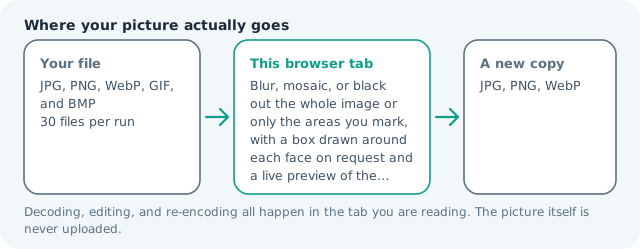
To blur an image online without uploading it, pick Blur, then decide whether the whole photo or only the boxes you drag should soften. This page applies a real Gaussian blur to your own copy of the pixels inside the browser tab, previews the result as you drag, and hands you a new file, so faces, addresses, and screens stop being readable while the picture never leaves your device.
Soften the whole photo, or only what you cover
Set the strength, choose Whole image or drag boxes over the parts that must stop being readable, and the preview paints the blur the file will carry. Suitable for blur & pixelate tasks on JPG, PNG, WebP, GIF, and BMP files; the export is always a new copy.
Click a thumbnail to preview it before you start.
These are the settings you last used for this tool. They stay in this browser and are never sent anywhere.
Drag a rectangle over each face, plate, or line of text. The preview shows the effect you are about to export at full resolution.
The first press loads a face detector into this tab and keeps it there. It frames the face, not the hair or the chin, so check the boxes before you export.
A flat bar is the only setting that guarantees nothing shows through — a weak blur can be sharpened back.
Your files are read locally. Nothing is uploaded.
Your results
Pick a picture in the list to look at that file instead.
Full size
Actual pixels, straight from this browser — scroll to check edges and fine detail, then close.
Free to use. Local limits: up to 30 files, 100 MB per file, and 250 MB per batch, processed entirely in this browser. Nothing is uploaded; what stays on your device afterwards is the settings you last used and, after a run, the picture this page made so a next step can open it without choosing the file again. Start over deletes that picture.
Blur & pixelate at a glance
| Files it opens | JPG, PNG, WebP, GIF, and BMP |
|---|---|
| Files you get back | JPG, PNG, WebP |
| Camera data (EXIF) | Not copied — this browser writes a fresh picture from its pixels, so GPS, timestamps and camera tags stay in the file you started with |
| Where the work happens | In this browser tab — the picture itself is never uploaded |
| Largest file | 100 MB, 40 megapixels or fewer |
| Largest batch | 30 files per run |
| Account, price, watermark | No sign-up, no charge, nothing stamped on your export |
When this helps
- A street or building photo published with strangers still in frame
- A background that competes with the subject, softened rather than cut out
- A screenshot whose surrounding detail should not travel with it
- A graphic scene that can be shared once it stops being explicit
Measured on this page: blurring a 1,200 × 900 photo of 372 KB across the whole frame returned a 58 KB JPG at quality 92. The weight falls that far because a blur leaves the encoder almost no detail worth describing, which is also why softening can quietly cost you legibility.
Detailed guidance
What a blur actually removes
A blur replaces each pixel with a weighted average of its neighbours, so fine structure disappears first: letterforms, skin texture, whisker-thin detail, the characters on a plate. Large shapes survive, which is why a heavily blurred face still reads as a face at thumbnail size. That is the honest limit of every blur tool, this one included, and it explains why the effect looks convincing on your phone and less convincing when someone zooms in.
Whole image or only what you cover
Two coverage modes handle almost every job. Whole image softens the picture evenly, which is what you want behind overlaid text, for a background that should not compete, or when a photo is too graphic to publish as it is. Only boxes I draw lets you drag a rectangle over each face, screen, document, or plate and leaves the rest of the frame untouched. The preview paints the real effect inside those boxes rather than a placeholder tint, and double-clicking a box deletes it.
How strong is strong enough
The strength slider scales with the size of the image instead of sitting in fixed pixels, so the same number hides the same amount of detail on a 900 px screenshot and on a 48-megapixel frame. Around 10 still leaves outlines readable. Between 20 and 30 removes text and facial detail for most viewers. Above 40 you are smearing color across the region, at which point a solid bar is both safer and visually cleaner.
Where this earns its keep
Street and architecture work gets published with strangers in frame, and a soft rectangle over each face is the difference between a normal post and a complaint. Trades who photograph their own jobs routinely blur the whiteboard on the wall, the invoice on the desk, or the registration plate in the drive. Almost everyone who shares a conversation screenshot needs the name and avatar of the other person softened. None of those people want to install a design suite, and none of them want the file sitting on a server they do not control.
Limits worth knowing before you rely on it
A blur is not encryption. A weak one can be partly undone by sharpening, and a box that only just covers a line of text can leak at the edges, so open the export at full zoom before you send it. Blurring a transparent PNG keeps the transparency but softens its outline, and an animated GIF comes out as a single frame. Boxes are reused across every file in a batch, so redact unrelated photos one at a time. Your original file is never modified: the tool writes a new copy, which means the safe version and the unsafe version both exist until you decide what to keep.
Blur Image Online questions
How do I blur only part of a photo?
Set Apply it to to Only boxes I draw, then drag a rectangle over each face, plate, screen, or line of text. Strength sets how far the detail dissolves, and the preview paints the real effect inside those boxes, so what you see is what exports.
Is a blurred area recoverable?
Not by an ordinary viewer, but do not treat it as secure. A light blur on a high-contrast region can leave shapes and letterforms readable, and sharpening tools partly undo soft edges. For anything genuinely sensitive, choose the mosaic or solid black cover instead.
Can it find faces automatically?
Yes. One button draws a box around each face it recognises, and you can add or delete boxes afterwards. It is built for frontal faces at a normal distance, so a profile, a face behind a mask, or one filling a small corner is easy to miss and wants a box of your own.
Why does a light blur still leave text readable?
Blur averages neighbouring pixels, and letterforms are mostly hard edges with strong contrast, so a small setting softens them without destroying them. Increase the strength until the line merges into the background around it, then look at the preview again before exporting.
Does blurring change the size or format of my picture?
Dimensions carry over exactly and the export is a new copy, so the original file stays as it was. Weight shifts with the re-encode, which the result card prints as two numbers, and a transparent PNG keeps its transparency while the softened area loses a crisp outline.