
Local browser tool · Resize
Resize a Photo for an Instagram Post
The feed gives a 4:5 portrait the most screen area of any shape it accepts, so 1080 × 1350 is the file to export. To resize a photo for an Instagram post, use this page preset to exactly those dimensions: the tool resamples locally, so nothing is auto-cropped after you publish. A landscape shot still works — switch the preset to 1080 × 566 — but portrait is the frame that fills a phone.
Build a 1080 × 1350 feed image
Preset for the vertical 4:5 frame Instagram renders largest, with fill and fit both available. Suitable for resize tasks on JPG, PNG, and WebP files; the export is always a new copy.
Click a thumbnail to preview it before you start.
These are the settings you last used for this tool. They stay in this browser and are never sent anywhere.
Picking one fills both boxes with that platform's exact size, releases the aspect lock, and crops the overflow instead of stretching it — switch the mode below if you would rather keep every pixel.
Estimated output —
Your files are read locally. Nothing is uploaded.
Your results
Pick a picture in the list to look at that file instead.
Full size
Actual pixels, straight from this browser — scroll to check edges and fine detail, then close.
Free to use. Local limits: up to 30 files, 100 MB per file, and 250 MB per batch, processed entirely in this browser. Nothing is uploaded; what stays on your device afterwards is the settings you last used and, after a run, the picture this page made so a next step can open it without choosing the file again. Start over deletes that picture.
Resize at a glance
| Files it opens | JPG, PNG, WebP, GIF, BMP |
|---|---|
| Files you get back | JPG, PNG, WebP |
| Camera data (EXIF) | Not copied — this browser writes a fresh picture from its pixels, so GPS, timestamps and camera tags stay in the file you started with |
| This page is already set to | JPG output, 1080 px wide |
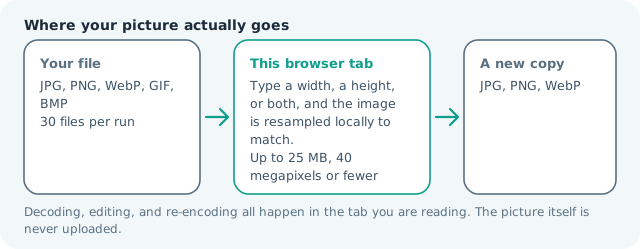
| Where the work happens | In this browser tab — the picture itself is never uploaded |
| Largest file | 100 MB, 40 megapixels or fewer |
| Largest batch | 30 files per run |
| Account, price, watermark | No sign-up, no charge, nothing stamped on your export |
When this helps
- Feed posts and carousels that want maximum screen area
- Product catalogues where detail must survive the grid thumbnail
- Portraits recomposed from landscape originals
- Creator portfolios prepared in batches before a schedule
Measured on this page: a 1,200 × 900 photo became a 1,080 × 1,350 portrait at 159 KB. Reaching 4:5 from a landscape original means the sides are cropped, so frame the subject with the preview before committing.
Detailed guidance
Why 4:5 wins the feed
A phone is tall, and the feed is a vertical scroll, so the image that occupies the most screen wins attention. Four-by-five does exactly that: 1080 × 1350 fills more of the viewport than a square and far more than a landscape frame, without triggering the padded letterboxing that a mismatched ratio produces. Grid thumbnails crop to square, which is why the subject should sit in the central band of a portrait composition — the corners are visible in the post but invisible in profile view. Creators who prepare at the target size publish faster, because nothing needs recomposing after the app crops it badly.
Adapting a landscape shot without losing it
Crop first, resize second. Taking a 3:2 landscape straight to 4:5 discards a third of the width, and the automatic centre crop is frequently the wrong third. Choose the band you want to keep, then let this page produce the exact frame. If nothing survives that crop — a wide panorama, a group of six — switch to 1080 × 566 and accept the smaller footprint, or add context above and below on fit mode with a background that matches your palette. Padding is a deliberate style; stretching is a defect.
Weight, sharpening, and the app re-encode
Instagram encodes every upload, so a heavy, over-sharpened file arrives softer than a modest one. Export at exactly 1080 px on the long edge, keep the file lean, and apply only light final sharpening. Text-heavy graphics suffer most because the encoder treats glyph edges as noise — if a carousel card carries a paragraph, raise its weight and lower its detail rather than shrinking the type. Check the result on a phone before publishing, since a desktop preview is generous in a way the feed never is.
Batching a week of posts
Thirty files run in one pass, which covers a carousel set plus its alternates. Keep the export order aligned to the sequence you plan to publish, and name files by slot rather than by date so a scheduling tool imports them cleanly. Everything happens in the browser, so unreleased product photography and client work stay on the machine rather than in somebody else's cloud queue — and the batch still finishes without a connection.
The feed, the grid, and one decision
A 4:5 post is shown as a square in the profile grid, so the top and bottom of the frame vanish there. That single fact settles most composition arguments: put the face or product in the middle band and treat the extra height as a bonus in the feed rather than essential content. Deciding once is easier than repairing a published grid later, because the app will not re-crop on request. If a shot genuinely needs its full frame, publish it as a carousel with a square cover, or run the source twice and accept two exports instead of one compromise that satisfies neither view.
Resize a Photo for an Instagram Post questions
What size should an Instagram post be?
1080 × 1350 px at 4:5 gives the largest feed footprint, 1080 × 1080 suits a square, and 1080 × 566 suits landscape. The app accepts other ratios and crops or pads them itself, so exporting at the target size keeps control of the framing.
Do I need to resize before uploading?
It is safer. Uploading an oversized image lets the app decide what to crop, and that decision is invisible until after publishing. Resizing here means you see exactly which edges are lost, and can recompose before you export.
Will Instagram reduce my image quality?
Every upload is re-encoded, so start from a clean file at the right dimensions instead of a huge one. A correctly sized 1080 × 1350 JPG with a sensible weight survives the app pass far better than a full-resolution original squeezed by their servers.
What about stories and reels covers?
Those are 9:16 at 1080 × 1920, a different frame from the feed. Use the story page or change the two fields before exporting, and keep text away from the top and bottom bands where the interface overlays sit.