
Local browser tool · Outline Image
Outline Image
Outline an image when you need a quick transparent edge reference for tracing, a colouring-page base, or a simple line-art experiment. ImageMunch compares neighbouring luminance values in your browser and writes stronger contrast as dark lines on a transparent PNG. The source remains unchanged. Because the detector responds to contrast rather than object meaning, a textured wall, fabric, or compression noise can also become an outline and needs review.
Extract visible edges onto transparency
Detect local contrast and download a transparent PNG of the strongest outline lines. Suitable for outline image tasks on JPG, PNG, WebP, GIF, and BMP files; the export is always a new copy.
Click a thumbnail to preview it before you start.
These are the settings you last used for this tool. They stay in this browser and are never sent anywhere.
The result is a transparent PNG of detected edges. Background texture can also become lines.
Output formatTransparent PNG
Your files are read locally. Nothing is uploaded.
Your results
Pick a picture in the list to look at that file instead.
Full size
Actual pixels, straight from this browser — scroll to check edges and fine detail, then close.
Free to use. Local limits: up to 30 files, 100 MB per file, and 250 MB per batch, processed entirely in this browser. Nothing is uploaded; what stays on your device afterwards is the settings you last used and, after a run, the picture this page made so a next step can open it without choosing the file again. Start over deletes that picture.
Outline Image at a glance
| Files it opens | JPG, PNG, WebP, GIF, and BMP files |
|---|---|
| Files you get back | A transparent PNG outline |
| Camera data (EXIF) | Not copied — this browser writes a fresh picture from its pixels, so GPS, timestamps and camera tags stay in the file you started with |
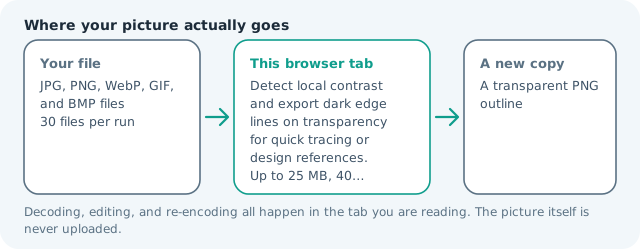
| Where the work happens | In this browser tab — the picture itself is never uploaded |
| Largest file | 100 MB, 40 megapixels or fewer |
| Largest batch | 30 files per run |
| Account, price, watermark | No sign-up, no charge, nothing stamped on your export |
When this helps
- Creating a transparent outline reference
- Preparing a simple colouring-page base
- Finding the main contour of a logo or object
- Testing a line-art treatment before manual cleanup
A high-contrast icon produces a clean contour, while a textured wall produces many small edges. Lower strength keeps only stronger boundaries; higher strength includes more local detail.
Detailed guidance
What Outline image is for
An outline can be a useful first pass when the final job is manual tracing, a colouring page, a logo reference, or a simple line-art mock-up. The browser can identify local contrast consistently, but it cannot know which edges are important to a person. That is why this page produces a transparent raster reference and describes the texture limitation directly. A browser canvas is good at repeatable pixel operations and poor at reading intent, so the control below stays narrow and names its output honestly.
What the local engine changes
The source is decoded to a capped canvas and neighbouring luminance values are compared. Stronger changes become darker lines, while the amount of alpha reflects the detected edge strength. The background is left transparent so the output can sit over another colour or be cleaned up in an editor. The result is always a PNG because transparency is part of the output contract. The file is decoded in this tab, transformed in memory, and encoded as a new download; the source is never overwritten.
Limits and output trade-offs
The local guardrails are 30 files per run, 100 MB per input, and about 40 megapixels per decoded image. A detailed photo can create many lines and a large transparent PNG. Lower the edge strength or resize the source when the result is meant for a small display, and keep the clean source for manual cleanup. A compressed camera file can occupy many times its disk size once decoded, which is what the ceilings are there to protect.
How to check the download
Inspect the subject boundary, text, hair, and background at full size. A useful outline has the main contour visible without turning every texture into a dark mesh. If it will become a colouring page or logo draft, remove stray marks in an editor and confirm that the transparent background is preserved in the destination. These effects are exports, not reversible edits, so keep the source until the copy has been judged where it will be used.
Other jobs this page does
The image outliner, create-outline, and transparent-image-outline searches all describe this edge export. Image to sketch creates a light full-frame sketch, while this page emphasises dark contour pixels on transparency. The outline is drawn on a transparent canvas, so it needs a background of its own once placed: a dark line on a dark slide disappears exactly as a shadow would.
When to use a stronger tool
This is not vector tracing, object segmentation, background removal, or a hand-drawn line-art model. It does not create editable Bézier curves and it cannot decide whether a shadow should be kept. Use a dedicated vector or illustration workflow when the output must scale cleanly or separate objects.
Outline Image questions
How do I make an outline from an image?
Add the image, choose edge strength, and press the button. The browser compares neighbouring luminance values and writes detected edges to a transparent PNG. Review the subject and background at full size because textured areas can create extra lines.
Can the outline tool trace a photo into vector paths?
No. It creates raster edge pixels on transparency rather than editable curves. Use a dedicated vector tracing tool when you need scalable paths, Bézier handles, or a file that can be recoloured as separate vector shapes.
Why does the outline include background texture?
The local detector responds to contrast wherever it appears. A clean, evenly lit source and a lower strength reduce stray lines, but manual cleanup may still be needed.
Is the image uploaded to create the outline?
No. Edge detection runs in your browser and the transparent PNG is assembled locally. The selected pixels are read by the current tab, so the outline can be generated without sending the source to a remote conversion service.