
Local browser tool · Resize
Resize a Photo for a WhatsApp Status
The status viewer is a vertical 9:16 screen, and anything else arrives with black bands above and below it. To resize a photo for a WhatsApp status, use this page preset to 1080 × 1920 and pick fill so the picture covers the frame. WhatsApp re-encodes what it receives over a mobile connection, so a correctly sized export survives that pass far better than a huge original, and your status stops arriving soft.
Fill a phone with a 1080 × 1920 status
A vertical preset that removes the black bars WhatsApp adds when the shape does not match. Suitable for resize tasks on JPG, PNG, and WebP files; the export is always a new copy.
Click a thumbnail to preview it before you start.
These are the settings you last used for this tool. They stay in this browser and are never sent anywhere.
Picking one fills both boxes with that platform's exact size, releases the aspect lock, and crops the overflow instead of stretching it — switch the mode below if you would rather keep every pixel.
Estimated output —
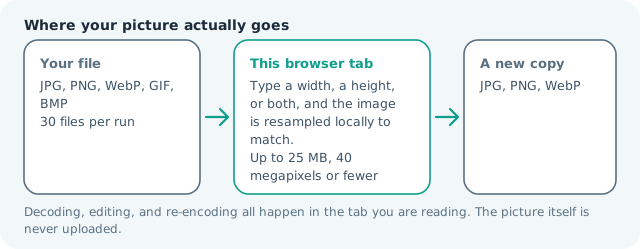
Your files are read locally. Nothing is uploaded.
Your results
Pick a picture in the list to look at that file instead.
Full size
Actual pixels, straight from this browser — scroll to check edges and fine detail, then close.
Free to use. Local limits: up to 30 files, 100 MB per file, and 250 MB per batch, processed entirely in this browser. Nothing is uploaded; what stays on your device afterwards is the settings you last used and, after a run, the picture this page made so a next step can open it without choosing the file again. Start over deletes that picture.
Resize at a glance
| Files it opens | JPG, PNG, WebP, GIF, BMP |
|---|---|
| Files you get back | JPG, PNG, WebP |
| Camera data (EXIF) | Not copied — this browser writes a fresh picture from its pixels, so GPS, timestamps and camera tags stay in the file you started with |
| This page is already set to | JPG output, 1080 px wide |
| Where the work happens | In this browser tab — the picture itself is never uploaded |
| Largest file | 100 MB, 40 megapixels or fewer |
| Largest batch | 30 files per run |
| Account, price, watermark | No sign-up, no charge, nothing stamped on your export |
When this helps
- Announcements and quotes that need a full-screen card
- Shop photos shared as a status for local customers
- Travel and event shots recomposed from landscape originals
- A profile photo matched to the status frame
Measured on this page: a 1,200 × 900 photo filled a 1,080 × 1,920 status frame at 190 KB, which means most of the width was cropped away. A tall subject survives this shape; a wide scene usually does not.
Detailed guidance
Why the black bars appear
A status is a vertical full-screen surface, and a phone photograph is rarely vertical. When the shapes disagree, WhatsApp resolves the mismatch for you by shrinking the image and painting the remainder with a background, which is exactly the letterboxed result everyone recognises. Resizing to 1080 × 1920 beforehand replaces that automatic decision with yours. In fill mode the picture covers the frame and loses whatever sits outside the vertical band; in fit mode nothing is lost but you choose the padding colour deliberately, which looks far more considered than the app default.
Beating the chat compression
Messengers are not archives; they are resamplers with a bandwidth budget. The rules that survive that pass are unglamorous: export at the display size rather than larger, keep the file modest, send on wifi where the client is less aggressive, and avoid re-sending a previously compressed copy. A 1080 × 1920 JPG produced here is already at the destination size, so WhatsApp has little reason to resize it again, and detail that would have been averaged away stays where it was.
Reading a photo vertically
Full-screen vertical viewing changes what a photograph needs. A subject should be centred with breathing room top and bottom, because the caption bar sits over the lower part of the frame and the sender strip over the upper. Text announcements work better than dense photography: a short line, large, inside the middle band, is legible on a phone held at arm's length. If a shot only works horizontally, it deserves a feed post rather than a status forced vertical.
Quick checks before you send
Confirm the reported dimensions in the result card, then open the file on your own phone full screen and look for anything halved at the cut edges — a hand, a sign, a logo corner. Send it to yourself first, since a status is visible to contacts immediately and a private test message is free. Everything runs locally, so personal photographs and shop stock images never route through an unknown server to be resized.
Status, profile photo, and chat are three jobs
The app treats each surface differently and people export once for all three. The status is full-screen vertical at 1080 × 1920. The profile photo is a small square — 640 × 640 is plenty, since it renders near 100 px — masked to a circle, so the subject must sit centred. Chat photos get resized hard, which is why a deliberately sized export beats an original, while documents skip compression entirely. Giving each surface its own shape takes one pass apiece here and removes the soft, wrongly cropped result that makes a business account look careless next to a personal one. Keep the unedited original too: the same photo returns later as a profile square or a chat attachment, and re-cutting from the master beats rebuilding from an export the app has already compressed once.
Resize a Photo for a WhatsApp Status questions
What size is a WhatsApp status photo?
Statuses render at 1080 × 1920 px in a 9:16 frame. Anything shorter gets padded with a coloured or black background by the app, which is why a photo resized here looks different from one sent directly from the gallery.
Why does my status look blurry?
WhatsApp compresses aggressively, especially on mobile data, and it compresses harder when the input is enormous or mismatched. Exporting at exactly 1080 px wide and sending on wifi keeps far more detail than sending the camera original.
Can I use a landscape photo?
You can, but fill mode cuts most of its width. For a scene you want shown whole, use fit mode and accept padding, or build the landscape into a story card instead of forcing it vertical.
Does this work for a profile photo too?
A profile photo is square, so set both fields to the same number, 500 × 500 is a good target. Keep the face tight, since the app renders it as a very small circle in chat lists.