
Local browser tool · Image to PDF
Image to PDF
Convert images to PDF when several JPG, PNG, or WebP files need to travel as one document. Add them in page order and ImageMunch creates a local PDF with one image per page, choosing a practical page orientation so photos are not stretched. The document is generated in your browser, without an account, upload queue, or watermark. It is a flattened visual PDF: the pictures are preserved as page content, but text that was only visible in a photo does not become selectable automatically.
Combine your pictures into one PDF
Add images in order and create a page-oriented PDF locally. Suitable for image to pdf tasks on JPG, PNG, WebP, GIF, and BMP files; the export is always a new copy.
Click a thumbnail to preview it before you start.
These are the settings you last used for this tool. They stay in this browser and are never sent anywhere.
Each selected image becomes one PDF page in queue order. The output is a flattened visual document.
Output formatPDF document
Your files are read locally. Nothing is uploaded.
Your results
Pick a picture in the list to look at that file instead.
Full size
Actual pixels, straight from this browser — scroll to check edges and fine detail, then close.
Free to use. Local limits: up to 30 files, 100 MB per file, and 250 MB per batch, processed entirely in this browser. Nothing is uploaded; what stays on your device afterwards is the settings you last used and, after a run, the picture this page made so a next step can open it without choosing the file again. Start over deletes that picture.
Image to PDF at a glance
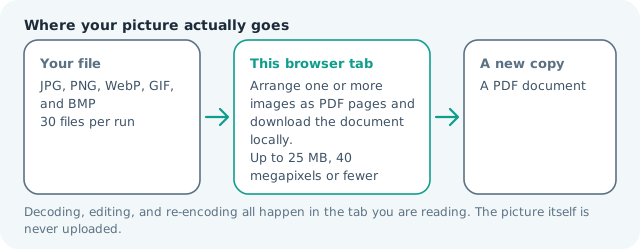
| Files it opens | JPG, PNG, WebP, GIF, and BMP |
|---|---|
| Files you get back | A PDF document |
| Camera data (EXIF) | Not copied — this browser writes a fresh picture from its pixels, so GPS, timestamps and camera tags stay in the file you started with |
| Where the work happens | In this browser tab — the picture itself is never uploaded |
| Largest file | 100 MB, 40 megapixels or fewer |
| Largest batch | 30 files per run |
| Account, price, watermark | No sign-up, no charge, nothing stamped on your export |
When this helps
- Combining photographed receipts into one attachment
- Turning scanned pages into a simple PDF packet
- Sending a gallery to a printer or school portal
- Archiving screenshots in a page-oriented format
Three portrait photos are placed on three A4 pages with their aspect ratios preserved. A landscape image receives a landscape page so it is not squeezed into a tall frame.
Detailed guidance
What Image to PDF is for
A folder of photos is awkward to attach when the receiving system expects one document. Receipts, photographed forms, scanned pages, and slide snapshots all benefit from a page boundary and a stable reading order. An image-to-PDF conversion is a packaging operation: it gives the pictures a common document container without pretending that a photograph is already editable text. A browser redraws pixels reliably; it cannot guess what a picture was meant to do. So the control below stays narrow, and the file it hands back is named for the job it did.
What happens in this browser tab
The tool loads the selected still images, calculates a page orientation from each aspect ratio, and adds one raster image to each PDF page in queue order. The browser library writes the PDF bytes in memory and returns one document blob. No server-side conversion is involved, and the source images are not replaced. Nothing waits in a server queue, and the file you chose is never rewritten: you get a new copy with its own download link.
Limits that are part of the tool
The same 30-file, 100 MB-per-file, and 40-megapixel local limits apply. A PDF with many full-resolution photographs can become large, so resize or compress the images first when the destination has an attachment cap. The output is page-oriented and flattened, which keeps the workflow predictable but is not the smallest possible archive. A decoded canvas costs several times its disk size in memory, which is why a slow phone should work in smaller batches or from a smaller source.
How to check the result before publishing it
Open the PDF in the destination reader and check page order, orientation, edge margins, and whether every photograph is readable at the intended zoom. If the document is going to print, test one page on the target paper size. If it is going to an OCR system, confirm that system accepts image-only pages. Judge the download in the application that will receive it rather than in the preview here, and keep the original until you have.
Other jobs this page does
The JPG-to-PDF, photo-to-PDF, and combine-pictures searches all land on this page because the operation is the same: one local document, several ordered image pages. Compress and resize are the practical next steps when the finished PDF is too heavy for the receiving form. Page order follows the queue order, so reorder the list before pressing rather than rearranging pages afterwards.
When another tool is the honest choice
This tool does not merge editable text layers, preserve camera albums, create bookmarks, or guarantee printer colour management. It also does not turn a scan into searchable text. Those are separate document jobs and should be handled by a PDF editor or OCR workflow after the visual packet is created.
Image to PDF questions
Can I convert several pictures into one PDF?
Yes. Select the pictures in the order they should appear and the browser creates one PDF with one flattened image page per file. The originals remain unchanged.
Does image to PDF make the text selectable?
No. It places the visible image on a PDF page. Use the image-to-text or a PDF OCR workflow when you need searchable words rather than a visual document.
Will the image be stretched to fit the page?
No. The page orientation follows the image shape and the visible composition keeps its aspect ratio. The result is designed for a readable handoff, not an editable layout file.
Are the photos uploaded to make the PDF?
No. The PDF library and the images run in your browser. The selected files stay in the current tab and the generated document is offered as a local download.