
Local browser tool · Black and White Image
Black and White Image
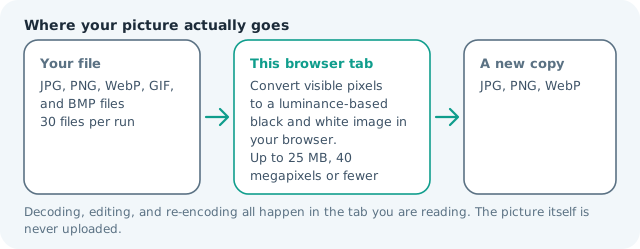
Make an image black and white when a colour photo, screenshot, or graphic needs a monochrome copy for print, photocopying, a profile variant, or a design test. ImageMunch converts visible pixels to perceived luminance locally, keeps the canvas dimensions, and downloads a new JPG, PNG, or WebP copy. The source remains untouched. The result is continuous grayscale rather than a two-colour threshold, so shadow and highlight detail can remain readable.
Turn colour pixels into a clean grayscale copy
Create a monochrome image while preserving dimensions and transparency where the format allows it. Suitable for black and white image tasks on JPG, PNG, WebP, GIF, and BMP files; the export is always a new copy.
Click a thumbnail to preview it before you start.
These are the settings you last used for this tool. They stay in this browser and are never sent anywhere.
This creates continuous grayscale, not only pure black and pure white. The original file remains untouched.
Your files are read locally. Nothing is uploaded.
Your results
Pick a picture in the list to look at that file instead.
Full size
Actual pixels, straight from this browser — scroll to check edges and fine detail, then close.
Free to use. Local limits: up to 30 files, 100 MB per file, and 250 MB per batch, processed entirely in this browser. Nothing is uploaded; what stays on your device afterwards is the settings you last used and, after a run, the picture this page made so a next step can open it without choosing the file again. Start over deletes that picture.
Black and White Image at a glance
| Files it opens | JPG, PNG, WebP, GIF, and BMP files |
|---|---|
| Files you get back | JPG, PNG, WebP |
| Camera data (EXIF) | Not copied — this browser writes a fresh picture from its pixels, so GPS, timestamps and camera tags stay in the file you started with |
| Where the work happens | In this browser tab — the picture itself is never uploaded |
| Largest file | 100 MB, 40 megapixels or fewer |
| Largest batch | 30 files per run |
| Account, price, watermark | No sign-up, no charge, nothing stamped on your export |
When this helps
- Preparing a monochrome photo for print
- Making a colour screenshot easier to photocopy
- Creating a black and white profile or document image
- Testing a grayscale design variant before export
A colour photo becomes a range of dark and light gray values while its width, height, and visible composition remain unchanged. JPG output is flattened as usual; PNG and WebP can keep transparency.
Detailed guidance
What Black and white image is for
Monochrome is often a delivery decision rather than an artistic one. A document may need to photocopy clearly, a profile photo may need a restrained variant, and a colour screenshot may be easier to print in grayscale. The page keeps the task predictable: it removes hue while retaining the relative light and dark structure that makes the original recognizable. A browser canvas is good at repeatable pixel operations and poor at reading intent, so the control below stays narrow and names its output honestly.
What the local engine changes
The browser uses a perceived-luminance calculation on each decoded pixel, then writes that value to red, green, and blue while leaving alpha unchanged. The output canvas has the same width and height as the source. The chosen format controls how the new pixels are encoded, so a JPG is compact while PNG or WebP can keep transparent areas. The file is decoded in this tab, transformed in memory, and encoded as a new download; the source is never overwritten.
Limits and output trade-offs
The normal local guardrails apply: up to 30 files, 100 MB each, and about 40 megapixels per image. Grayscale does not make a huge source small by itself. If the destination has a byte limit, resize or compress after the colour conversion and compare the result in the receiving system. A compressed camera file can occupy many times its disk size once decoded, which is what the ceilings are there to protect.
How to check the download
Inspect skin, fine text, gray borders, and shadow areas at full size. A good grayscale conversion keeps important dark and light separation; a very flat source can still look flat after hue is removed. Check the downloaded extension and transparency if the file is going into a print or design workflow. These effects are exports, not reversible edits, so keep the source until the copy has been judged where it will be used.
Other jobs this page does
Grayscale images, black-and-white conversion, and draining the colour out of a photograph are the same job. Posterize offers a more graphic limited-level result, while the filter page provides sepia, warm, cool, and contrast treatments. Grayscale removes hue, not contrast, so a flat scan or an overcast photo still needs the contrast filter before it will photocopy cleanly. Two mild passes, monochrome first then contrast, are easier to judge than one aggressive edit, because each change stays visible in the download.
When to use a stronger tool
This is not a threshold scanner, OCR engine, colour restoration tool, or calibrated black-and-white print proof. It creates screen-oriented grayscale pixels. A document that needs searchable text should go through OCR, and a print job that must match ink coverage needs a colour-managed workflow.
Black and White Image questions
How do I turn a colour image black and white?
Add the file and press the button. The browser calculates a luminance value for each visible pixel and exports a grayscale copy without changing the source.
Is the result pure black and pure white only?
No. It is grayscale, so it contains many shades between black and white. Use posterize when you want a limited number of hard colour or gray levels.
Will a transparent PNG stay transparent?
Yes. The visible colour channels are changed while the alpha channel stays in place in PNG and WebP exports. This keeps logos, stickers, and cut-outs usable over a different background.
Does the black and white converter upload images?
No. The conversion runs in the current browser tab and offers a local download. The original remains on your device and is not sent to a conversion endpoint.