
Local browser tool · Convert
Convert WebP to PNG
An asset came off a modern website, and the desktop tool you edit with will not import WebP. To turn WebP into PNG, drop the files on this page and the browser decodes and rewrites them losslessly on your own machine. Transparency crosses over intact, and because the export is lossless, the round of edits ahead stops costing detail the way another re-compression would.
Get a WebP into software that reads PNG
Decode once, write losslessly, keep the alpha mask, and hand the file to any editor that refuses WebP. Suitable for convert tasks on WebP, plus JPG, PNG, GIF, BMP, SVG, TIFF, HEIC and AVIF files; the export is always a new copy.
Click a thumbnail to preview it before you start.
These are the settings you last used for this tool. They stay in this browser and are never sent anywhere.
Pick the format every app accepts — the picture itself stays untouched.
Estimated output —
Your files are read locally. Nothing is uploaded.
Your results
Pick a picture in the list to look at that file instead.
Full size
Actual pixels, straight from this browser — scroll to check edges and fine detail, then close.
Free to use. Local limits: up to 30 files, 100 MB per file, and 250 MB per batch, processed entirely in this browser. Nothing is uploaded; what stays on your device afterwards is the settings you last used and, after a run, the picture this page made so a next step can open it without choosing the file again. Start over deletes that picture.
Convert at a glance
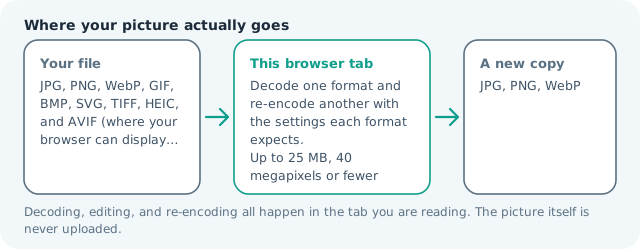
| Files it opens | WebP, plus JPG, PNG, GIF, BMP, SVG, TIFF, HEIC and AVIF files |
|---|---|
| Files you get back | JPG, PNG, WebP |
| Camera data (EXIF) | Not copied — this browser writes a fresh picture from its pixels, so GPS, timestamps and camera tags stay in the file you started with |
| This page is already set to | PNG output |
| What the new file keeps | Every pixel it can display — the same width, height and colours as on screen |
| What never carries over | Camera data and GPS, the colour profile (painted into plain sRGB), and animation, which exports as its first still frame |
| Transparent areas | Kept: PNG stores an alpha channel, so a cut-out stays a cut-out |
| Size after the change | Usually larger: PNG redraws an already-compressed photo without rounding |
| Where the work happens | In this browser tab — the picture itself is never uploaded |
| Largest file | 100 MB, 40 megapixels or fewer |
| Largest batch | 30 files per run |
| Account, price, watermark | No sign-up, no charge, nothing stamped on your export |
When this helps
- An asset pulled from a site, destined for an editor with no WebP import
- A sprite or UI element you need to trace, mask, or recolour
- Teaching material where the picture will be annotated repeatedly
- A print or slide workflow that accepts PNG but not WebP
Measured on this page: a 1,200 × 900 WebP of 86 KB became a 1.62 MB PNG. The alpha mask carries straight across, and the weight is the price of a lossless container, not of a second lossy pass.
Detailed guidance
The situation this is for
You saved an asset off a modern site, or a designer handed you an export, and your software cannot open it. Desktop tools adopted WebP far more slowly than browsers did, and many still refuse it on import or offer no export path at all. Rather than fighting that, decode the file once into something universal. PNG is the natural landing format here because it accepts transparency and because the file is about to be edited, which is precisely the circumstance where a lossless container earns its extra weight.
What the round trip preserves
Dimensions and colour come across unchanged, the alpha channel is carried rather than flattened, and nothing is resized or cropped unless you ask. Metadata such as colour profile annotations is not rewritten, so a file that relied on one should be checked after conversion. Animation does not survive: an animated WebP returns as its first still frame, since PNG has no animation model to write into. What you get is a faithful single picture, ready for a mask, a trace, or a recolour.
Choosing between the two output paths
If the destination is an editor, choose PNG. If the destination is a piece of legacy desktop software that only wants a picture, JPG is smaller and simpler, and the lossless argument does not apply to a file nobody will touch again. If the asset has to keep transparency and be opened in ancient software, PNG is still the answer, because a JPG would erase the very thing you are carrying across. That single question, transparency yes or no, decides almost every case.
Working on the converted file
Once the asset is PNG you can annotate, crop and re-save it as many times as the job needs without each save taxing the picture. When the work ends, export the delivery copy in whatever the destination wants, usually WebP or JPG for the web and PNG or PDF for print. Keeping the working file and the delivered file as two artefacts, with names that say which is which, is what stops a project being rebuilt from an export three years later. Each result keeps your base name and carries a short suffix, so a converted batch lands in your downloads without silently replacing the files it came from.
A note on screen recordings and sprite sheets
Two uses of this pair are heavier than they look. A sprite sheet pulled from a site often needs to be sliced before it is usable, so convert, then crop each cell on the crop page of this site while the file is still lossless. A frame captured from a screen recording carries fine text and hard edges that a lossy encode has already blurred; converting it to PNG does not undo that, and the honest next step is re-capturing at a higher bitrate.
Convert WebP to PNG questions
Does the transparency survive?
Yes, which is the reason to choose PNG here rather than JPG. WebP stores an alpha channel and PNG stores one too, so a cut-out or badge arrives in the editor still able to sit over any background. The only conversion that would flatten it is a JPG one.
Is this a quality upgrade?
It is a quality freeze rather than a boost. Whatever the WebP decoder produced is written down exactly and never discarded again, so the file stops degrading with each save. Artefacts that were already in the WebP remain, because no conversion can invent detail that the source threw away.
Why is my PNG so much heavier than the WebP?
WebP is allowed to approximate; PNG records every pixel. A transparent interface asset can go from tens of kilobytes to several hundred, which is a fine price for a working file and a poor one for something a visitor downloads on every page view.
Can I batch a whole icon set?
Add up to thirty files at once, each processed separately in the tab, up to 100 MB and roughly 40 megapixels per file. There is no upload queue, so a folder of exports takes seconds even on a bad connection, and nothing about the set leaves the device.