
Local browser tool · Convert
Convert HEIC to PNG
Keep the pixels and drop the awkward container: to convert HEIC to PNG, add the iPhone photo here, a small decoder is fetched the first time, and the picture is unpacked inside your browser tab into a lossless file. This is the pair to reach for when the photo still has work ahead of it, since a PNG can be opened and re-saved repeatedly without each save costing detail.
An iPhone photo that survives editing
Decode the HEVC frame once, then store it losslessly so further saves stop taxing the picture. Suitable for convert tasks on HEIC and HEIF, plus JPG, PNG, WebP, GIF, BMP, SVG and TIFF files; the export is always a new copy.
Click a thumbnail to preview it before you start.
These are the settings you last used for this tool. They stay in this browser and are never sent anywhere.
Pick the format every app accepts — the picture itself stays untouched.
Estimated output —
Your files are read locally. Nothing is uploaded.
Your results
Pick a picture in the list to look at that file instead.
Full size
Actual pixels, straight from this browser — scroll to check edges and fine detail, then close.
Free to use. Local limits: up to 30 files, 100 MB per file, and 250 MB per batch, processed entirely in this browser. Nothing is uploaded; what stays on your device afterwards is the settings you last used and, after a run, the picture this page made so a next step can open it without choosing the file again. Start over deletes that picture.
Convert at a glance
| Files it opens | HEIC and HEIF, plus JPG, PNG, WebP, GIF, BMP, SVG and TIFF files |
|---|---|
| Files you get back | JPG, PNG, WebP |
| Camera data (EXIF) | Not copied — this browser writes a fresh picture from its pixels, so GPS, timestamps and camera tags stay in the file you started with |
| This page is already set to | PNG output |
| What the new file keeps | Every pixel it can display — the same width, height and colours as on screen |
| What never carries over | Camera data and GPS, the colour profile (painted into plain sRGB), and animation, which exports as its first still frame |
| Transparent areas | Kept: PNG stores an alpha channel, so a cut-out stays a cut-out |
| Size after the change | Much larger: PNG writes the decoded frame with none of HEIC's compression |
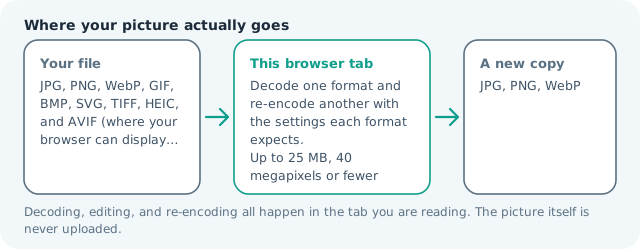
| Where the work happens | In this browser tab — the picture itself is never uploaded |
| Largest file | 100 MB, 40 megapixels or fewer |
| Largest batch | 30 files per run |
| Account, price, watermark | No sign-up, no charge, nothing stamped on your export |
When this helps
- A phone shot about to be retouched, masked or annotated
- A Live Photo still frame needed at full quality
- An iPhone screenshot of a document with small type
- A master copy to archive beside the original
Measured on this page: a 1,200 × 900 HEIC of 120 KB became a 1.49 MB PNG. Pick this route when the pixels have to survive more editing, and HEIC to JPG when the weight matters more.
Detailed guidance
Why the format on your phone is not a JPG
Apple moved its camera roll to HEIC because the same photograph costs meaningfully fewer bytes with newer compression, and a phone with limited storage cares about that more than a website does. The cost arrives the moment the file leaves the phone: formats that pack tightly are usually formats that software is reluctant to open, and the ecosystem that accepts them universally is the browser, which decodes them here rather than displaying them. Choosing PNG as the target is a deliberate trade, giving up compactness for a file that stops degrading.
What comes out of the decode
The full-resolution still frame, at the pixel dimensions the camera recorded, with colour preserved as the decoder produced it. The live-photo video clip is a separate file and is not touched. Depth information from portrait mode does not survive, since a PNG is a flat picture, and neither do adjustment histories stored inside the HEIC: what you get is the rendered appearance of the frame as it currently stands, not a raw file.
The cases where this is genuinely the right pair
Editing is the whole reason. A photo about to be retouched, a document screenshot destined to be cropped several times, an image that will be masked or annotated, or a master you want to keep so future exports can be redone. For those, the extra megabytes are cheap insurance. A picture that only has to be emailed or uploaded is a different job, and the JPG route off the same source is smaller and just as good. Work a handful at a time when you do need a batch: the page takes up to thirty files per run, every one of them decoded inside this tab rather than on a server. If a particular photo refuses to decode, it is named on the result list as skipped and the rest of the run still finishes, so one odd live-photo frame cannot throw away twenty good conversions.
Keeping the size sane
A twelve-megapixel phone photo commonly lands between eight and twenty megabytes as PNG, which is fine on a disk and awkward in a form. Two habits fix that. Convert only the frames you will actually work on, and export the finished result as a compressed JPG or WebP for delivery, keeping the PNG as the archive. If the file must be small and lossless at once, run the PNG through the compressor page here, where flat areas pack well.
What to do with the original
Leave it where it is. The HEIC remains the most compact representation of that photograph, and it is the thing the phone and its backups already manage. Treat the PNG as a working copy that exists to be edited and re-saved, and delete it when the derived exports are done, because a gallery full of twenty-megabyte working files is the one downside of this conversion, and it is entirely avoidable.
Convert HEIC to PNG questions
Why go to PNG rather than the usual JPG?
Because of what happens afterwards. A JPG loses a little information every time it is saved, so an image you are about to edit repeatedly would degrade in stages. PNG records pixels without negotiating, so the working file stays exactly as good as the decoded frame from first save to last.
Does the PNG recover quality the HEIC threw away?
No. HEIC is itself a lossy format, and what you get is a faithful, permanent copy of the picture it decoded. The gain is that nothing further is discarded from that point on, which is a different and more useful promise than repair.
Will my iPhone screenshot keep its crisp text?
That is the best case for this pair. Screenshots are mostly flat colour and hard-edged lettering, where a JPG introduces visible softening and PNG stores both perfectly. Expect a large file and excellent legibility.
What is the decoder download?
A single WebAssembly binary, fetched once from this site rather than a CDN, that teaches the browser to open HEVC-encoded Apple photos. Chrome and Firefox cannot display HEIC on their own, so without it the conversion could not run locally at all.