
Local browser tool · Convert
Convert BMP to JPG
A BMP stores each pixel as a plain number with no cleverness at all, so an ordinary scan can sit at tens of megabytes. To convert a BMP into a JPG, drop the bitmap here and the browser decodes it and writes a compressed JPG on the spot, with nowhere for the file to be uploaded. This is the shortest route from that giant to something you can attach, post, or email without a rejection.
Make an enormous bitmap portable
Read the raw pixel grid and write it back as a compressed JPG at the quality you choose. Suitable for convert tasks on BMP, plus JPG, PNG, WebP, GIF, SVG, TIFF, HEIC and AVIF files; the export is always a new copy.
Click a thumbnail to preview it before you start.
These are the settings you last used for this tool. They stay in this browser and are never sent anywhere.
Pick the format every app accepts — the picture itself stays untouched.
Estimated output —
Your files are read locally. Nothing is uploaded.
Your results
Pick a picture in the list to look at that file instead.
Full size
Actual pixels, straight from this browser — scroll to check edges and fine detail, then close.
Free to use. Local limits: up to 30 files, 100 MB per file, and 250 MB per batch, processed entirely in this browser. Nothing is uploaded; what stays on your device afterwards is the settings you last used and, after a run, the picture this page made so a next step can open it without choosing the file again. Start over deletes that picture.
Convert at a glance
| Files it opens | BMP, plus JPG, PNG, WebP, GIF, SVG, TIFF, HEIC and AVIF files |
|---|---|
| Files you get back | JPG, PNG, WebP |
| Camera data (EXIF) | Not copied — this browser writes a fresh picture from its pixels, so GPS, timestamps and camera tags stay in the file you started with |
| This page is already set to | JPG output |
| What the new file keeps | Every pixel it can display — the same width, height and colours as on screen |
| What never carries over | Camera data and GPS, the colour profile (painted into plain sRGB), and animation, which exports as its first still frame |
| Transparent areas | Flattened onto the colour you pick — JPG has no alpha channel |
| Size after the change | Much smaller: a BMP stores every pixel as a raw number |
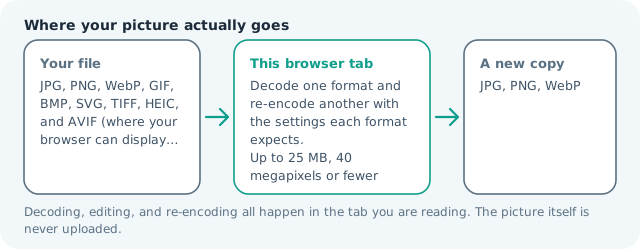
| Where the work happens | In this browser tab — the picture itself is never uploaded |
| Largest file | 100 MB, 40 megapixels or fewer |
| Largest batch | 30 files per run |
| Account, price, watermark | No sign-up, no charge, nothing stamped on your export |
When this helps
- Family scans and old hard-drive bitmaps destined for an email
- A document upload that states a limit in megabytes
- A software asset folder full of raw paint exports
- A machine-readable form that lists JPG as the only accepted type
Measured on this page: a 1,200 × 900 BMP of 3.09 MB became a 146 KB JPG at quality 82. A BMP stores every pixel as a raw number, which is why the drop is this large.
Detailed guidance
How a bitmap ends up on a modern machine
Nobody chooses BMP today. It arrives from a scanner utility that had no other option, an old paint program, a screenshot tool on a kiosk or industrial machine, a document converter that emitted what it knew, or a folder of files from a Windows machine of a certain age. The file itself is completely harmless, just enormous, and it fails at the exact moment you need it to be small: an email with a size limit, a portal that bounces anything above a couple of megabytes, or a chat app that silently refuses. Converting is a five-second job once you know the file is not corrupt, and it is worth doing in a batch rather than one at a time.
What survives and what the new file gives up
Dimensions, colour and every visible pixel are read from the raw grid before re-encoding, so nothing is resized here. The output is a normal JPG, which means one thing is given up: reversibility. A JPG is a set of decisions about what to drop, so if you expect to edit the picture further, convert to PNG first, work, and generate the JPG at the end. Any palette or mask information in exotic BMP variants is not carried, and unusual header forms occasionally refuse to decode, in which case opening the file in a viewer and re-saving is the practical fix.
A realistic size ladder
The useful mental model is that a bitmap costs about three bytes per pixel before any cleverness. Ten million pixels is therefore near thirty megabytes. A JPG of the same photo at quality in the eighties is generally one to three megabytes, and around seventy it is often under a megabyte while remaining fine on screen. That spread is why the page prints the delivered weight on every result: the honest number for your specific picture is the only one worth planning with, and a scanned receipt compresses very differently from a landscape.
Processing a box of old files
Work in batches of about twenty rather than throwing a whole archive at one run, so you can see the results and spot the odd file that did not decode. Keep the original folder untouched, place the outputs in a parallel one, and name files so the origin is traceable, because a folder of three hundred identical generic names is a chore to reconcile later. Since everything happens in the browser tab, an archive of personal scans never travels through a third party, which is the main reason people prefer a local tool for family material.
When to choose a different destination
If the pictures are documents with small text, a JPG will fuzz the characters that matter, and a PNG keeps them sharp at a size that is still far below the bitmap. If the goal is a web page, WebP gives you a smaller file than JPG for the same look. And if the file has to remain byte-exact for a system that will hash it, converting is the wrong move entirely, because any re-encode changes every byte.
Convert BMP to JPG questions
Why are my BMP files so huge?
The format was designed to be simple rather than small. Each pixel is written out more or less directly, with no serious compression, so a twelve-megapixel photo is roughly thirty-six megabytes of file. That is normal for BMP, and it is the entire reason the format is rarely used outside Windows internals and legacy tools.
How much smaller will the JPG be?
Commonly a tenth of the original or less, because JPG discards detail the eye mostly tolerates. A twelve-megabyte scan frequently lands between two hundred and eight hundred kilobytes at a sensible quality setting, which is small enough for almost any form or inbox.
Do I lose anything important?
You lose losslessness, so do not convert a file you intend to keep editing, and never re-save the same JPG repeatedly. For a picture whose job is to be looked at or attached, nothing visible is lost at quality settings around 85 or above.
Is BMP ever worth keeping?
As an archive master, yes, in the same way a PNG works: it cannot degrade further. Keep the bitmap and generate JPG copies for distribution, because those copies can always be rebuilt from the master at a different setting whenever a destination asks for something smaller.