
Local browser tool · Convert
Convert SVG to PNG
SVG is a set of drawing instructions rather than a picture, which is why so many destinations refuse it outright. To turn an SVG into a PNG, add the vector file here and the browser paints it onto a canvas and saves that painting as a lossless image, with nothing uploaded. The rasterised PNG is the copy those systems accept, and your transparency comes along with it.
Turn drawing instructions into a real picture
The vector is rendered to pixels at its displayed size, then saved as a transparent PNG you can send anywhere. Suitable for convert tasks on SVG, plus JPG, PNG, WebP, GIF, BMP, TIFF, HEIC and AVIF files; the export is always a new copy.
Click a thumbnail to preview it before you start.
These are the settings you last used for this tool. They stay in this browser and are never sent anywhere.
Pick the format every app accepts — the picture itself stays untouched.
Estimated output —
Your files are read locally. Nothing is uploaded.
Your results
Pick a picture in the list to look at that file instead.
Full size
Actual pixels, straight from this browser — scroll to check edges and fine detail, then close.
Free to use. Local limits: up to 30 files, 100 MB per file, and 250 MB per batch, processed entirely in this browser. Nothing is uploaded; what stays on your device afterwards is the settings you last used and, after a run, the picture this page made so a next step can open it without choosing the file again. Start over deletes that picture.
Convert at a glance
| Files it opens | SVG, plus JPG, PNG, WebP, GIF, BMP, TIFF, HEIC and AVIF files |
|---|---|
| Files you get back | JPG, PNG, WebP |
| Camera data (EXIF) | Not copied — this browser writes a fresh picture from its pixels, so GPS, timestamps and camera tags stay in the file you started with |
| This page is already set to | PNG output |
| What the new file keeps | Every pixel it can display — the same width, height and colours as on screen |
| What never carries over | Camera data and GPS, the colour profile (painted into plain sRGB), and animation, which exports as its first still frame |
| Transparent areas | Kept: PNG stores an alpha channel, so a cut-out stays a cut-out |
| Size after the change | Not comparable: an SVG is drawing instructions, painted here into one fixed-size picture |
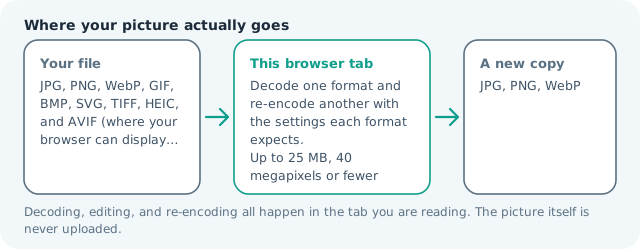
| Where the work happens | In this browser tab — the picture itself is never uploaded |
| Largest file | 100 MB, 40 megapixels or fewer |
| Largest batch | 30 files per run |
| Account, price, watermark | No sign-up, no charge, nothing stamped on your export |
When this helps
- A logo that a chat app, slide deck or form will not take as vector
- An icon needed as a raster for a platform with no SVG slot
- A chart or diagram to paste into a document as a picture
- A design export that must be opened by someone without a design tool
Measured on this page: an 800 × 600 SVG of 386 bytes rendered to a 31 KB transparent PNG. The drawing is resolved once at its own size, so the export cannot be enlarged later without softness.
Detailed guidance
Two completely different kinds of file
A PNG is a grid of coloured squares. An SVG is a sentence: draw this rectangle, stroke that path, place this text. That difference is why SVG is wonderful on a website, where it scales and stays crisp at any zoom, and awkward everywhere else, because a destination that expects pixels has to interpret instructions before it can show anything. Plenty of systems simply refuse to try, which is why the request to convert shows up so often. Rasterising resolves the argument permanently by deciding the pixel size once.
What the painting step does and refuses to do
The browser lays the vector out at its declared size and copies the result into a canvas, so colour, transparency and shape come across exactly as displayed. It cannot do the reverse, since reconstructing drawing instructions from pixels is a different craft entirely, and this page does not claim to. It also will not fetch things the SVG asks for by reference: an external font, a linked image, or a stylesheet leaves those parts unpainted. Flatten to outlines before exporting if the artwork depends on lettering.
Getting a usable resolution
Since a vector has no native pixel count, the size you receive is the size it was painted at. For an icon needed at forty-eight pixels that is ideal. For artwork destined for print or a large display, give the source an explicit larger width before converting, then rasterise, because drawing the same instructions bigger produces genuinely sharper edges rather than interpolated blur. Check the delivered dimensions on the result card rather than trusting a guess, and re-run if the number is too small.
Which destination decides the format
Send PNG when the receiving system has no idea how to draw: a chat attachment, a slide, an email signature, a form upload, a marketplace image slot, a document. Keep SVG when you control the page and want one file that serves every screen density. The in-between case, a design tool that says it supports SVG but silently renders it at an absurd default size, is common enough that checking the pixel count after import is worth the seconds.
A habit that prevents rework
Keep the vector as the master and treat each raster as a derived export, regenerated whenever the artwork changes, rather than editing the PNG and losing the original. Naming by size, so the icon at one scale and the banner at another read differently on disk, means a colleague can pick the right file without opening it. When the artwork is for your own site, this site's convert page can hand back a WebP copy of the same raster, which is lighter for a browser to pull down than the PNG.
Convert SVG to PNG questions
What size will the PNG come out?
At the dimensions the browser rendered the SVG at, which for a file without explicit width and height can be smaller than you hoped. A vector has no fixed pixel size, so rasterising picks one. If you need a large poster version, open the SVG in a design tool, set an explicit size, then run it here again.
Can I upscale a small icon this way?
Partly, and this is where the format confuses people. If the SVG declares a large size, rendering at that size produces genuinely sharp pixels, because the instructions are being drawn bigger. A file with a tiny intrinsic size still paints small, so the honest answer is that this page rasterises rather than enlarges.
Is transparency kept?
Yes. Anything the SVG leaves unpainted stays transparent in the PNG, which is exactly what makes this pair useful for logos and icons that have to sit over coloured backgrounds. If you need the picture over white instead, that is a JPG conversion.
Why did my SVG come out blank or wrong?
Two usual causes: the file references an external font, image, or stylesheet that a browser will not fetch while painting it, or the drawing is entirely made of text converted at export time. Flatten outlines in the source tool and re-run. Files that need scripts to draw themselves will not paint at all.