
Local browser tool · Convert
Convert TIFF to JPG
Nobody chooses TIFF out of preference today: it arrives from a flatbed scanner, a print house, or an archive folder, and then nothing on the modern side of your work opens it. To convert a TIFF into a JPG, add the scan here and your browser reads the picture and writes back a file that every viewer, phone and web page can display. This page is the exit door for those files.
Get an archive scan into something viewable
TIFF holds layers, pages and enormous bit depths. The JPG path flattens to one viewable picture. Suitable for convert tasks on TIFF, plus JPG, PNG, WebP, GIF, BMP, SVG, HEIC and AVIF files; the export is always a new copy.
Click a thumbnail to preview it before you start.
These are the settings you last used for this tool. They stay in this browser and are never sent anywhere.
Pick the format every app accepts — the picture itself stays untouched.
Estimated output —
Your files are read locally. Nothing is uploaded.
Your results
Pick a picture in the list to look at that file instead.
Full size
Actual pixels, straight from this browser — scroll to check edges and fine detail, then close.
Free to use. Local limits: up to 30 files, 100 MB per file, and 250 MB per batch, processed entirely in this browser. Nothing is uploaded; what stays on your device afterwards is the settings you last used and, after a run, the picture this page made so a next step can open it without choosing the file again. Start over deletes that picture.
Convert at a glance
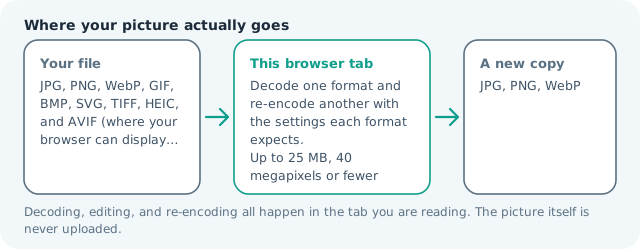
| Files it opens | TIFF, plus JPG, PNG, WebP, GIF, BMP, SVG, HEIC and AVIF files |
|---|---|
| Files you get back | JPG, PNG, WebP |
| Camera data (EXIF) | Not copied — this browser writes a fresh picture from its pixels, so GPS, timestamps and camera tags stay in the file you started with |
| This page is already set to | JPG output |
| What the new file keeps | Every pixel it can display — the same width, height and colours as on screen |
| What never carries over | Camera data and GPS, the colour profile (painted into plain sRGB), and animation, which exports as its first still frame |
| Transparent areas | Flattened onto the colour you pick — JPG has no alpha channel |
| Size after the change | Much smaller: the TIFF a scanner or print shop hands you keeps its pixels uncompressed |
| Where the work happens | In this browser tab — the picture itself is never uploaded |
| Largest file | 100 MB, 40 megapixels or fewer |
| Largest batch | 30 files per run |
| Account, price, watermark | No sign-up, no charge, nothing stamped on your export |
When this helps
- A scanned contract or receipt a portal refuses to display
- Old magazine or newspaper scans from a press workflow
- A genealogy archive of family photographs in TIFF
- A print master that has to become a screen-proof copy
Measured on this page: a 1,200 × 900 TIFF of 3.09 MB returned a 146 KB JPG at quality 82. Browsers will not display a TIFF at all, so this page reads the container itself before any pixel is drawn.
Detailed guidance
Why these files keep turning up
TIFF survives because three professions needed it: printing, scanning and archiving. It can hold a page stack, layers, an alpha mask, a print colour space, and a bit depth far beyond screen, all without lossy compression, and a scanner can write it without any clever software in the loop. The consequence is a file that no ordinary viewer speaks. People discover this at the worst moment, when a scanned document has to be attached to a form or dropped into a chat, and the receiving end simply refuses. Converting a batch of them takes a minute once you know the trick.
The limits worth knowing before you trust the output
A JPG holds one flat picture at eight bits per channel in a screen colour space, so a conversion is a series of reductions rather than a repackaging. Multi-page files lose everything after the first page. Layers are flattened. Print colour spaces are mapped, sometimes visibly. Very high resolutions are accepted up to about forty megapixels, above which the browser gives up decoding, so a large archival scan may need downscaling first, which this site handles on the resize page. Nothing of this is hidden: the card reports the real delivered size and count.
A sensible order for archival work
If the TIFF is the only surviving copy of something, treat it as the master and never overwrite it. Generate a screen copy at moderate quality for browsing and sharing, and a second high-quality copy for anything that may be printed later. Name both after the source with a suffix that says which is which, because a folder of scans from a decades-old machine will otherwise become unreadable to whoever inherits it. Work in modest batches so each result gets a glance, since a mis-decoded page from an old scanner is easy to miss.
When the archive deserves PNG instead
Documents with small text, line drawings, stamps, and anything you expect to read at full zoom should land on PNG. A JPG at moderate quality softens character edges in exactly the places where an old typewritten letter is already hard to make out, and the lossless container keeps the strokes crisp. The size penalty is real but usually modest compared with the TIFF you started from, and legibility is the entire point of digitising a document.
Reading the result honestly
Two checks catch almost every problem. Open the converted picture at one hundred percent and confirm text and edges survived, then compare the delivered size against the source: a JPG many times smaller than a huge TIFF is normal and expected, while a suspiciously tiny output usually means the decode grabbed an empty page rather than the scan itself. Both numbers are printed on the result card, so you never have to guess which file is which.
Convert TIFF to JPG questions
Can a browser open a TIFF at all?
No. Chrome, Firefox and Safari will not display one inline, which is why the file looks missing rather than broken in most web contexts. Conversion is not a convenience step here, it is the only way the picture becomes visible in a browser without a plug-in or a desktop viewer.
What happens to a multi-page TIFF?
You get the first page and nothing else, because a JPG holds one picture. If your file is a stack of scans, split it into single pages in whichever tool produced it before converting, otherwise you will silently lose everything after page one and only notice later.
I scanned in CMYK or sixteen bits. Will colour shift?
It can. TIFF happily carries print colour spaces and deep bit depths; JPG is an eight-bit sRGB kind of file, so those values are approximated on the way out. Saturated blues and magentas move the most. If colour accuracy is the point, check the converted file against the original on a calibrated screen before relying on it.
Is it safe for documents with personal details?
Yes, and that is the reason this page exists in a no-upload tool. The scan is read and re-written inside your browser, so a contract, a medical letter, or an identity document is never transmitted to a stranger's server or left in somebody's temporary storage.