
Local browser tool · Convert
Convert GIF to PNG
GIF is the only common format with a still picture trapped inside an animation container, and it caps the palette at 256 colours. To convert a GIF to PNG, add the file here and the browser reads its first frame and writes it back as a lossless PNG, without uploading anything. The frame comes out at full size, ready for editing, printing, or a destination that rejects animated files outright.
Liberate a frame from the animation
The first frame is decoded and saved as a lossless PNG at the original pixel size. Suitable for convert tasks on GIF, plus JPG, PNG, WebP, BMP, SVG, TIFF, HEIC and AVIF files; the export is always a new copy.
Click a thumbnail to preview it before you start.
These are the settings you last used for this tool. They stay in this browser and are never sent anywhere.
Pick the format every app accepts — the picture itself stays untouched.
Estimated output —
Your files are read locally. Nothing is uploaded.
Your results
Pick a picture in the list to look at that file instead.
Full size
Actual pixels, straight from this browser — scroll to check edges and fine detail, then close.
Free to use. Local limits: up to 30 files, 100 MB per file, and 250 MB per batch, processed entirely in this browser. Nothing is uploaded; what stays on your device afterwards is the settings you last used and, after a run, the picture this page made so a next step can open it without choosing the file again. Start over deletes that picture.
Convert at a glance
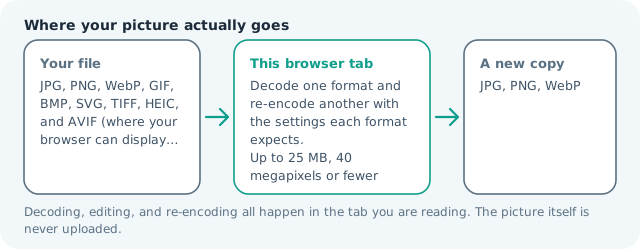
| Files it opens | GIF, plus JPG, PNG, WebP, BMP, SVG, TIFF, HEIC and AVIF files |
|---|---|
| Files you get back | JPG, PNG, WebP |
| Camera data (EXIF) | Not copied — this browser writes a fresh picture from its pixels, so GPS, timestamps and camera tags stay in the file you started with |
| This page is already set to | PNG output |
| What the new file keeps | Every pixel it can display — the same width, height and colours as on screen |
| What never carries over | Camera data and GPS, the colour profile (painted into plain sRGB), and animation, which exports as its first still frame |
| Transparent areas | Kept: PNG stores an alpha channel, so a cut-out stays a cut-out |
| Size after the change | Usually larger: GIF packs a 256-colour frame tightly, PNG stores what it decodes to |
| Where the work happens | In this browser tab — the picture itself is never uploaded |
| Largest file | 100 MB, 40 megapixels or fewer |
| Largest batch | 30 files per run |
| Account, price, watermark | No sign-up, no charge, nothing stamped on your export |
When this helps
- A meme or reaction frame that a form will not accept as animated
- An icon pulled out of an old sprite sheet
- A diagram from a legacy page that needs editing rather than playing
- A still to print, where animation is meaningless
Measured on this page: a 640 × 640 animated GIF of 17 KB returned a 16 KB PNG containing its first frame. The motion itself is not carried over, so use the GIF maker or the GIF compressor for that.
Detailed guidance
What GIF actually is
A GIF is a sequence of frames sharing one small colour table, plus a loop instruction, packaged in a container from 1987. It is still everywhere for one reason: it is the only image format that animates without a plug-in, on software older than most of the people using it. Everything else about the format is a compromise, most importantly the ceiling of 256 colours, which is why photographs saved as GIF look posterised and gradients arrive in visible steps. Pulling a frame out of that container is a genuine upgrade for the still picture, because the pixels stop being hostage to a palette chosen for animation.
Where this conversion is useful
Three jobs come up constantly. A form, portal or listing system that rejects animated uploads and wants a plain picture. A design task where someone needs the composition of an icon or a meme frame to redraw it, which requires an editable lossless file rather than a looped animation. And a print or slide use, where motion is meaningless and the file just has to look correct on paper, which a palette-limited GIF often does not.
What is and is not preserved
Pixel dimensions carry across exactly, and the visible content of that first frame is reproduced without any further loss, which is the whole point of landing on PNG. Metadata, the frame delay and the loop count are dropped along with the animation. Colour depth is a one-way gain: the decoded frame may occupy sixteen million values, but the values themselves come from that small table, so a photo GIF stays posterised. It is a faithful copy of a limited original, not a repair.
The transparency trap
GIFs store alpha as a single index value, so a shape that was composited over a coloured page background in the animation keeps the fringe of that background around its edge. As a PNG the fringe stops being invisible, because the surroundings are now transparent rather than the same colour it was authored against. If you are extracting a logo or a cut-out, expect to spend a minute erasing the halo in an editor, or run the picture through the portrait cut-out page on this site if the subject happens to be a person.
When you should reach for a different output
If the destination is a web page and the frame is a photograph, PNG is the wrong landing spot and a heavy one; go to WebP or JPG from the GIF instead. If you need several frames, this page is not a filmstrip tool and does not pretend to be: it hands back one still, and a multi-frame extraction belongs in a video or animation editor. If you want a GIF of your own, build it on the make a GIF page here from a set of images instead.
Convert GIF to PNG questions
Which frame do I get?
The first one, consistently. That is what a browser shows before an animation starts, and it is the frame most GIFs were composed to display as a poster. There is no frame picker on this page, so if you need a later moment, open the animation in a player and step to it, or capture that frame from the source.
Will the colours change?
They cannot improve, and they do not get worse either. A GIF holds at most 256 colours, and whatever palette it used is written faithfully into PNG, which is capable of millions. The result looks identical on screen and simply stops being limited if you edit it further.
What happens to the animation and the transparency?
The animation is left behind, since PNG has no timeline. A transparent GIF keeps a transparent PNG, though a GIF stores transparency as one fully on or off colour rather than a soft edge, so a halo of leftover background pixels can show around the shape once it is free of its original background.
Why is the PNG bigger than my GIF?
A GIF squeezes a tiny palette extremely well, so converting one still frame to PNG can cost more bytes. That is not a failure, it is a different job: the PNG is a lossless editable still. If you only need something small to display, convert to JPG or WebP instead.