
Local browser tool · Convert
Convert PNG to JPG
When a form states its limit in kilobytes, a PNG photograph is usually the file that fails it — five to ten times the weight of the same picture as a JPG. To convert a PNG to a JPG, drop it here and your browser flattens and re-encodes it on your own machine, with no upload step at all. The dimensions stay exactly as they were, and only the container and the weight change.
Stop a PNG costing you ten times more
Flatten the alpha onto a colour you choose, then write a JPG at the quality you set. Dimensions stay put. Suitable for convert tasks on PNG, plus JPG, WebP, GIF, BMP, SVG, TIFF, HEIC and AVIF files; the export is always a new copy.
Click a thumbnail to preview it before you start.
These are the settings you last used for this tool. They stay in this browser and are never sent anywhere.
Pick the format every app accepts — the picture itself stays untouched.
Estimated output —
Your files are read locally. Nothing is uploaded.
Your results
Pick a picture in the list to look at that file instead.
Full size
Actual pixels, straight from this browser — scroll to check edges and fine detail, then close.
Free to use. Local limits: up to 30 files, 100 MB per file, and 250 MB per batch, processed entirely in this browser. Nothing is uploaded; what stays on your device afterwards is the settings you last used and, after a run, the picture this page made so a next step can open it without choosing the file again. Start over deletes that picture.
Convert at a glance
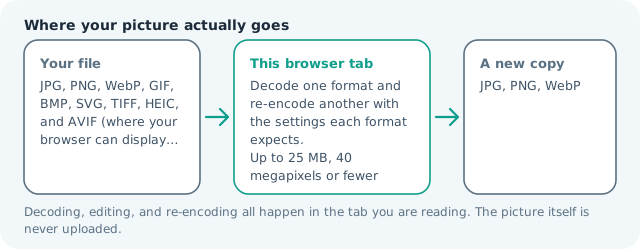
| Files it opens | PNG, plus JPG, WebP, GIF, BMP, SVG, TIFF, HEIC and AVIF files |
|---|---|
| Files you get back | JPG, PNG, WebP |
| Camera data (EXIF) | Not copied — this browser writes a fresh picture from its pixels, so GPS, timestamps and camera tags stay in the file you started with |
| This page is already set to | JPG output |
| What the new file keeps | Every pixel it can display — the same width, height and colours as on screen |
| What never carries over | Camera data and GPS, the colour profile (painted into plain sRGB), and animation, which exports as its first still frame |
| Transparent areas | Flattened onto the colour you pick — JPG has no alpha channel |
| Size after the change | Usually much smaller for a photograph; a flat-colour graphic can go the other way, so read both byte counts |
| Where the work happens | In this browser tab — the picture itself is never uploaded |
| Largest file | 100 MB, 40 megapixels or fewer |
| Largest batch | 30 files per run |
| Account, price, watermark | No sign-up, no charge, nothing stamped on your export |
When this helps
- A screenshot-based application form that caps every attachment
- A phone gallery full of camera PNGs that should never have been PNGs
- A site where one heavy hero image is dragging the whole page
- A chat app that refuses PNG above a fixed size
Measured on this page: a 900 × 600 flat-colour PNG of 16 KB returned a 14 KB JPG at quality 82. Photographs shrink far more than that; graphics with hard edges can go either way, so read both byte counts.
Detailed guidance
The mistake that produced the giant file
Photographs leave home as PNG for a handful of ordinary reasons: a screen-capture tool that defaults to PNG, a design export dialog nobody changed, a messaging app that re-wraps a photo to keep it lossless, or a camera set to a format nobody thought about. The result is a file with the pixel data of a photograph and the storage strategy of a diagram, which is the worst of both. Converting to JPG is not a quality compromise in that situation; it is using the container that matches the content. A one-hundred-twelve-megapixel phone photo saved as PNG can sit near thirty megabytes, and the same image at JPG quality 85 is frequently under two.
What changes and what stays
Width, height and colour stay exactly as they were, since the browser decodes the PNG first and re-encodes afterwards rather than resizing. Transparency is the one real casualty, because JPG describes only opaque rectangles, so the alpha channel is composited against a background colour you pick. Text metadata embedded in the PNG is not carried into the new file either. Animation behaves like a GIF here: a layered or animated PNG comes back as a still, first frame.
Choosing settings by subject rather than by habit
Portraits, landscapes and interiors tolerate a quality setting in the low eighties with no visible cost, and the byte saving is enormous because skin and sky compress well. Anything containing small text, thin strokes, or hard-edged UI furniture should stay at the top of the range, and if the picture is mostly flat colour with lettering, JPG is simply the wrong target and PNG will be both smaller and sharper. The honest test is to open one converted file at one hundred percent and look at edges, since that is where a JPEG reveals itself first.
Sequence the work so the file survives it
Convert from the original, never from a file you already squeezed. Each JPG save throws away a little information permanently, so a chain of PNG, then JPG, then an edit, then another JPG costs more than one well-chosen encode. If a form imposes a hard limit, do the format change first and only then check the weight, because a stubborn file is cheaper to fix by dropping pixels than by dropping quality. Crop dead space before you convert; a tighter frame gives the encoder a smaller job and the subject keeps its detail.
Cases where you should keep the PNG
A logo that sits on unknown backgrounds. A cutout you will drop into a design. A screenshot of a document you need legible at print size. A single-colour illustration where PNG is often smaller than JPG anyway. In those four cases the heavier container is doing real work, and converting it is a false economy: you would be paying bytes to buy a problem that did not exist.
Convert PNG to JPG questions
Why is my PNG so much bigger than a JPG of the same photo?
PNG stores a photograph without throwing information away, so every subtle gradient in a sky or a patch of skin has to be encoded. JPG is allowed to discard detail the eye mostly ignores, which is why a photographic PNG is often several times heavier with no visible gain. The reverse is true for flat graphics and text, where PNG compresses brilliantly and JPG blurs.
Will anyone be able to tell the difference?
On a photograph, not at normal viewing distance and not at a quality setting around 82 to 88. What you are trading is exact reproduction of every pixel, which only matters for text, line art, and images you intend to edit again afterwards. Zoom to one hundred percent on faces and on any small text before you decide.
My PNG had a transparent background. Where did it go?
JPG has no alpha channel, so the transparent region has to be painted with a solid colour while the file is written. This page asks you for that colour rather than assuming white, which is what turns a cut-out product shot on a dark page into a white rectangle if you are not paying attention. Keep PNG when the transparency is the point.
Is it worth converting thirty PNGs at once?
Yes, and it is the case where local processing pays off most. Add up to thirty files and each is handled on its own, with no queue, no throttling and nobody else's server reading your gallery. Files up to 100 MB and roughly 40 megapixels are accepted.