
Local browser tool · Convert
Convert JPG to PNG
Saving the same photo as JPG again throws away a little more detail every time, which is how a file degrades without anyone editing it. To convert a JPG to PNG, add the photo here and your browser decodes it and writes the pixels into a lossless container, locally, with no upload and no queue. The PNG that comes back is larger, and that is the point: from now on the edits stop costing picture.
Give the picture somewhere safe to edit
The JPG is decoded once and stored losslessly, so further saves stop costing detail. Suitable for convert tasks on JPG and JPEG, plus PNG, WebP, GIF, BMP, SVG, TIFF, HEIC and AVIF files; the export is always a new copy.
Click a thumbnail to preview it before you start.
These are the settings you last used for this tool. They stay in this browser and are never sent anywhere.
Pick the format every app accepts — the picture itself stays untouched.
Estimated output —
Your files are read locally. Nothing is uploaded.
Your results
Pick a picture in the list to look at that file instead.
Full size
Actual pixels, straight from this browser — scroll to check edges and fine detail, then close.
Free to use. Local limits: up to 30 files, 100 MB per file, and 250 MB per batch, processed entirely in this browser. Nothing is uploaded; what stays on your device afterwards is the settings you last used and, after a run, the picture this page made so a next step can open it without choosing the file again. Start over deletes that picture.
Convert at a glance
| Files it opens | JPG and JPEG, plus PNG, WebP, GIF, BMP, SVG, TIFF, HEIC and AVIF files |
|---|---|
| Files you get back | JPG, PNG, WebP |
| Camera data (EXIF) | Not copied — this browser writes a fresh picture from its pixels, so GPS, timestamps and camera tags stay in the file you started with |
| This page is already set to | PNG output |
| What the new file keeps | Every pixel it can display — the same width, height and colours as on screen |
| What never carries over | Camera data and GPS, the colour profile (painted into plain sRGB), and animation, which exports as its first still frame |
| Transparent areas | Kept: PNG stores an alpha channel, so a cut-out stays a cut-out |
| Size after the change | Almost always larger: PNG writes every pixel without rounding |
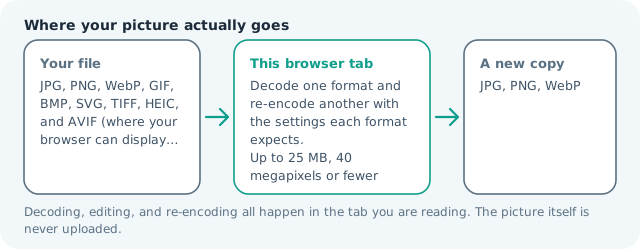
| Where the work happens | In this browser tab — the picture itself is never uploaded |
| Largest file | 100 MB, 40 megapixels or fewer |
| Largest batch | 30 files per run |
| Account, price, watermark | No sign-up, no charge, nothing stamped on your export |
When this helps
- A photo you are about to retouch, crop and save several times
- A scanned document with small type that JPG has already softened
- A frame you will trace, mask, or use as a working layer
- An asset that must end up with real transparency in an editor
Measured on this page: a 1,200 × 900 JPG of 372 KB became a 1.92 MB PNG. Nothing is discarded, which is the whole point, and the file is about five times heavier because of it.
Detailed guidance
The problem this solves is arithmetic, not aesthetics
A JPG save is a set of decisions about which detail to discard, and those decisions are made again on every save. Open a photo, correct the exposure, save: the shadows get coarser. Straighten it, save again: the edges of every high-contrast line get softer. Three rounds in and the file has artefacts that were never in the scene. Converting to PNG ends that cycle, because PNG stores what it is told and never recompresses with loss. This is why the conversion is popular with anyone who works on one image repeatedly, and why it is the wrong instinct for a file that is finished and only needs to be looked at.
What arrives on the other side
The same dimensions, the same colours, and now sixteen million of them written down exactly. There is no quality slider in the PNG path, because there is nothing left to trade. Expect a file two to ten times heavier than the JPG it came from on photographic subject matter, and occasionally lighter on graphics that contain large areas of one colour. Alpha starts fully opaque, since the source had none, and any embedded orientation or camera metadata is dropped when the new file is written.
Where this fits in a real editing chain
Convert at the moment the file must be edited, not before. A common order that works: take the camera or messenger JPG, convert to PNG once, do the crops, masks and colour work, export the final delivery copy as JPG or WebP at the quality the destination needs, and archive the PNG. The archive is the expensive file, and it is the one that lets you redo the export next year without starting from a degraded copy.
Screenshots, scans and text deserve it
The strongest case for the PNG side of the matrix is not photographs but anything a human has to read. JPG handles smooth gradients beautifully and thin high-contrast lines badly, so scanned forms, receipts, slides, code screenshots and page scans arrive already fuzzy. Storing them as PNG keeps what survived the scan intact, and if you also run the text through the OCR page in this same browser you will see the difference in how legible the characters stay.
Do not confuse a bigger file with a better one
Converting a JPEG to PNG cannot recover information that was thrown away, so the extra megabytes are a faithful copy of a lossy image. That is still worth having as a working file, and worth refusing as a delivery file. Judge the destination: if a person will only look at the picture through a chat window or a web page, ship a compressed format and keep the PNG to yourself.
Convert JPG to PNG questions
Does converting to PNG unblur my JPG?
No, and this page will not pretend otherwise. Blocking artefacts were baked in when the JPG was written, and a lossless container preserves them faithfully rather than repairing them. The gain is that from this point onward nothing else is thrown away, so the work you do next stops making the file worse.
Why did the file get so much bigger?
PNG stores a photograph without discarding anything, and a camera JPG typically holds one tenth of that information after throwing detail away. A five-megapixel photo commonly lands between eight and twenty megabytes as PNG. That is the price of a container you can re-save repeatedly without degradation.
Can this make a JPG transparent?
It can only make transparency possible, not create it. JPG has no alpha channel, so the converted PNG starts fully opaque. Once the file is PNG you can erase or mask a background in an editor and the result will hold, which is not true of a repeated JPG save.
When is PNG actually the better delivery format?
For graphics with large flat areas, hard edges, or readable text, PNG is often smaller than a high-quality JPG and sharper too. For a photograph that only has to be looked at, ship JPG or WebP and keep the PNG as your working copy.