
Local browser tool · Convert
Convert JPG to WebP
Take a third off the weight with the photo looking the same: to convert JPG to WebP, drop the files here and the browser re-encodes them locally, with no server ever receiving a copy. WebP usually delivers a photograph 25 to 35 percent lighter than a comparable JPG, which is why most websites now ship it. Build those copies in a batch, and read the delivered byte count before you publish any of them.
Cut the weight, keep the picture
Re-encode JPG photos as WebP at a quality you control, one file or thirty, and compare the sizes side by side. Suitable for convert tasks on JPG, PNG, WebP, GIF, BMP, SVG, TIFF, HEIC and AVIF files; the export is always a new copy.
Click a thumbnail to preview it before you start.
These are the settings you last used for this tool. They stay in this browser and are never sent anywhere.
Pick the format every app accepts — the picture itself stays untouched.
Estimated output —
Your files are read locally. Nothing is uploaded.
Your results
Pick a picture in the list to look at that file instead.
Full size
Actual pixels, straight from this browser — scroll to check edges and fine detail, then close.
Free to use. Local limits: up to 30 files, 100 MB per file, and 250 MB per batch, processed entirely in this browser. Nothing is uploaded; what stays on your device afterwards is the settings you last used and, after a run, the picture this page made so a next step can open it without choosing the file again. Start over deletes that picture.
Convert at a glance
| Files it opens | JPG, PNG, WebP, GIF, BMP, SVG, TIFF, HEIC and AVIF files |
|---|---|
| Files you get back | JPG, PNG, WebP |
| Camera data (EXIF) | Not copied — this browser writes a fresh picture from its pixels, so GPS, timestamps and camera tags stay in the file you started with |
| This page is already set to | WEBP output |
| What the new file keeps | Every pixel it can display — the same width, height and colours as on screen |
| What never carries over | Camera data and GPS, the colour profile (painted into plain sRGB), and animation, which exports as its first still frame |
| Transparent areas | Kept: WebP stores an alpha channel, so a cut-out stays a cut-out |
| Size after the change | Usually lighter than the JPG you started with at the same quality setting |
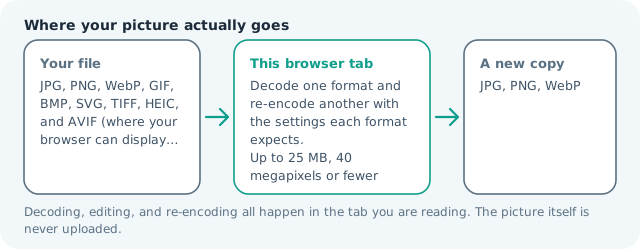
| Where the work happens | In this browser tab — the picture itself is never uploaded |
| Largest file | 100 MB, 40 megapixels or fewer |
| Largest batch | 30 files per run |
| Account, price, watermark | No sign-up, no charge, nothing stamped on your export |
When this helps
- A blog gallery where photos are the heaviest thing on the page
- A product catalogue being rebuilt one batch at a time
- An image folder that has to squeeze into a hosting quota
- A page whose Largest Contentful Paint element is one large photo
Measured on this page: a 1,200 × 900 JPG of 372 KB came back as a 94 KB WebP at quality 82, roughly three quarters lighter from one pass over the same pixels.
Detailed guidance
Why the format exists before you optimise anything
Pages got heavier than they are worth because JPG is old, universal and lazy to reach for. WebP was designed to fix the parts of that picture that cost bytes: it can spend fewer of them on the same visual result, and unlike JPG it can carry transparency at all. The reason to convert is not trend-following but arithmetic. If photos are the heaviest class of asset on your site, a third off their weight is a third off the network cost of every page view, paid by every visitor on every load, which is worth more than any caching rule you could add afterwards.
Reading the numbers this page gives you
Every result prints the delivered file size beside the source, and you should trust that measurement over any table of averages, including the one above. Three outcomes are worth learning to recognise. A photo that came out only a little lighter was probably already compressed hard, so there is little left to take. A graphic that grew larger was probably flat colour, where PNG encodes better. A file that dropped by half had a noisy or heavily detailed source, and that is the case where you can also afford to lower quality one notch.
Fit the setting to the job
For full-width hero images, stay around quality 80 to 85 and let the format do the work. For thumbnails and grid tiles, which are displayed at a fraction of their pixel size, 70 to 75 is invisible and cheaper again. For anything a visitor might zoom, keep it high and accept the bytes. One discipline matters more than the exact number: convert from your original export, because a chain of lossy saves compounds, and a WebP made from an already weak JPG inherits the weakness.
Publishing them without breaking the site
The safe pattern is a WebP copy with the old JPG kept in place as a fallback, so no visitor sees a broken tile. On a static page an image element with two sources handles it; on a CMS the media library or a plugin often does the same job. Keep filenames aligned to the original so a rollback is a one-line change rather than a hunt, and clear the cache after a batch, because a CDN holding the old heavy file hides the entire improvement.
What this conversion will not do
It will not make a badly composed photo lighter than a well composed one, and it will not shrink dimensions. If the browser is downloading a four-thousand-pixel photo into a six-hundred-pixel slot, the win is in the resize page of this site, not here. Format change and size change are different tools that work best in that order: resize first so the encoder has less to describe, then convert to WebP.
Convert JPG to WebP questions
How much smaller will the WebP be?
For photographs, plan on a quarter to a third lighter at similar visual quality, though the number depends entirely on the subject. Smooth skies and skin compress well; dense foliage, fabric and noise compress badly. The card on every result shows the real figure for your file instead of an estimate.
Will my visitors be able to see WebP?
On any browser released in the last several years, yes, which covers effectively all traffic. The exceptions worth planning for are older desktop mail clients and a handful of legacy enterprise browsers, so many sites keep a JPG alongside and let the markup fall back.
Does converting hurt quality?
At the same perceived quality, no; you are paying fewer bytes for a picture that looks the same. What you cannot do is convert a heavily compressed JPG and expect WebP to rebuild the detail the JPG discarded, so start from your original export rather than a squeezed version.
Should I convert PNGs to WebP as well?
Often yes, and sometimes dramatically. WebP supports transparency and typically beats PNG on graphics too. Flat-colour logos are the exception where PNG can still win, so convert one and compare before doing the whole set.
Can I do a lot of images at once?
Up to thirty files per run, each handled independently in your browser at up to 100 MB and about 40 megapixels. Nothing queues behind another visitor, and the work still finishes when the connection drops.