
Local browser tool · Convert
Convert AVIF to JPG
Desktop software has not caught up with AVIF, even though more and more sites now serve it. To convert an AVIF to a JPG, drop the file here and the browser that already understands AVIF decodes it and rewrites the picture as a JPG, locally, with no upload step anywhere in the chain. That gap is the whole reason this pair exists: the format is fine on the web and unusable in your viewer.
Open the format your software has not met
Whatever the browser can display, this page can hand back as a JPG that anything can display. Suitable for convert tasks on AVIF, plus JPG, PNG, WebP, GIF, BMP, SVG, TIFF and HEIC files; the export is always a new copy.
Click a thumbnail to preview it before you start.
These are the settings you last used for this tool. They stay in this browser and are never sent anywhere.
Pick the format every app accepts — the picture itself stays untouched.
Estimated output —
Your files are read locally. Nothing is uploaded.
Your results
Pick a picture in the list to look at that file instead.
Full size
Actual pixels, straight from this browser — scroll to check edges and fine detail, then close.
Free to use. Local limits: up to 30 files, 100 MB per file, and 250 MB per batch, processed entirely in this browser. Nothing is uploaded; what stays on your device afterwards is the settings you last used and, after a run, the picture this page made so a next step can open it without choosing the file again. Start over deletes that picture.
Convert at a glance
| Files it opens | AVIF, plus JPG, PNG, WebP, GIF, BMP, SVG, TIFF and HEIC files |
|---|---|
| Files you get back | JPG, PNG, WebP |
| Camera data (EXIF) | Not copied — this browser writes a fresh picture from its pixels, so GPS, timestamps and camera tags stay in the file you started with |
| This page is already set to | JPG output |
| What the new file keeps | Every pixel it can display — the same width, height and colours as on screen |
| What never carries over | Camera data and GPS, the colour profile (painted into plain sRGB), and animation, which exports as its first still frame |
| Transparent areas | Flattened onto the colour you pick — JPG has no alpha channel |
| Size after the change | Either way — both ends are lossy, so the quality slider decides more than the format does |
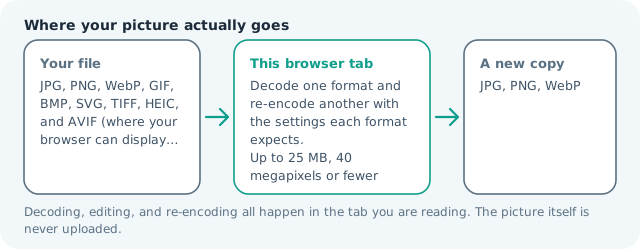
| Where the work happens | In this browser tab — the picture itself is never uploaded |
| Largest file | 100 MB, 40 megapixels or fewer |
| Largest batch | 30 files per run |
| Account, price, watermark | No sign-up, no charge, nothing stamped on your export |
When this helps
- An image saved from a site that now ships AVIF by default
- A design tool that offers no AVIF import path
- A form or inbox that rejects the extension outright
- A shared asset that must open on older colleagues' machines
Measured on this page: a 1,200 × 900 AVIF of 61 KB returned a 135 KB JPG at quality 82. AVIF is the tighter encoder, so this conversion is about opening the picture in older software, not shrinking it.
Detailed guidance
How the file landed on your machine
AVIF is the newest of the compact web formats and it is very good at what it does, which is precisely why websites have started serving it automatically. Content delivery networks and image CDNs negotiate with the browser and hand out the smallest format that the visitor can decode. So an ordinary right-click save, which used to reliably produce a JPG, now produces an AVIF that your desktop viewer cannot open and your office suite will not import. The image is completely fine. The software on the receiving end is a few years behind the server that produced it.
Where the conversion actually runs
Inside the browser, using the decoder it already has. This page does not bundle an AVIF decoder of its own, which means the honest constraint is your browser: display the picture and the conversion will work; see nothing at all and the tool reports that plainly rather than inventing a failure message. That dependency is the one difference between this pair and the older formats here, and it is worth knowing before you blame the file.
What the JPG keeps and what it drops
Dimensions and the visible picture carry across, since decoding happens before re-encoding. Dropped along the way: the alpha channel, flattened onto a colour you pick; any animation beyond the first frame; and the exceptional dynamic range that AVIF can describe, since a JPG is an eight-bit file and a wide-gamut source is mapped down. If a converted picture looks flatter than the original on a good display, that mapping is the cause, and the fix is a PNG copy rather than a higher quality number.
A routine for pulled-together batches
Convert in one run and check the results in the same sitting, because the failure mode of unusual files is silence rather than noise: a blank tile or a tiny output means the decode did not produce a picture, and a heavy batch of correct files can hide it. Open one result at full zoom before you send anything. Keep the originals until the converted set is confirmed, since the AVIF is the smaller file and you may want a second pass at different settings.
Choosing the right output for what comes next
If the destination is a form, an inbox or a document, JPG is the answer and the preset on this page is already correct. If the asset must keep its transparency for design work, convert to PNG instead and accept the weight. If the picture is going onto a website, the AVIF you started with is already the efficient choice, and the honest advice is to keep serving it rather than converting it for a minority of ancient visitors.
Convert AVIF to JPG questions
Can every browser open AVIF?
No, which is the reason the format surprises people. Recent versions of Chrome, Edge, Firefox and Safari decode it, but an older release does not, and if the picture will not display on your screen here it will not convert either. Update the browser, or open the file in one that supports AVIF.
Why is converting better than changing the extension?
Because the extension is a label and the container is a fact. Renaming a file does not re-encode anything, so the receiving software still meets AVIF data inside a file it believes is a JPG, and it refuses or shows a broken tile. Re-encoding produces the actual bytes the destination expects.
Does the conversion cost quality?
The source is already a lossy encode, and a JPG pass adds a second one, so keep the quality setting around 85 and work from the largest copy of the AVIF you can get. Nothing that is visible at normal viewing size is meaningfully lost.
What happens to a transparent or animated AVIF?
Transparency is flattened onto a background colour you choose, because JPG cannot store alpha; use the PNG output if the cut-out has to survive. An animated AVIF returns its first still frame only, as with other animation containers here.