
Local browser tool · Compress
Compress JPG to 500KB
Half a megabyte is room to spare for most photographs, so this run should end with detail untouched. To compress a JPG to 500 KB while keeping its resolution, use this page with the target preset at 500 KB and drop the file in: the encoder searches locally for the lightest setting that fits. That budget suits print-ready proofs, high-resolution listings, and archives where losing pixels would hurt.
Cap a full-resolution JPG at 500 KB
Half a megabyte is enough to keep native dimensions, so the encoder trades only marginal detail. Suitable for compress tasks on JPG, PNG, and WebP files; the export is always a new copy.
Click a thumbnail to preview it before you start.
These are the settings you last used for this tool. They stay in this browser and are never sent anywhere.
Estimated output —
Your files are read locally. Nothing is uploaded.
Your results
Pick a picture in the list to look at that file instead.
Full size
Actual pixels, straight from this browser — scroll to check edges and fine detail, then close.
Free to use. Local limits: up to 30 files, 100 MB per file, and 250 MB per batch, processed entirely in this browser. Nothing is uploaded; what stays on your device afterwards is the settings you last used and, after a run, the picture this page made so a next step can open it without choosing the file again. Start over deletes that picture.
Compress at a glance
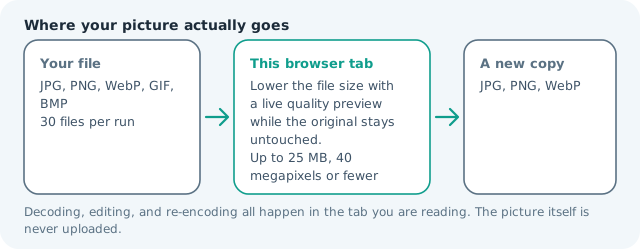
| Files it opens | JPG, PNG, WebP, GIF, BMP |
|---|---|
| Files you get back | JPG, PNG, WebP |
| Camera data (EXIF) | Not copied — this browser writes a fresh picture from its pixels, so GPS, timestamps and camera tags stay in the file you started with |
| This page is already set to | JPG output, 500 KB target |
| Where the work happens | In this browser tab — the picture itself is never uploaded |
| Largest file | 100 MB, 40 megapixels or fewer |
| Largest batch | 30 files per run |
| Account, price, watermark | No sign-up, no charge, nothing stamped on your export |
When this helps
- Photo contests and stock submissions with a 0.5 MB ceiling
- Full-resolution listing images where buyers zoom
- Design and print proofs sent by email
- Archive copies that must stay light but retain size
Measured on this page: a 4,000 × 3,000 camera JPG that arrived at 1.99 MB came back at 472 KB under the 500 KB ceiling, still 4,000 × 3,000, because quality 64 cleared the limit without touching the frame.
Detailed guidance
Why half a megabyte is the comfortable tier
Fifty kilobytes forces choices; five hundred lets the encoder breathe. At that weight a modern photograph can keep its full pixel dimensions and still look clean, because the savings come from tighter chroma packing rather than from throwing away structure. This is the tier where compression stops being visible, which is why photo competitions, print proofs, and stock submissions tend to cap around here — enough for a reviewer to judge the image properly, light enough to move in bulk. The corollary is that you rarely need to touch dimensions at this budget. Resize only if the source is enormous, and let the encoder do the rest.
Full resolution versus a smaller frame
A 6,000 px file at 500 KB and a 2,400 px file at 500 KB are not the same photograph. One carries detail you can print or crop later; the other is a screen object. Decide which the destination needs before you compress. A proof for a client, an archive copy, or a listing image buyers zoom all justify native resolution. A web banner that renders at 1,200 px does not, and shipping it at full size just downloads slower for everyone. When the answer is screen-only, resize first and compress to the target afterwards — you get a lighter file and a sharper result than a single strained encode.
Reading the delivered number
The result prints the byte count the browser actually produced, so a claim of under 0.5 MB is verifiable rather than hopeful. If a file lands far below the cap, that usually means large flat areas encoded cheaply — skies, walls, scanned documents. That is a good outcome, not a warning. If it lands above the cap anyway, the encoder has already spent pixels to try to fit and something else is the problem: PNG output, which has no quality lever, or a frame too detailed to shrink further without falling apart. Change the format or crop tighter rather than running a second pass. Avoid stacking passes: each JPG save discards information permanently, so working from the cleanest source beats iterating toward the target.
Keeping masters and deliveries apart
Treat exports as delivery artefacts with a naming rule that records the destination: contest-500kb, proof-500kb, archive-500kb. Six months later you will know exactly which file answered which requirement, and you will not be hunting through downloads folders to work out whether an image was already resized. Nothing here leaves your machine, so a batch of proofs can run on a train, in a café, or on a client laptop without a network round trip or a storage policy in the way.
Matching a megapixel rule as well as a weight rule
Competitions and stock sites rarely state one requirement. A call for entries may ask for 500 KB and a minimum of 2,000 px on the long edge, and the two only clash when the source is enormous or tiny. Read both before editing: satisfy the pixel rule first with the resizer, then let this page handle weight. If a file cannot reach the floor without upscaling, that is a signal to submit a different frame rather than invent resolution, because stretched detail looks soft immediately. Keep exports named for the requirement they answer and archive the untouched master, so a looser rule next season means a new export rather than a reshoot.
Compress JPG to 500KB questions
Can I reach 500 KB without resizing?
Usually yes, and the tool prefers to leave your pixels alone: it first tries every quality setting at full size, which is how a 4,000 × 3,000 photo of 844 KB came back at 197 KB against a far tighter 200 KB cap with no dimension change at all. The frame only shrinks when no quality at full size can fit, and the card then names the dimensions it delivered.
Is 500 KB the same as 0.5 MB?
Close enough that most forms mean the same thing, though some systems compute 0.5 MB as 512 KB. When the limit is strict, aim for the smaller number: this page treats the target as kilobytes of 1,000 bytes, matching how most uploaders report size.
What should I do if the file will not go below 500 KB?
With JPG or WebP it should: the encoder spends pixels when no quality at full size fits. Two cases stay over the line — PNG output, which has no quality lever, and a frame so detailed that shrinking it again would make it unreadable. Change the format, or crop tighter and rerun.
Does the tool change my original file?
No. You always receive a new copy with a suffix, and the original remains untouched on your device, so it is safe to experiment with the target before settling on an export.