
Local browser tool · Compress
Compress Image to 1MB
One megabyte is the most forgiving upload limit there is, so most images reach it with no visible change at all. To compress an image to 1 MB, drop it on this page with the 1 MB target already set: the tool re-encodes JPG, PNG, or WebP inside your browser and returns the heaviest setting that stays under the cap, reporting the delivered bytes so you can confirm before you upload anywhere.
Clear a 1 MB upload ceiling
Set the budget to 1 MB and let the encoder find the best quality that still fits. Suitable for compress tasks on JPG, PNG, and WebP files; the export is always a new copy.
Click a thumbnail to preview it before you start.
These are the settings you last used for this tool. They stay in this browser and are never sent anywhere.
Estimated output —
Your files are read locally. Nothing is uploaded.
Your results
Pick a picture in the list to look at that file instead.
Full size
Actual pixels, straight from this browser — scroll to check edges and fine detail, then close.
Free to use. Local limits: up to 30 files, 100 MB per file, and 250 MB per batch, processed entirely in this browser. Nothing is uploaded; what stays on your device afterwards is the settings you last used and, after a run, the picture this page made so a next step can open it without choosing the file again. Start over deletes that picture.
Compress at a glance
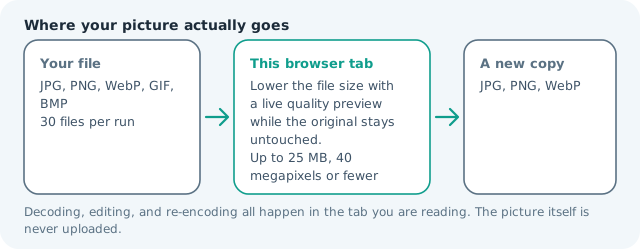
| Files it opens | JPG, PNG, WebP, GIF, BMP |
|---|---|
| Files you get back | JPG, PNG, WebP |
| Camera data (EXIF) | Not copied — this browser writes a fresh picture from its pixels, so GPS, timestamps and camera tags stay in the file you started with |
| This page is already set to | JPG output, 1000 KB target |
| Where the work happens | In this browser tab — the picture itself is never uploaded |
| Largest file | 100 MB, 40 megapixels or fewer |
| Largest batch | 30 files per run |
| Account, price, watermark | No sign-up, no charge, nothing stamped on your export |
When this helps
- Tender and university portals that allow 1 MB per document
- Scanned PDFs exported as images that must stay under a megabyte
- High-resolution listing heroes where zoom still matters
- Website assets uploaded through a capped media library
Measured on this page: that same 1.99 MB, 4,000 × 3,000 photo landed at 993 KB under a 1 MB ceiling at quality 89, full resolution kept. A file that is already lighter than your limit stays light; the tool never pads it up to reach the number.
Detailed guidance
What the 1 MB tier is really asking
A megabyte is rarely an arbitrary number. It is usually a storage or bandwidth line drawn by whoever administers an upload form, and it is generous enough that they expect real documents rather than thumbnails. That means the correct response to a 1 MB rule is usually to keep resolution intact and let the encoder do the work — the opposite of the reflex to shrink a photo to a postage stamp. Scanned contracts, exported PDF pages, and camera originals all typically clear a megabyte without visible cost. Screenshots of dense text are the exception worth knowing: they encode poorly at high quality, so a slight dimension reduction beats a large quality reduction.
Choosing the format at this budget
JPG remains the safest assumption because most forms were designed around it. WebP is the better technical choice when the destination only renders the image in a browser, since the same budget carries more detail. PNG is lossless and therefore hard to fit inside a cap for photographs, but ideal for diagrams and flat UI art. A practical rule: run the file as JPG first, and if the form rejects the extension, rerun as PNG and expect the tool to push dimensions down to reach the target.
Verifying before you submit
The result card pairs the original weight with the delivered weight, so a 4.8 MB scan showing 920 KB is evidence rather than optimism. Open the export once and check the places a form reviewer will: page corners on a scan, faces on a portrait, and any printed text on a product. Then rename the file to something the receiving system can follow, because generic names cause more rejected submissions than marginal quality does. If the form also states pixel requirements, satisfy those with the resizer before compressing — one clean pipeline beats two competing adjustments.
Working in bulk, offline, and privately
Thirty files run in one batch, which is enough for a full set of tender annexures or a semester of scanned receipts. Because decoding and encoding happen in the browser tab, the work continues without a connection, so a train or a dead zone is not a reason to postpone. Medical documents, legal exhibits, and client photography never transit a server either, which is the difference between a tool you can use for real work and one you only use for holiday photos.
Why a file can fail at 1.02 MB
Rejections at this tier usually come from arithmetic rather than the photograph. Some systems mean 1,000,000 bytes; others mean 1,048,576, and a form that rounds the wrong way will bounce a file that looks compliant in the finder. Add the small chance that the server counts request overhead, and a 995 KB upload becomes a mystery failure. Treat the ceiling as a target instead: aim at 900 KB here, keep the encoder inside its comfort zone, and the file passes on either reading. That margin costs nothing visible and removes the most common cause of a rejected tender annexure or claim document at the last minute.
Compress Image to 1MB questions
How do I make an image under 1MB?
Leave the preset at 1,000 KB and add the file. The tool bisects the quality range, keeping the heaviest encode that still fits, so you do not adjust anything by hand. Scans and photographs usually clear 1 MB from a full-resolution camera file in one run.
Can PNG files reach 1 MB too?
Yes, though PNG behaves differently: it is lossless, so flat-colour graphics can stay small while photographs stay large. If a PNG will not reach the target, export it as JPG or WebP from this page instead, which is normally what a 1 MB form limit expects.
Will quality suffer at 1 MB?
Rarely, because the budget is generous. A 24-megapixel frame at 1 MB retains most texture detail, and a scan of a document looks identical. Quality only becomes a discussion when you push several hundred megapixels of fine detail into the same cap.
Is a 1 MB target the same as 1024 KB?
Not always: some uploaders compute 1 MB as 1,000 KB and others as 1,024 KB. This page treats the target in thousands, which is the stricter reading, so hitting it satisfies both interpretations.