
Local browser tool · Compress
Compress Image to 50KB
Fifty kilobytes is genuinely tight, so expect to trade pixels for quality on the way in. To compress an image to 50 KB, use this page with the 50 KB target preset and add your file: the tool searches the quality range locally and returns the heaviest encode that fits inside the cap. Resize to the display size the destination uses first, and the result will look far better than a full-frame squeeze.
Get an image inside 50 KB
A hard budget that rewards small dimensions, with the byte count printed before you download. Suitable for compress tasks on JPG, PNG, and WebP files; the export is always a new copy.
Click a thumbnail to preview it before you start.
These are the settings you last used for this tool. They stay in this browser and are never sent anywhere.
Estimated output —
Your files are read locally. Nothing is uploaded.
Your results
Pick a picture in the list to look at that file instead.
Full size
Actual pixels, straight from this browser — scroll to check edges and fine detail, then close.
Free to use. Local limits: up to 30 files, 100 MB per file, and 250 MB per batch, processed entirely in this browser. Nothing is uploaded; what stays on your device afterwards is the settings you last used and, after a run, the picture this page made so a next step can open it without choosing the file again. Start over deletes that picture.
Compress at a glance
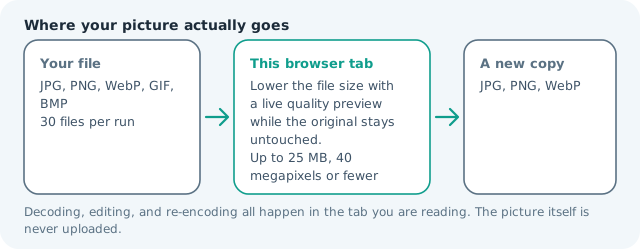
| Files it opens | JPG, PNG, WebP, GIF, BMP |
|---|---|
| Files you get back | JPG, PNG, WebP |
| Camera data (EXIF) | Not copied — this browser writes a fresh picture from its pixels, so GPS, timestamps and camera tags stay in the file you started with |
| This page is already set to | JPG output, 50 KB target |
| Where the work happens | In this browser tab — the picture itself is never uploaded |
| Largest file | 100 MB, 40 megapixels or fewer |
| Largest batch | 30 files per run |
| Account, price, watermark | No sign-up, no charge, nothing stamped on your export |
When this helps
- Passport and ID photos with a 50 KB maximum
- Forum avatars and profile images with tiny caps
- Inline email images that must not bloat a message
- Legacy intranet forms with per-file kilobyte ceilings
Measured on this page: a 1,200 × 900 photo of 372 KB came back at 49 KB, still 1,200 × 900, with the encoder pushed to quality 24 to fit. This is the tightest target on the site, so check faces and text at full zoom before you submit it.
Detailed guidance
Why a 50 KB limit forces a resize
Fifty kilobytes is not really a file-size rule; it is a disguised pixel rule. Every document standard that quotes it also expects a small image, because a kilobyte budget only behaves once the frame is modest. That is good news for quality: resize to the box the form wants, and the encoder has enough room to keep skin tones smooth and edges clean. Attempt the same budget on a twelve-megapixel frame and the encoder cannot hold it at any setting, so rather than hand you a mushy full-size file the tool pulls the frame down until something fits and reports the dimensions it used. The workflow that works is two steps in order — dimensions first, weight second — and this page handles the second step while the resizer handles the first.
Where 50 KB limits show up
Identity and travel forms are the classic case, since their systems were built when bandwidth was scarce and every upload was metered. Forum and community software uses the same number for avatars. Older corporate intranets cap attachments low enough that a phone photo bounces. Email-embedded images want it too, because a heavy inline picture inflates a message for every recipient and trips spam filters. In each of those places a correctly sized small image is accepted instantly, so the target is not a hurdle but a specification to satisfy.
Making a tight file look deliberate
Small budgets expose two failures: banding in skies and shimmer on hair or foliage. Both improve markedly when you crop out dead space before compressing, because the encoder then spends its allowance on the subject rather than on a plain background. A square avatar should be cropped to the head and shoulders first; a document photo should be cropped to the page. Sharpness survives better at low weight when the image contains fewer competing details, so a tight crop is worth more than a quality slider moved one notch.
Confirming the number that matters
Forms reject silently, so verify the delivered weight in the result card before uploading rather than after a failure. Keep the export named for the requirement it answers, and keep your clean original: if the same photo is later needed for a looser limit, working from the original beats rebuilding from a 50 KB file that has already lost detail. Nothing leaves the browser at any point, which is the entire reason an ID photo can be processed here at all.
The adjustments that make 50 KB behave
Order matters more than any single slider. Crop to the subject first, resize to the box the form displays, convert to grayscale when the image carries no colour worth keeping, and only then compress to the target. Desaturating a black-and-white scan is a free saving worth more than two quality steps. Dropping to a 400 px square usually satisfies the encoder without a struggle. Avoid soft focus and heavy grain, both expensive at any setting. Finally, prefer one clean pass from the original over two passes from a previous export: every JPG save discards detail permanently, and the second pass always looks worse than the first.
Compress Image to 50KB questions
How can an image be only 50KB?
By carrying fewer pixels. A 400 × 500 px portrait encodes cleanly at 50 KB, which is why most ID-photo specifications also state dimensions. Resize to the required box first, then run this page, and the encoder will have enough room to keep faces natural.
Why will my photo not reach 50 KB?
It usually does. Detail costs bytes, so the encoder now buys the budget by lowering the frame when no quality at full size fits, and the card names the dimensions it landed on. Two cases stay over: PNG, which has no quality lever, and a photo too detailed to shrink below about 240 px.
What dimensions should I use with a 50 KB limit?
For a person on a document form, 350-600 px on the long edge is typical. For an avatar, 200-300 px is plenty. Above those ranges you are spending budget on pixels the destination will downscale anyway.
Does a PNG work at this size?
Only for flat graphics. PNG is lossless, so a logo with few colours can sit under 50 KB easily, while a photograph never will. For photos, stay on JPG at this budget.