
Local browser tool · Blur & pixelate
Black Out Text on an Image
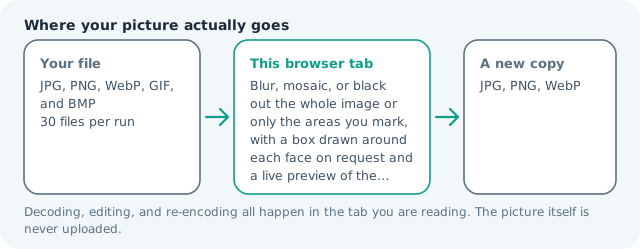
To black out text on an image, choose the solid bar, switch on box mode, and drag a rectangle over each name, number, or line you want gone; the tool paints flat color into the pixels themselves and hands you a new file. Because there is no text layer under a photograph or a screenshot, overwriting is the only redaction that genuinely holds, and the whole pass happens on your own machine with nothing uploaded.
Drop a solid bar over the words you cannot share
Draw one rectangle per line of text and the bar replaces those pixels with flat color in your browser, so the exported copy carries no readable trace of what was underneath. Suitable for blur & pixelate tasks on JPG, PNG, WebP, GIF, and BMP files; the export is always a new copy.
Click a thumbnail to preview it before you start.
These are the settings you last used for this tool. They stay in this browser and are never sent anywhere.
Drag a rectangle over each face, plate, or line of text. The preview shows the effect you are about to export at full resolution.
The first press loads a face detector into this tab and keeps it there. It frames the face, not the hair or the chin, so check the boxes before you export.
A flat bar is the only setting that guarantees nothing shows through — a weak blur can be sharpened back.
Your files are read locally. Nothing is uploaded.
Your results
Pick a picture in the list to look at that file instead.
Full size
Actual pixels, straight from this browser — scroll to check edges and fine detail, then close.
Free to use. Local limits: up to 30 files, 100 MB per file, and 250 MB per batch, processed entirely in this browser. Nothing is uploaded; what stays on your device afterwards is the settings you last used and, after a run, the picture this page made so a next step can open it without choosing the file again. Start over deletes that picture.
Blur & pixelate at a glance
| Files it opens | JPG, PNG, WebP, GIF, and BMP |
|---|---|
| Files you get back | JPG, PNG, WebP |
| Camera data (EXIF) | Not copied — this browser writes a fresh picture from its pixels, so GPS, timestamps and camera tags stay in the file you started with |
| Where the work happens | In this browser tab — the picture itself is never uploaded |
| Largest file | 100 MB, 40 megapixels or fewer |
| Largest batch | 30 files per run |
| Account, price, watermark | No sign-up, no charge, nothing stamped on your export |
When this helps
- Names, case numbers, and addresses in a photographed paper form
- A signature, handwritten date, or account number before a public post
- A caption burned into a meme or screenshot with no editable layer behind it
- The flat black bar readers expect to see on a shared official document
Cover the whole line rather than the words. A half-line bar tells a reader exactly how much was removed and leaves the shape of the first letter intact, which is enough for a motivated reader to reconstruct a name. Measured on this engine across an entire 3,992 × 2,992 frame of 3.55 MB, a solid bar exported 69 KB where a mosaic of the same frame exported 180 KB: with text, the stronger effect is also the cheaper one.
Detailed guidance
Why a bar is the only answer for words
Text is a pathological case for every softening technique. Glyphs are thin, high contrast, and built from a small set of shapes, so a reader only needs a few surviving stems to guess a whole word, and software only needs a little of the original contrast to bring more of it back. Blur leaves exactly that. A mosaic keeps the rhythm of ascenders and descenders and the length of each word. A solid bar writes one color across the region and the file no longer contains the information. If the words are names, numbers, addresses, or anything you would not want reconstructed, the choice is overwrite, not disguise.
The failure mode is coverage, not strength
In practice almost every leaked redaction is a box that was too small. It clips the tail of a descender, misses the last character of a line, or sits one pixel above an underline, and the surviving fragment is enough. Draw the box around the whole line rather than the words inside it, extend it a few pixels past both ends, and let the bar run slightly taller than the text. The extra margin costs nothing visually and removes the entire class of error, which is why the preview here paints the real bar instead of an outline you have to trust.
Chasing the second copy of the same detail
Documents repeat themselves, and the repeat is what catches people out. A screenshot that shows an email also shows the sender address in the header, the same name in the signature block, and often the thread below quoting what you just covered. A photo of a form shows the patient name again in the corner of the page underneath. A chat screenshot carries the contact name at the top, the avatar beside every message, and the notification banner that arrived mid-conversation. After your first pass, look at the frame as if you were trying to identify the person from what is left, because that is the test someone else will run.
Working with screenshots and documents on screen
Screenshots have one advantage over photographs: the text is upright, evenly lit, and the lines are the same height, so a single bar dragged across a full line covers it cleanly and the same box can be repeated down the column. Switch to a white bar when the document is white and the point is simply that a field does not concern the reader, and keep black where you want the reader to see that an edit was made deliberately. Save the result as PNG, since a high quality JPEG encoder is unkind to thin black edges on a white ground and produces a colored halo that makes a clean redaction look sloppy.
What this page is not
It edits pictures, so it cannot redact a PDF text layer, an Office document, or a database record, and a file that carries hidden text needs that layer removed properly before you share it. It leaves no audit trail and no certificate, so it is not a compliance control and should not be treated as one in a regulated disclosure. And it writes a new copy while leaving your original untouched, which means the unredacted file is still on your device and in your backups until you delete it yourself. Check the export, then deal with the source.
Black Out Text on an Image questions
Is blacking out text on a photo reversible?
Not once you have exported the file. The covered pixels are replaced with one flat color and the picture is re-encoded from those pixels alone, so there is nothing hidden beneath to reveal. That is different from dropping a black rectangle over a document or an image in an editor, where the original stays intact underneath and anyone can move the shape.
Should I use a black bar or a white one?
Match the surface, not your mood. A white bar disappears into a white document and reads as a blank, which is better when the point is simply that the field does not concern the reader. A black bar announces an edit, which is what you want in journalism, legal disclosure, and anywhere the reader deserves to know something was withheld.
Why not blur the text instead?
Text is the worst case for blur. Letterforms are high-contrast, thin, and regularly spaced, so even quite strong smoothing leaves stems and joins, and sharpening tools can pull a lightly blurred line back toward readable. For photographs of faces a blur is a reasonable convention; for words, use a bar.
Can I redact a screenshot of a chat conversation?
Yes, and it is a common use. Draw one bar per message bubble you want gone rather than per word, then check the sender name, avatar, timestamps, phone status bar, and any quoted text further down, because conversations repeat details and the repetition is what identifies people.
Does this remove text from a PDF?
No, this page works on pictures. A PDF is not an image with pixels on top: it usually carries a live text layer, so a black box drawn over a word in a viewer leaves the word selectable and copyable. Export the page as an image, censor it here, then put the image back in the document if you need a truly flat file.