
Local browser tool · Blur & pixelate
Censor an Image Online
Censoring an image means replacing part of it with something unreadable on purpose, and this page does it locally: pick a solid black bar, a white bar, or a coarse mosaic, drag a rectangle over each detail you want withheld, and export a new copy. Because a bar overwrites the pixels instead of disguising them, it is the one setting here that leaves genuinely nothing to recover, and the marked edit also tells your audience that something was hidden.
Block out the parts that must not be read
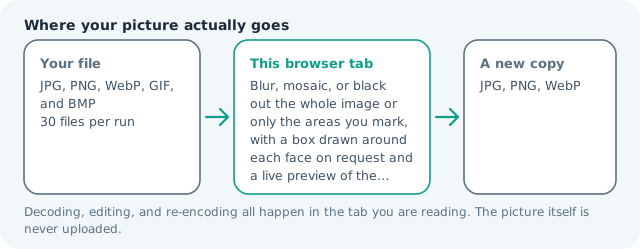
Choose a flat bar or a coarse mosaic, drag one rectangle per detail, and the tool overwrites those pixels in your browser so the exported file carries nothing recoverable underneath. Suitable for blur & pixelate tasks on JPG, PNG, WebP, GIF, and BMP files; the export is always a new copy.
Click a thumbnail to preview it before you start.
These are the settings you last used for this tool. They stay in this browser and are never sent anywhere.
Drag a rectangle over each face, plate, or line of text. The preview shows the effect you are about to export at full resolution.
The first press loads a face detector into this tab and keeps it there. It frames the face, not the hair or the chin, so check the boxes before you export.
A flat bar is the only setting that guarantees nothing shows through — a weak blur can be sharpened back.
Your files are read locally. Nothing is uploaded.
Your results
Pick a picture in the list to look at that file instead.
Full size
Actual pixels, straight from this browser — scroll to check edges and fine detail, then close.
Free to use. Local limits: up to 30 files, 100 MB per file, and 250 MB per batch, processed entirely in this browser. Nothing is uploaded; what stays on your device afterwards is the settings you last used and, after a run, the picture this page made so a next step can open it without choosing the file again. Start over deletes that picture.
Blur & pixelate at a glance
| Files it opens | JPG, PNG, WebP, GIF, and BMP |
|---|---|
| Files you get back | JPG, PNG, WebP |
| Camera data (EXIF) | Not copied — this browser writes a fresh picture from its pixels, so GPS, timestamps and camera tags stay in the file you started with |
| Where the work happens | In this browser tab — the picture itself is never uploaded |
| Largest file | 100 MB, 40 megapixels or fewer |
| Largest batch | 30 files per run |
| Account, price, watermark | No sign-up, no charge, nothing stamped on your export |
When this helps
- A receipt or invoice where the card digits and total stay private
- A scanned letter or contract with names and addresses still legible on it
- A benefits, medical, or account document sent round for a second opinion
- A screenshot carrying a handle, phone number, or email address
Give the bar a little breathing room on every side. A rectangle that clips the last few pixels of a character leaves enough shape for a reader to guess the rest, which is how a lot of real-world redaction failures actually happen. Measured on this engine with a solid bar across an entire 3,992 × 2,992 frame of 3.55 MB, the export weighed 69 KB — the flattest pixels a JPEG ever had to describe.
Detailed guidance
What makes a censorship mark trustworthy
The failures people remember are almost never about the shape of the black box. They are about the file underneath it: documents where a drawn-on rectangle left the original text selectable, images where an overlay sat on a separate layer that any viewer could peel off, and screenshots where the redaction was a display effect rather than a change to the pixels. A mark is only as good as the data it destroys, and in a flat bitmap the pixels are the data. Overwrite them and there is no layer to remove, no hidden text, no original sitting in an embedded thumbnail. That is the whole reason this page writes the bar into the canvas and re-encodes the result rather than drawing a shape on top of your picture.
Bars, mosaics, and blurs are not interchangeable
A flat bar deletes: nothing about the covered region survives, which is why it is the standard in legal, medical, and newsroom use, and why it looks blunt. A mosaic destroys fine detail while keeping rough structure, so the shape of a head or the length of a line is still visible; it suits photographs where you want the viewer to understand what kind of thing was hidden. A blur keeps both structure and a good deal of contrast, which is the friendliest to look at and the weakest as a control. Choose by what you need the mark to guarantee, not by which looks cleanest in a thumbnail.
Newsroom and document conventions worth copying
Where a detail is withheld for legal reasons, the convention is a solid rectangle in the tone that reads as intentional against the background, sized with margin around the thing it hides, never a tight fit around glyphs. Where a person is protected rather than a document, a mosaic or blur over the face is normal and expected. Where the entire remainder of a page has no bearing on the story, cropping is more honest than censoring, because it does not pretend the frame is complete. And a caption that states what was removed and why does more for credibility than any amount of visual tidiness.
Checking your own work before it leaves
Zoom the export to one hundred percent and inspect each box for three failures. Bleed: a few pixels of the original showing at one edge, which happens when the box was drawn against the text rather than around it. Ghosting: a bar that covers a line but not the taller descenders of the same line. And leakage through reflection or a second copy of the same detail elsewhere in the frame, which is where a censored document photographed at an angle has historically burned people. Re-run with a bigger box rather than trying to patch the exported file, since every re-encode costs quality.
Where the honest limits are
This is pixel destruction inside your browser, which means it is only as permanent as the copy you share. Your original stays on disk, your backup service may hold a version, and a phone photo library syncs quietly unless you told it not to. Nothing here writes metadata claiming a region was redacted, so the mark carries no legal weight on its own. And if the image is evidence, a regulatory record, or part of a disclosure you may have to stand behind, follow your own procedure rather than a free web tool, and keep the file you censored so you can show what you did.
Censor an Image Online questions
Is a black bar on an image actually permanent?
Yes, once you export. The tool writes flat color over those pixels and the encoder stores only what is left, so unlike a black rectangle drawn on top of a PDF or a document, there is no live text sitting underneath waiting to be copied out. What survives is only the file you downloaded.
Why not just blur what I want hidden?
Because blur is a disguise and a bar is a deletion. Blur keeps the color distribution and much of the structure of what it covers, and a weak one can be partly reversed by sharpening. Where the content is a name, an account number, a face in a dispute, or anything legally sensitive, overwrite it.
Does the marked edit look unprofessional?
It looks edited, which is the point in journalism, legal, and medical use: readers are entitled to know a detail was withheld rather than being shown a picture that quietly lies about the frame. Use a white bar on light documents and a black bar on dark ones so the mark reads as deliberate instead of accidental.
Can I censor several photos in one run?
Yes. Add up to thirty files and the same boxes, style, and strength print on each export, which suits a batch of identical forms or a run of receipts. It is a poor fit for unrelated photographs, where each sensitive detail sits somewhere different, so censor those one file at a time.
What about the original file on my computer?
It stays exactly as it was, which protects you but also means the unredacted version is still on your disk, in your photo library, and quite possibly in your cloud backup and trash folder. If the original must not exist anywhere, delete it after checking the censored export and empty the trash.