
Local browser tool · Add a Border
Add a Shadow to an Image
A shadow works because it tells you which object is on top of which surface, and it fails the moment it is clipped at the edge of the file. This page adds the air a shadow needs around your picture, then draws it at full resolution in one pass, so the falloff fades out instead of ending in a hard grey band. Export a PNG or WebP and everything outside the shadow stays transparent, which lets an image sit on a page instead of carrying its own background box.
Lift the picture off the page
Cast an even soft shadow under the whole frame, with the canvas grown so the falloff is never cut short. Suitable for add a border tasks on JPG, PNG, WebP, GIF, and BMP files; the export is always a new copy.
Click a thumbnail to preview it before you start.
These are the settings you last used for this tool. They stay in this browser and are never sent anywhere.
Everything is drawn once at full resolution, so the curve stays clean when you zoom in instead of showing a staircase. PNG and WebP keep the cut corners transparent; JPG fills them with the colour above.
Your files are read locally. Nothing is uploaded.
Your results
Pick a picture in the list to look at that file instead.
Full size
Actual pixels, straight from this browser — scroll to check edges and fine detail, then close.
Free to use. Local limits: up to 30 files, 100 MB per file, and 250 MB per batch, processed entirely in this browser. Nothing is uploaded; what stays on your device afterwards is the settings you last used and, after a run, the picture this page made so a next step can open it without choosing the file again. Start over deletes that picture.
Add a Border at a glance
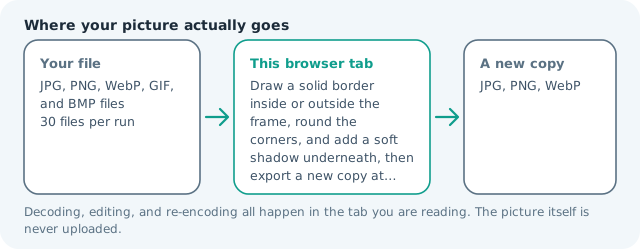
| Files it opens | JPG, PNG, WebP, GIF, and BMP files |
|---|---|
| Files you get back | JPG, PNG, WebP |
| Camera data (EXIF) | Not copied — this browser writes a fresh picture from its pixels, so GPS, timestamps and camera tags stay in the file you started with |
| This page is already set to | PNG output |
| Where the work happens | In this browser tab — the picture itself is never uploaded |
| Largest file | 100 MB, 40 megapixels or fewer |
| Largest batch | 30 files per run |
| Account, price, watermark | No sign-up, no charge, nothing stamped on your export |
When this helps
- A product cut-out that needs to look like it is resting on a surface rather than floating
- Screenshots in a feature list, where the frame needs separating from the page
- A card or poster mockup where the artwork is the only thing on a light ground
- Slides where two images have to read as stacked rather than side by side
The canvas grows on every side as you raise the strength, so the shadow has room to fade out inside the file. A shadow that touches the edge of the image is not a shadow that was drawn badly — it is one that was cropped, and it is the fastest way to make a careful mockup look pasted.
Detailed guidance
What a shadow is doing perceptually
A soft dark region under an object is the strongest single cue a flat image has for saying that one thing is nearer than another. It is why a card with a two-pixel shadow reads as clickable and the same card without one reads as part of the background. The cue is fragile, though: too little and nothing happens, too much and the eye stops believing the object is resting on the surface at all. The useful range is narrow, and it is narrower for light images than dark ones.
Why the file has to grow
A blurred silhouette is wider than the shape that cast it. If the canvas stays the size of your picture, the falloff is sliced off at the boundary and you get a hard grey edge where the softness should have been. That is the single most common way a cheap shadow gives itself away, and it is a geometry problem rather than a taste problem. So the canvas grows before anything is drawn, by an amount that scales with the strength you set, and the shadow fades out inside the file.
Even on all four sides, on purpose
This draws one soft rectangle under the whole frame. It does not know where your light is, so it does not offset the shadow to one side or throw it into perspective. That is a deliberate limit rather than an omission: an even lift is what a card, a thumbnail, or a cut-out product on a light ground needs, and a directional shadow guessed without knowing the lighting in your photo looks worse than no shadow at all.
Matching a rounded or framed picture
The shadow follows whatever shape you have already given the picture, so rounded corners cast a rounded shadow and a border casts the outline of the border. That is the order people expect and the one that makes a mockup hold together. If you want the shadow without the frame, set the border width to zero and leave only the strength.
When a shadow is the wrong answer
If the picture is going onto a dark background, a dark shadow disappears and only costs you file size. If two elements are meant to sit on the same plane, shadowing one of them invents a hierarchy nobody intended. And if the real problem is that the image has no separation from a busy page, a coloured border or a panel behind it is more honest, because a shadow pretends there is depth where the layout has none.
Because the shadow sits under the whole rectangle, a picture that already carries a white margin casts that margin, and the lift reads as a box. Trim the border first, or move it to the inside option.
Add a Shadow to an Image questions
How do I add a drop shadow without a Photoshop?
Set the strength and press the button. The page adds margin around the picture, draws a blurred copy of its silhouette underneath, and encodes the result as a new file. There is no layer to keep straight and nothing to upload.
Should the shadow be on a transparent or white background?
Transparent, almost always. Export PNG or WebP and the shadow floats on its own alpha, so it works on white, on a coloured panel, and on a photo. A JPG fills everything outside the picture with white, which is invisible on a white page and a rectangle everywhere else.
Why does my shadow look fake?
Usually one of three things. It is too dark, so it reads as a second object rather than a soft lift. It is the same strength on all sides when the picture is clearly lit from one direction. Or it is clipped at the edge of the file, which this page prevents by growing the canvas. Start low and raise it until you can just notice it.
Can I shadow several images identically?
Yes, up to thirty files per run, with the strength measured against each file’s own shorter edge so a mixed set fades by the same amount. If you need the light coming from a specific direction, or a shadow that follows an irregular outline, this is not the tool for it.