
Local browser tool · Watermark
Watermark Image With a Repeating Pattern
A corner watermark is the one anyone can defeat: crop the image and the credit goes with it. A repeating pattern survives that, because the mark is spread across the whole frame on a slant. Type the text, or tick the logo option and choose a transparent PNG, then set the size and how faint the repeat should sit. The page tiles it over the entire picture at full resolution and writes a new copy, leaving your original untouched.
Repeat the mark across the whole frame
Tile text, a logo, or both on a diagonal so the watermark survives cropping, resizing, and a crop into a square. Suitable for watermark tasks on JPG, PNG, and WebP files; the export is always a new copy.
Click a thumbnail to preview it before you start.
These are the settings you last used for this tool. They stay in this browser and are never sent anywhere.
Watermark is baked into the exported copy — your original file stays clean.
Your files are read locally. Nothing is uploaded.
Your results
Pick a picture in the list to look at that file instead.
Full size
Actual pixels, straight from this browser — scroll to check edges and fine detail, then close.
Free to use. Local limits: up to 30 files, 100 MB per file, and 250 MB per batch, processed entirely in this browser. Nothing is uploaded; what stays on your device afterwards is the settings you last used and, after a run, the picture this page made so a next step can open it without choosing the file again. Start over deletes that picture.
Watermark at a glance
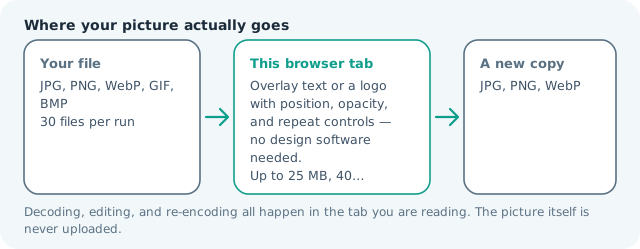
| Files it opens | JPG, PNG, WebP, GIF, BMP |
|---|---|
| Files you get back | JPG, PNG, WebP |
| Camera data (EXIF) | Not copied — this browser writes a fresh picture from its pixels, so GPS, timestamps and camera tags stay in the file you started with |
| Where the work happens | In this browser tab — the picture itself is never uploaded |
| Largest file | 100 MB, 40 megapixels or fewer |
| Largest batch | 30 files per run |
| Account, price, watermark | No sign-up, no charge, nothing stamped on your export |
When this helps
- Portfolio and commission previews where a client has not paid yet
- Stock and listing photos that get re-posted without credit
- Event and school photo sets downloaded by dozens of separate people
- Real-estate and rental galleries re-used by portals without attribution
The grid is spaced from the width of your own text, so a short mark repeats more often than a long one and the pattern never overlaps itself into a solid band. The diagonal is fixed at thirty degrees because a horizontal row lines up with the edges of a crop and reads as a border rather than a mark.
Detailed guidance
Why a corner mark gets cropped away
The corner is the least informative part of almost any photograph, which is exactly why it is the least costly place to put a watermark. Crop it out, or let a social platform square the image, and the credit disappears while the picture survives intact. A repeating pattern moves the argument: to remove the mark, the re-poster has to damage the image itself, and that is a job most people will not do for a photo they could have licensed or asked for.
What the diagonal is doing
A horizontal or vertical row of marks lines up with the edges of a crop, so a re-poster can find a framing that slices between them. A slant makes that much harder, because any rectangular crop still cuts through several tiles. Thirty degrees is steep enough to break the alignment and shallow enough that the text stays readable without tilting your head, which matters when the mark is also meant to advertise the studio.
Opacity, and the argument it settles
Two jobs are in tension: being invisible to an honest viewer and being impossible to ignore for a dishonest one. A mark at eight percent is a signature; at sixty percent it is a hostage note, and the second kind teaches people to crop. Start around twenty to thirty percent over photographs and raise it only for previews where the image is worth nothing to the viewer until they pay. For flat graphics and screenshots a slightly heavier mark stays legible, because there is no texture hiding it.
Batch work and what stays consistent
Applying the same pattern across a shoot is the normal case. The grid spacing is calculated from each file’s own dimensions and the text size from its shorter edge, so a mixture of landscape and portrait frames comes out looking like one set rather than one lucky file and twenty-nine sparse ones.
Where the honest limit is
This bakes the mark into the pixels. That is what makes it durable and also what makes it permanent — there is no layer to switch off later, so a pattern that looks right on your monitor may be too loud on a phone. Check one export before running thirty. And if the real risk is that somebody will re-create the image anyway, a watermark is a signal rather than a lock: the useful control is publishing a smaller file than the one you keep.
Opacity is the only real dial, and the honest test is a thumbnail: shrink the marked file to the size it will be shared at and look away from the centre. If the pattern is invisible there it protects nothing, and if it dominates, the next person crops. A short mark repeats more often than a long one, which is why a name reads busier than a sentence.
Watermark Image With a Repeating Pattern questions
How do I watermark an image with a repeating pattern?
Type the text you want repeated, choose Tiled diagonal in the position list, and set a size and opacity. Press the button and the mark is stamped across the whole frame on a slant. Tick the logo option as well if you want your mark and your caption repeating together.
Can I tile a logo instead of text?
Yes. Tick the logo option, choose a PNG or WebP with transparency, and the logo repeats on the same diagonal grid as the text. A flat JPEG logo will drag its white box across every tile, so use a transparent file.
What opacity is strong enough?
High enough that a compression pass or a small thumbnail still shows it, usually between twenty and thirty-five percent over photographs. Anything lighter protects nothing; anything much heavier destroys the picture you were trying to protect, and people simply crop harder.
Does this stop someone removing the watermark?
No tool does. A pattern makes removal tedious enough that casual re-posting stops, and it survives crops that would take a corner mark with it. A determined editor can still paint it out, which is why the file you publish should also be smaller and lower quality than the one you keep.
Can I apply the same pattern to a batch?
Yes. Add up to thirty files and each one gets the identical text, size, and opacity, which is the usual requirement for a shoot or a listing set. The grid is spaced from each file’s own dimensions, so mixed sizes all read at the same weight.