
Local browser tool · Favicon Generator
Favicon Generator
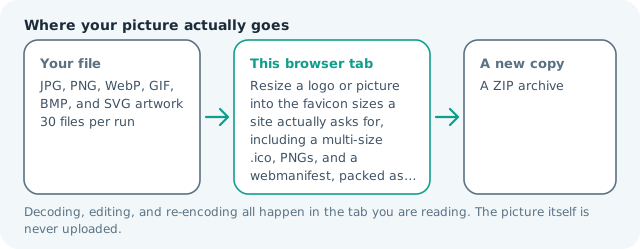
A favicon generator exists because a site needs more than one icon, and guessing the numbers is half the job. Add a logo or a picture and this page builds the set browsers and install prompts actually ask for: a favicon.ico carrying 16, 32, 48, and 64 px, an apple-touch-icon at 180 px, icon PNGs at 192 and 512 px, and a site.webmanifest that names them. Everything is resized from your full-resolution original in this tab, and the set comes back as one archive.
Build the icon set a site asks for
Generate a multi-size .ico, the touch and app icons, and a webmanifest from one picture, packed as a single download. Suitable for favicon generator tasks on JPG, PNG, WebP, GIF, BMP, and SVG artwork files; the export is always a new copy.
Click a thumbnail to preview it before you start.
These are the settings you last used for this tool. They stay in this browser and are never sent anywhere.
One picture in, one archive out: a multi-size .ico holding 16, 32, 48, and 64 px, plus 180, 192, and 512 px PNGs and a webmanifest that points at them. Everything is resized from the full-resolution original in this tab, so the 16 px version is a real downscale rather than a shrunken screenshot of a shrunken screenshot.
Output formatZIP archive
Your files are read locally. Nothing is uploaded.
Your results
Pick a picture in the list to look at that file instead.
Full size
Actual pixels, straight from this browser — scroll to check edges and fine detail, then close.
Free to use. Local limits: up to 30 files, 100 MB per file, and 250 MB per batch, processed entirely in this browser. Nothing is uploaded; what stays on your device afterwards is the settings you last used and, after a run, the picture this page made so a next step can open it without choosing the file again. Start over deletes that picture.
Favicon Generator at a glance
| Files it opens | JPG, PNG, WebP, GIF, BMP, and SVG artwork |
|---|---|
| Files you get back | A ZIP archive |
| Camera data (EXIF) | Not copied — this browser writes a fresh picture from its pixels, so GPS, timestamps and camera tags stay in the file you started with |
| Where the work happens | In this browser tab — the picture itself is never uploaded |
| Largest file | 100 MB, 40 megapixels or fewer |
| Largest batch | 30 files per run |
| Account, price, watermark | No sign-up, no charge, nothing stamped on your export |
When this helps
- A new site that needs the whole icon set wired up in one go
- Replacing a tab icon that has been a pixelated 16 px crop for years
- Adding the 192 and 512 PNGs an install prompt asks for before it offers the app
- Turning a hand-drawn mark into touch icons for a documentation site
Five files come out of one press: the .ico with four sizes inside it, apple-touch-icon.png, icon-192.png, icon-512.png, and site.webmanifest. Each size is drawn from the original artwork rather than from a smaller copy of it, which is why the 16 px version is a real downscale instead of a blur of a blur.
Detailed guidance
Why one icon is not enough
A tab, a home screen, and an installed app each ask for something different, and each asks at a different size. Browsers will scale what you give them, which is how sites end up with a blurry square in the tab: a 512 px artwork squeezed to 16 px by a browser trying to be helpful. Providing the actual sizes costs nothing and is the difference between a mark that reads as a logo and one that reads as a smudge.
What a modern .ico file really contains
The .ico container is a small table of pointers followed by the images themselves. Older files hold raw bitmaps with a separate mask; what current browsers and Windows accept now is a PNG inside the container, which keeps real alpha and compresses far better. The file this page writes is that modern form: one header, four sizes, each entry a PNG drawn from your original artwork.
Padding, and why the small sizes need it
Artwork that runs to the edge of its square loses that edge the moment it is scaled down, because the browser rounds pixels off and the outer row goes semi-transparent against whatever the tab colour is. A few percent of padding inside each size keeps the mark whole at 16 px. Too much and the icon shrinks into a dot, which is its own common failure on a crowded tab strip.
The manifest and the two names that matter
An installed web app reads its icons from a manifest rather than from a link tag, and it wants at least a 192 px and a 512 px entry. The generated file names those two and declares standalone display. The name is taken from your file and the background colour from your choice, so open it once and fix the two lines nobody could guess — a manifest with a wrong name is the most common way an install prompt shows the wrong label.
What no generator can fix
A wordmark, a photograph, and a detailed illustration do not become good 16 px icons. If your logo is a name, use its initial for the small sizes. If it is a photograph, the tab is not where it belongs. And if the artwork only reads in colour, remember that a dark mark on transparent disappears in a dark tab — tick the solid background option and choose the colour your site uses.
The sizes exist so a browser never has to do the downscale itself. A 512 px artwork squeezed into a 16 px tab slot uses a fast filter with no idea that your mark has thin strokes, which is how a crisp logo becomes grey mush. Here each size is measured against its own square and padded inside it, so the small files keep their edges. Look at the 16 px version before deploying, because it is the one people see most and judge least generously.
Favicon Generator questions
What sizes do I need for a favicon now?
A .ico with 16, 32, and 48 px covers tabs, bookmarks, and desktop shortcuts; 180 px covers an iPhone or iPad home screen; 192 and 512 px cover an installed web app, and the manifest points at those two. This page writes all of them plus the manifest, so nothing is left for a validator to complain about.
Can I make a favicon from a PNG with transparency?
Yes, and that is the usual case. The transparency is preserved into the .ico because the entries are stored as PNG images rather than as the older bitmap format, so the icon keeps its alpha on any tab colour.
Why does my small icon look muddy?
Because the artwork has more detail than 16 pixels can hold. Add padding, or use a simplified version of the mark for the small sizes. Letterforms are the worst case: a wordmark that is legible at 512 px is unreadable at 16 px no matter how careful the resizer is.
Does the manifest need editing after download?
The name field is filled from your file name and the background colour from whatever you chose, so check those two lines. Serve the folder as it arrives and reference the manifest from your page head; the icon paths are relative to the manifest, which is why the set stays in one archive.
Is my logo uploaded?
No. The resizes, the .ico container, and the manifest text are all written in this tab and handed back to you. Nothing is stored on a server, which is the point of a site that does its work locally.