
Local browser tool · Blur Image Background
Blur Image Background
Background blur is mostly about where the eye lands, and you can get it without a better lens. This page blurs the background of an image while the person stays sharp: it finds them in the frame, softens only what is behind, and copies the subject from the original pixels, so faces keep every detail they had. The separation runs on your device, because the model is downloaded once into this tab and your photograph never leaves it.
Soften the scene, not the person
Find the subject, blur the background behind them, and widen the transition until the edge stops looking pasted. Suitable for blur image background tasks on JPG, PNG, and WebP photos with a person in them files; the export is always a new copy.
Click a thumbnail to preview it before you start.
These are the settings you last used for this tool. They stay in this browser and are never sent anywhere.
The first press loads a person-segmentation model into this tab and keeps it there. It separates a human from their scene, so a landscape, a product, or a photo nobody is in is refused rather than blurred everywhere by mistake. Check hair and thin edges at full size before you publish.
Your files are read locally. Nothing is uploaded.
Your results
Pick a picture in the list to look at that file instead.
Full size
Actual pixels, straight from this browser — scroll to check edges and fine detail, then close.
Free to use. Local limits: up to 30 files, 100 MB per file, and 250 MB per batch, processed entirely in this browser. Nothing is uploaded; what stays on your device afterwards is the settings you last used and, after a run, the picture this page made so a next step can open it without choosing the file again. Start over deletes that picture.
Blur Image Background at a glance
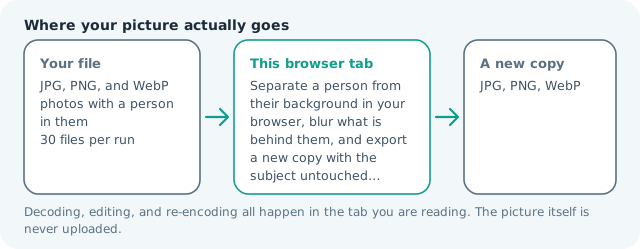
| Files it opens | JPG, PNG, and WebP photos with a person in them |
|---|---|
| Files you get back | JPG, PNG, WebP |
| Camera data (EXIF) | Not copied — this browser writes a fresh picture from its pixels, so GPS, timestamps and camera tags stay in the file you started with |
| Where the work happens | In this browser tab — the picture itself is never uploaded |
| Largest file | 100 MB, 40 megapixels or fewer |
| Largest batch | 30 files per run |
| Account, price, watermark | No sign-up, no charge, nothing stamped on your export |
When this helps
- An event or conference photo where the background is louder than the subject
- A headshot taken in a normal office instead of a studio
- A family or travel photo where a stranger is readable over the shoulder
- A profile image that needs depth a phone lens could not give it
The result card prints what share of the frame it kept sharp, which is the fastest way to spot a bad separation: a portrait where the person is a quarter of the frame should read near that, and a number far off means the model grabbed something else. Check hair and thin edges at full size before you publish.
Detailed guidance
What depth of field is actually telling you
A sharp face against a soft scene is an instruction to the eye: look here first. Cameras produce it because a wide aperture only focuses a thin slice of the world, and the fall-off is gradual rather than a cliff. That gradual part is the whole difficulty of faking it. A hard-edged subject on a heavily blurred background reads as a cut-out immediately, and the eye stops believing the photograph, which is the opposite of what the effect is for.
How the two layers are put together
The page makes three things: your picture at full resolution, a blurred copy of it, and a mask of the person. The blurred layer is then erased where the subject is, and the untouched original is dropped into the hole. Because the mask carries soft values rather than a hard yes-or-no, the boundary blends between the two layers instead of switching, and the edge control widens that blend when a photo needs it. The subject itself is never re-drawn, so no detail is invented and none is lost.
Why the model only knows about people
The segmentation that runs in a browser without an enormous download is trained to find a human figure. That is a deliberate trade: it is accurate enough for portraits and useless for a car on a street, a product on a table, or a dog in grass. Rather than blurring the whole frame and hoping you do not notice, the page refuses and points you at the whole-image blur.
Getting an edge that survives zooming
Look at the export at one hundred percent before you publish, and look specifically at hair, glasses, shoulders against patterned walls, and anything held in front of the body. If an arm has partly vanished into the background, the mask has claimed it, and the fix is a lower blur and a wider edge rather than another crop. A busy background is harder than a plain one, because there is more contrast for the mask to be wrong about.
When this is the wrong tool
If the background is the information — a venue, a storefront, a worksite — blurring it destroys the reason the photo exists. If the person is small in the frame, the separation is coarse relative to the subject and will look untidy. And if what you want is the background gone entirely rather than softened, the transparent cut-out page does that properly with the same model.
The blur covers everything behind the subject, so a background with its own strong edges, such as a fence, a window frame, or lettering on a wall, stays faintly readable through the haze. That is a property of a soft blur rather than a fault in it, and it is why the export should be judged at the size it will be seen.
Blur Image Background questions
How do I blur the background of a photo online?
Add a photo with a person in it, set how strong you want the background blur, and press the button. The page separates the subject, blurs only the rest at full resolution, and hands back a new copy. The first run loads the model into the tab, so the second photo is quicker.
Can I blur the background behind an object or a pet?
Not here. The segmentation that runs in a browser separates a human from their scene, so a car, a product on a table, or an animal has nothing for it to keep sharp, and the page says so instead of blurring the whole frame. For a scene with no person in it, use the whole-image blur.
Why does my hair look cut out?
Because individual strands are finer than the mask the model works from, and it is the hardest case in the whole tool. Raise the edge softening so the transition widens, keep the blur moderate rather than extreme, and if it still reads badly a plain background suited the photo better than a fake aperture.
How strong should the blur be?
Enough to stop the background competing, not enough to look like a sticker. A street scene usually reads correctly around the middle of the range; anything much higher only suits a wall or foliage. Strength scales with the size of your picture, so the same number behaves the same on a phone photo and a large one.
Is the photo uploaded for this?
No. The segmentation model is served from this site and runs on your device, which is why the first press takes a moment and every press after it does not. Nothing is stored, and the original file is never modified.